Everyone thinks Adobe revision management software is about tracking file versions. That’s the surface level. You’re probably already doing that, clicking ‘Save As’ and maybe using Creative Cloud’s version history.
None of that is wrong. But it’s incomplete.
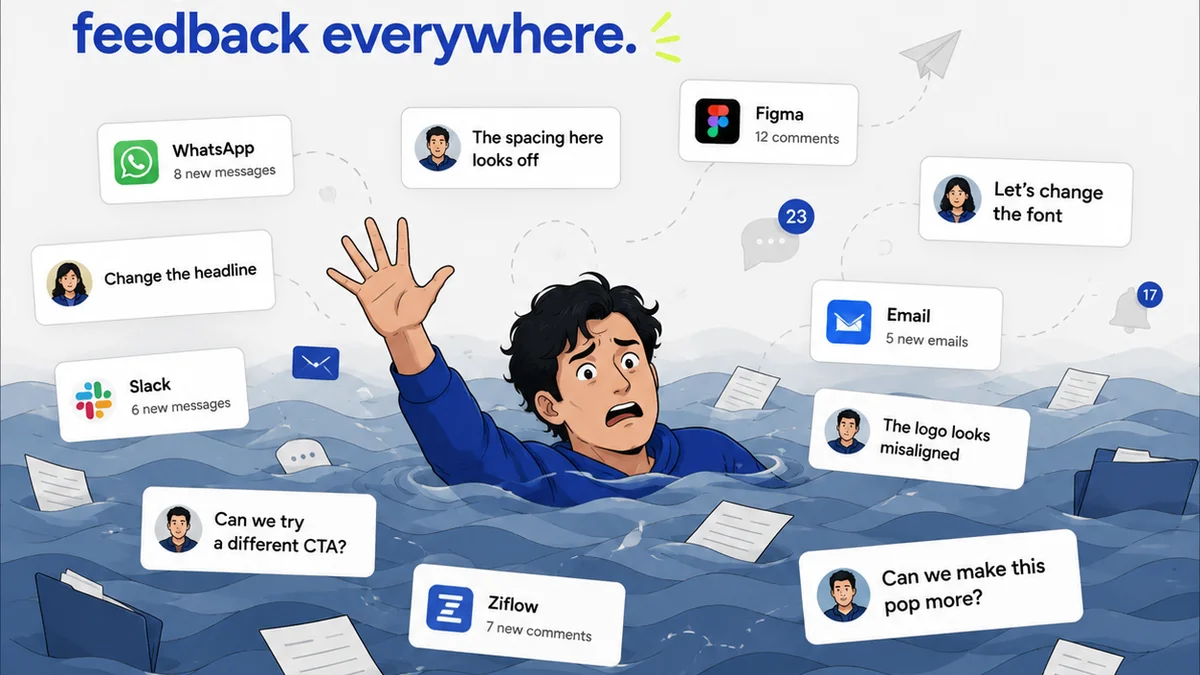
The real challenge for agencies isn’t just *storing* old versions. It’s managing the *process* of feedback, revisions, and approvals efficiently, especially when multiple stakeholders are involved. That’s where standard Adobe tools fall short.
1. The Illusion of Control: Versioning vs. Workflow
Creative Cloud’s auto-saving and version history are great for individual recovery. If you accidentally delete a layer or want to revert to an earlier state of a single file, it’s a lifesaver. But this isn't revision management for a client project.
Client revision management is about more than just the file itself. It's about the context:
- Who provided the feedback?
- When was it given?
- What specific changes were requested?
- Which version of the asset does this feedback apply to?
- Has this feedback been addressed in a new version?
- Who approved the latest version?
Adobe’s built-in versioning doesn't inherently track this contextual data. You end up with a chaotic mess of files and emails, trying to piece together the project's history.
The Email Trail Problem
Most agencies rely on email for feedback. Subject lines like “Revisions for Project X” get lost, buried, or misinterpreted. A single email might contain feedback for multiple assets or multiple rounds of revisions.
This leads to:
- Missed feedback points.
- Conflicting instructions from different stakeholders.
- Endless back-and-forth clarification emails.
- Wasted hours trying to find that *one* crucial comment.
The Spreadsheet Scramble
Some try to combat this with spreadsheets. A master spreadsheet for feedback, another for versions, another for approvals. It’s a manual effort that quickly becomes outdated and error-prone.
This isn't efficient. It's busywork.
2. Beyond Static Files: The Need for Centralized Feedback
Your primary Adobe revision management tool shouldn't just be a file repository. It needs to be a hub for all project communication related to creative assets. Think of it as the single source of truth for feedback.
What does this look like?
Contextual Annotations
The ideal system allows stakeholders to provide feedback directly on the creative asset itself. Whether it's a static image, a video, or a design mockup, comments should be tied to specific areas. This eliminates ambiguity.
Imagine a client clicking on a specific part of a banner ad and typing, “Make this headline larger.” That’s clear. That’s actionable.
Version-Specific Comments
Feedback must be linked to a specific version of the asset. If a client gives feedback on Version 3, that feedback should live with Version 3. When a new version (Version 4) is uploaded, the previous feedback remains associated with its original version, preventing confusion.
This clarity is crucial for tracking the evolution of an asset and ensuring all requested changes are addressed systematically.
Role-Based Access and Notifications
Not everyone needs to see every piece of feedback or every version. Different stakeholders have different roles. Project managers need an overview. Clients need to approve. Designers need to act.
A good system allows you to control who sees what and who gets notified when. This streamlines communication and ensures the right people are involved at the right times.
3. Visibility: Tracking Revisions and Approvals
If you can’t see where you are in the process, you can’t manage it. Revision management software needs to provide clear visibility into the status of assets.
The Revision Trail
Every time a new version is uploaded, it should be logged. This creates a clear, chronological trail of all revisions made to an asset. You can easily see:
- When a new version was created.
- Who created it.
- What feedback it was intended to address.
- Which version it superseded.
This audit trail is invaluable for accountability and project history.
Approval Status Tracking
Knowing when an asset is approved is as important as knowing when it needs revisions. The software should clearly indicate the approval status of each version.
Is it:
- Pending approval?
- Approved by Stakeholder A?
- Rejected by Stakeholder B?
- Approved by all necessary parties?
This eliminates the guesswork and prevents accidental use of unapproved assets.
Dashboards and Reporting
For agency owners and creative directors, a high-level overview is critical. Dashboards that show the status of all assets across projects, highlighting bottlenecks or overdue approvals, are essential for proactive management.
4. Quality Assurance and Final Sign-off
The final hurdle is quality assurance. Before an asset goes live or is delivered to the client, it needs a final check. This is often an afterthought, leading to costly mistakes.
Dedicated QA Workflows
Your revision management process should include a distinct QA stage. This is separate from client feedback and client approval.
This stage involves:
- Checking if all client feedback has been implemented correctly.
- Verifying technical specifications (file formats, sizes, resolutions).
- Performing accessibility checks (e.g., color contrast, alt text).
- Ensuring brand guidelines are met.
This is the last chance to catch errors before they cause problems.
Clear Approval Gates
The final sign-off should be a clear, documented event. Once an asset passes QA and receives final approval, it should be marked as such, preventing further accidental revisions.
This ensures that what gets delivered is exactly what was signed off on.
Where Revue Fits In
While Adobe tools are fundamental for creation, managing the collaborative process around those creations is where specialized software shines. Revue is built for this exact challenge.
It acts as the central nervous system for creative feedback and approvals, bridging the gap between design tools and client communication.
- Centralized Feedback: All client comments, whether on static images, videos, or web designs, are collected in one place, linked to specific versions. No more hunting through emails or Slack messages.
- Revision Visibility: Track every iteration of an asset with a clear, chronological history. See exactly who requested what and when, and which version addressed it.
- Approval Tracking: Clearly define approval stages and track who has approved what, and when. Reduce the risk of using unapproved assets.
- Quality Control: Implement clear steps for QA before final sign-off, ensuring all requirements are met and all feedback is actioned.
Revue doesn’t replace your Adobe Creative Cloud. It enhances it by bringing order to the chaos of client collaboration.
Final Thought
Managing creative revisions is more than just saving files. It's about managing people, communication, and process. Are your current tools enabling that, or are they a bottleneck?
Frequently asked questions
What's the difference between Adobe's version history and true revision management software?
Adobe's version history is primarily for individual file recovery and tracking changes within a single user's workflow. True revision management software focuses on the collaborative process, centralizing feedback, tracking approvals, and providing context for each iteration across multiple stakeholders and projects.
Can Adobe Creative Cloud alone handle client revisions for an agency?
While Creative Cloud offers basic versioning, it lacks the structured workflow, centralized feedback mechanisms, and clear approval tracking essential for efficient agency client revision management. Relying solely on it often leads to miscommunication and inefficiency.
What are the key features to look for in revision management software for agencies?
Key features include centralized, contextual feedback (annotations on assets), version-specific comments, clear revision trails, approval status tracking, role-based access, notifications, and integrated QA workflows.
How does centralized feedback improve the revision process?
Centralized feedback eliminates ambiguity by allowing comments directly on specific parts of an asset and links them to particular versions. This prevents lost emails, conflicting instructions, and endless clarification, making the process faster and more accurate.