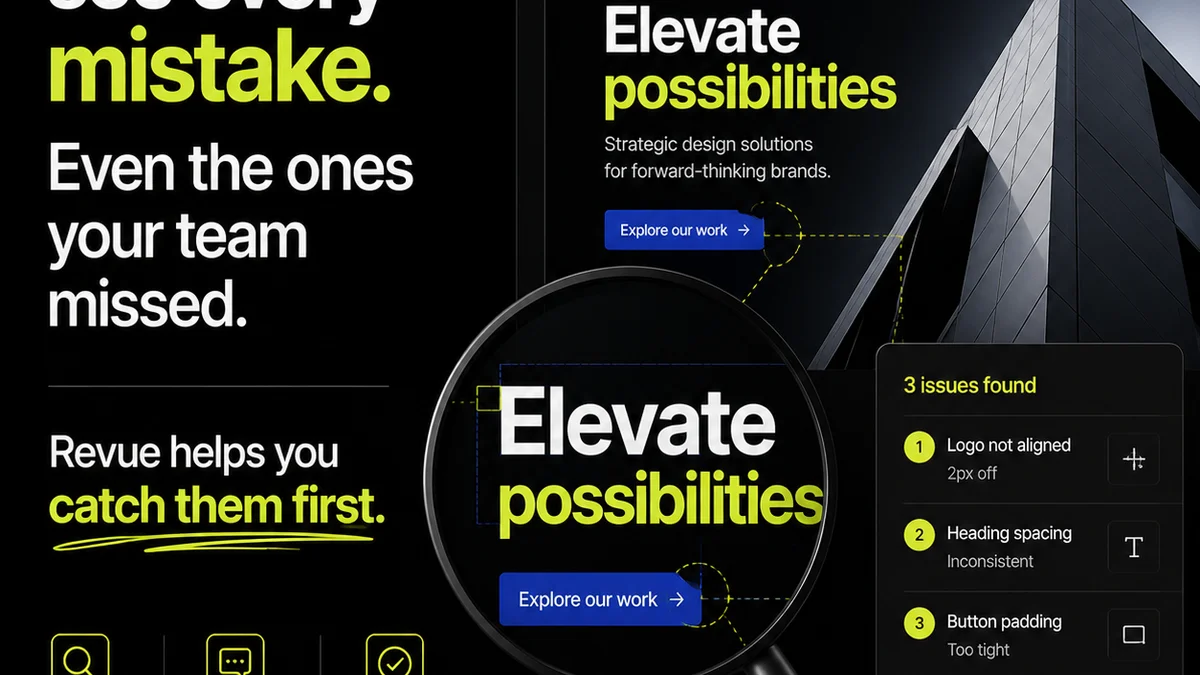
Everyone’s talking about AI creative proofing software. The promise is seductive: faster feedback, fewer errors, and quicker client approvals.
It sounds like a magic bullet for creative operations.
None of that is wrong. But it’s incomplete.
The real challenge with AI proofing isn’t just adopting new tech. It’s understanding what *actually* moves the needle in a creative workflow. The hard truth is that AI tools are only as good as the processes they’re plugged into. And most creative teams are still wrestling with foundational issues like siloed feedback and unclear revision history.
1. Beyond Basic Spellcheck: Contextual Understanding
AI creative proofing is often pitched as an evolution of grammar checkers. That's a low bar. True value comes from AI that understands context, not just syntax.
Think about the common pain points in creative reviews:
- Misinterpreting subjective feedback as objective error.
- Missing brand guideline violations.
- Failing to catch accessibility issues.
- Overlooking copy-paste errors or placeholder text.
- Inconsistent tone or voice across assets.
Effective AI proofing needs to go beyond flagging typos. It should identify potential brand misalignment, inconsistencies in design elements, and even suggest improvements based on established best practices.
Brand Consistency Checks
Does the AI analyze your brand guidelines? Can it flag when a logo is used incorrectly, or when colors deviate from the approved palette? This level of contextual awareness is crucial for maintaining brand integrity across campaigns.
Accessibility Compliance
Tools that can automatically check for contrast ratios, legible font sizes, and proper alt-text structure are invaluable. This isn't just about compliance; it's about ensuring your work reaches the widest possible audience.
Content Accuracy and Completeness
Beyond spelling, can the AI detect placeholder text (`lorem ipsum`), broken links, or missing information? Can it cross-reference copy against a brief to ensure all key points are covered?
2. Integration, Not Isolation
The biggest pitfall of new software is adding another silo. If your AI proofing tool doesn't talk to your existing systems, it becomes just another place to check, not a seamless part of your workflow.
Consider how the AI tool integrates with:
- Project Management Platforms (e.g., Asana, Jira, Monday.com)
- Design Tools (e.g., Figma, Adobe Creative Suite)
- Communication Channels (e.g., Slack, Email)
- Asset Management Systems
Seamless integration means feedback, AI-generated suggestions, and final approvals flow automatically. No manual re-entry. No copy-pasting from one tool to another. This is where the real efficiency gains are found.
If the AI proofing tool requires you to upload files separately or manually transfer comments, you’re creating more work, not less.
The API Advantage
Look for tools with robust APIs. This allows for custom integrations and ensures data can flow freely between your tech stack. It’s the backbone of a truly connected creative operation.
Automated Workflows
Can the AI trigger actions in other systems? For example, can an AI-flagged issue automatically create a task for a designer or flag it for a client review?
3. Actionable Insights, Not Just Data Points
AI can generate a lot of data. The question is, what do you do with it? Effective AI proofing software translates data into actionable insights that your team can immediately use.
It’s not enough for an AI to say, “This image has low contrast.” It should also explain *why* that’s a problem (e.g., WCAG AA compliance) and perhaps suggest specific adjustments.
Prioritization of Issues
Can the AI help prioritize feedback? Some issues are critical (e.g., legal disclaimers missing), while others are minor stylistic preferences. The software should help your team focus on what matters most.
Learning and Adaptation
The best AI tools learn from your team’s feedback and corrections. Over time, they should become more attuned to your specific brand, style guides, and common error patterns. This reduces false positives and refines the AI’s accuracy.
Customizable Rules and Thresholds
Can you train the AI on your specific needs? For instance, you might have unique brand guidelines or specific accessibility targets that differ from general standards. The ability to customize rules ensures the AI is relevant to *your* work.
4. Human Oversight and Collaboration
This is where the contrarian view really kicks in. Many assume AI proofing aims to replace human reviewers. That's a fundamental misunderstanding of creative work.
AI is a powerful assistant, not a replacement for critical human judgment. It excels at spotting patterns, inconsistencies, and rule-based errors at scale. It *cannot* replicate strategic thinking, nuanced aesthetic judgment, or a deep understanding of client goals.
Therefore, the AI proofing software should:
- Facilitate, not dictate, the review process.
- Clearly distinguish between AI-identified issues and human feedback.
- Provide clear explanations for its findings, allowing humans to validate or override them.
- Integrate smoothly with existing human review and approval workflows.
The goal is to augment your team’s capabilities, freeing them from tedious checks to focus on higher-level creative strategy and problem-solving. Think of it as a hyper-efficient junior reviewer who never gets tired.
The Role of the Creative Director
AI can flag a potential problem, but it takes a seasoned creative director to understand the strategic implications. Is that slightly off-brand color choice intentional for artistic effect? The AI won't know. The human will.
Client Collaboration
How does the AI feedback get presented to clients? The best systems ensure that the AI’s input is part of a clear, consolidated feedback loop, not a confusing stream of automated alerts.
5. Scalability and Performance
As your agency grows or your project load increases, your proofing process needs to keep up. An AI solution should be able to handle a large volume of assets and complex projects without a significant drop in performance.
Consider:
- How quickly can the AI process large files or multiple assets simultaneously?
- Does the system handle various file types efficiently (images, videos, PDFs, web pages)?
- What are the system's uptime guarantees and support SLAs?
A tool that slows down your workflow during peak times is worse than no tool at all.
Where Revue Fits In
AI creative proofing tools are powerful for identifying potential issues, but managing the *entire* feedback and approval lifecycle requires more. This is where a centralized platform like Revue becomes essential.
Revue acts as the single source of truth for all creative feedback, whether it originates from a human reviewer, a client, or an AI-powered tool.
- Centralized Feedback: All comments, annotations, and AI-generated suggestions are logged in one place, tied to specific versions of creative assets. No more hunting through emails or chat threads.
- Revision Visibility: Track every iteration, every change, and every approval. Understand exactly how feedback influenced the final output, and who signed off on what.
- Quality Assurance: Use Revue to consolidate AI findings with human checks, ensuring a comprehensive quality gate before final delivery. Flag AI-detected issues, assign them for human review, and track their resolution.
- Streamlined Approvals: Clearly see what’s been reviewed, what’s been approved, and what still needs attention. Reduce back-and-forth and get to final sign-off faster.
By integrating AI insights into a robust workflow management system, you create a truly efficient and transparent creative production process.
Final Thought
AI creative proofing software isn't a replacement for skilled professionals or well-defined processes. It’s a powerful amplifier. The real question isn't whether to adopt AI, but how to integrate it intelligently into a workflow that already values clarity, collaboration, and quality.
Are you using AI to automate tedious tasks, or are you just adding another layer of complexity?
Frequently asked questions
Can AI creative proofing software replace human reviewers?
No. AI is best suited for identifying rule-based errors, inconsistencies, and patterns at scale. It cannot replicate human judgment, strategic thinking, or nuanced aesthetic decisions. The goal is to augment, not replace, human oversight.
What is the most important feature to look for in AI proofing tools?
Integration. The AI tool must seamlessly connect with your existing project management, design, and communication platforms to avoid creating new silos and manual workarounds. Actionable insights and customizable rules are also critical.
How does AI proofing help with brand consistency?
Advanced AI tools can be trained on your brand guidelines to detect deviations in logo usage, color palettes, typography, and tone of voice. This helps ensure all creative assets align with your established brand identity.
What is the difference between basic spellcheck and AI creative proofing?
Basic spellcheck only identifies grammatical errors and typos. AI creative proofing goes much further, analyzing context, brand consistency, accessibility compliance, content completeness, and potential design flaws, offering a much deeper level of review.