Everyone’s talking about AI design automation. It’s the hot new thing, promising to revolutionize creative workflows. You hear it’ll slash production times, eliminate tedious tasks, and free up your teams for more strategic thinking.
None of that is wrong. But it’s incomplete.
The deeper truth is that AI design automation isn't a magic wand. It’s a powerful tool, but like any tool, its effectiveness depends entirely on how you use it and what you expect from it. Simply plugging in a new piece of software won't magically fix broken processes or elevate your creative output.
1. Beyond the Hype: Understanding AI’s Role
AI design tools are rapidly evolving. They can generate images, draft copy, suggest layouts, and even automate repetitive tasks like resizing assets or applying brand guidelines. This is where the real value lies – not in replacing designers, but in augmenting their capabilities.
Think of it as a highly skilled intern. It can handle the grunt work, freeing up your senior talent for complex problem-solving and creative direction. But it needs clear briefs, precise instructions, and careful oversight.
What AI Can and Cannot Do (Yet)
Currently, AI excels at:
- Generating variations based on existing assets.
- Automating repetitive, rule-based tasks.
- Performing data-driven analysis for optimization.
- Creating content drafts that require human refinement.
It struggles with:
- True conceptual originality and deep strategic thinking.
- Nuanced emotional intelligence and cultural context.
- Complex, multi-stakeholder feedback interpretation.
- Making subjective creative judgments without clear parameters.
The key is to identify tasks that are repetitive, data-intensive, or require rapid iteration. That’s where AI can deliver immediate ROI.
2. Identifying the Right Problems for AI Automation
The biggest mistake agencies make is looking for AI to solve everything. You need to be surgical. What specific bottlenecks are slowing you down? Where are your teams spending too much time on low-value activities?
Common areas ripe for AI automation include:
- Asset Management and Organization: AI can tag, categorize, and even suggest relevant assets, making your DAM (Digital Asset Management) system far more efficient.
- Repetitive Design Tasks: Think resizing banners for different platforms, creating social media variations, or applying basic styling across hundreds of assets.
- Content Generation Support: Drafting ad copy, social media posts, or initial website text that a human editor then polishes.
- Personalization and Variation: Generating personalized marketing materials or multiple design options for A/B testing at scale.
Don't chase the AI trend for its own sake. Identify a tangible problem that AI can solve more efficiently than your current process. This requires a deep understanding of your own operations.
3. Key Features to Look For in AI Design Automation Software
When evaluating AI tools, don't get dazzled by buzzwords. Focus on functionality that directly addresses your identified pain points.
Integration Capabilities
The best AI tools don't operate in a silo. They need to seamlessly integrate with your existing tech stack.
- Does it connect with your creative software (e.g., Adobe Creative Suite, Figma)?
- Can it pull assets from your DAM or cloud storage?
- Does it integrate with your project management tools?
Poor integration means manual workarounds, negating the automation benefits.
Customization and Control
Generic AI output is rarely good enough for client work. You need tools that allow for significant customization and maintain brand consistency.
- Can you input specific brand guidelines (fonts, colors, logos)?
- Does it allow for fine-tuning of AI-generated content?
- Can you set parameters and constraints for AI outputs?
The goal is AI-assisted creativity, not AI-dictated mediocrity.
Scalability and Performance
Your agency will grow, and your needs will change. The software should be able to scale with you.
- Can it handle increasing volumes of work?
- Does it offer different tiers or modules as your needs evolve?
- What are the processing speeds and turnaround times for complex tasks?
A tool that chokes under pressure is worse than no tool at all.
User Interface and Ease of Use
Even the most powerful AI tool is useless if your team can't figure out how to use it.
- Is the interface intuitive?
- Is training readily available?
- How steep is the learning curve?
Adoption is critical. If it's too complex, your team will revert to old habits.
Data Security and Privacy
You're entrusting client assets and potentially sensitive data to this software.
- What are their data handling policies?
- Where is your data stored?
- Are they compliant with relevant regulations (e.g., GDPR)?
This is non-negotiable.
4. The Human Element: Supervision and Strategy
This is the part the hype often glosses over. AI design automation doesn't eliminate the need for human oversight; it amplifies it.
Your creative directors and senior designers are more crucial than ever. They need to:
- Craft clear, detailed prompts for AI.
- Critically evaluate AI-generated outputs.
- Refine and elevate AI-assisted work.
- Ensure brand consistency and strategic alignment.
- Interpret complex client feedback that AI cannot yet parse.
AI can automate tasks, but it cannot automate judgment. It can generate options, but it cannot strategize or build client relationships.
5. Where Revue Fits In
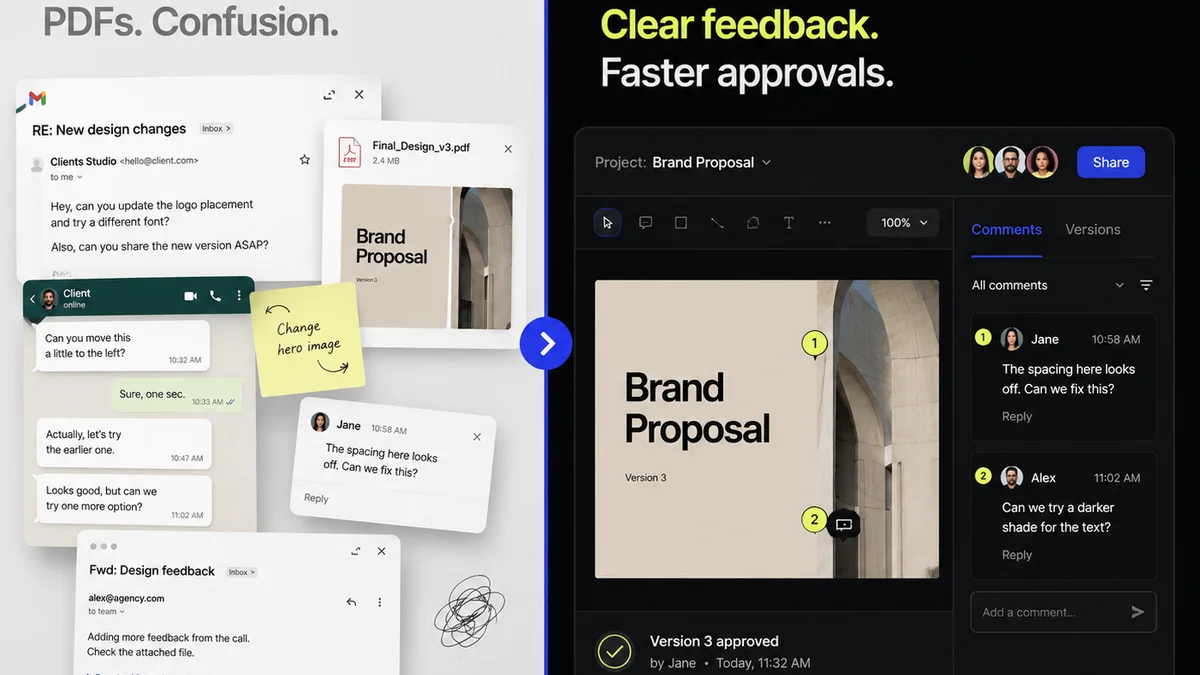
Implementing AI tools often means managing more variations, more iterations, and more feedback loops. This is precisely where a platform like Revue becomes indispensable.
Revue helps centralize client feedback, ensuring that AI-generated options and human-refined designs are reviewed in one clear, organized space. You can track revisions, manage approvals, and maintain visibility across every stage of the creative process, from initial AI generation to final client sign-off.
This structured approach ensures that the efficiency gains from AI automation aren't lost in a chaotic feedback cycle. It keeps your team aligned and your clients informed, turning potential AI-driven complexity into manageable, trackable progress.
6. Final Thought
AI design automation is not about replacing creatives; it’s about redefining their roles. It’s about shifting focus from rote execution to higher-level strategy, critical thinking, and client collaboration.
The agencies that thrive won't be the ones that adopt AI first, but the ones that adopt it smartest. They’ll be the ones who understand that technology is a tool, and its true power is unlocked by human expertise and strategic implementation.
Are you ready to redefine your agency's creative process, or are you waiting for the AI to tell you what to do next?
Frequently asked questions
Can AI design automation replace human designers?
No, AI design automation is best viewed as a powerful assistant. It excels at repetitive tasks and generating variations, freeing up human designers to focus on strategy, conceptualization, complex problem-solving, and client relationships.
What are the key benefits of AI design automation for agencies?
The primary benefits include increased efficiency by automating repetitive tasks, faster iteration cycles, reduced production costs, and allowing creative teams to focus on higher-value strategic and creative work.
How important is integration with existing design tools?
Integration is critical. AI tools that seamlessly connect with your existing software (like Adobe Creative Suite or Figma) and asset management systems prevent workflow disruptions and maximize the benefits of automation. Poor integration often leads to manual workarounds.
What should agencies look for in terms of customization and control?
Agencies should seek AI tools that allow for significant customization, enabling the input of brand guidelines (fonts, colors, logos) and offering control over AI-generated outputs. This ensures brand consistency and allows for fine-tuning to meet specific project needs.
How does AI design automation impact client feedback and revisions?
AI can generate more options and faster iterations, potentially increasing the volume of feedback. Centralized feedback platforms like Revue become crucial for managing this increased complexity, ensuring clear communication and efficient revision tracking.