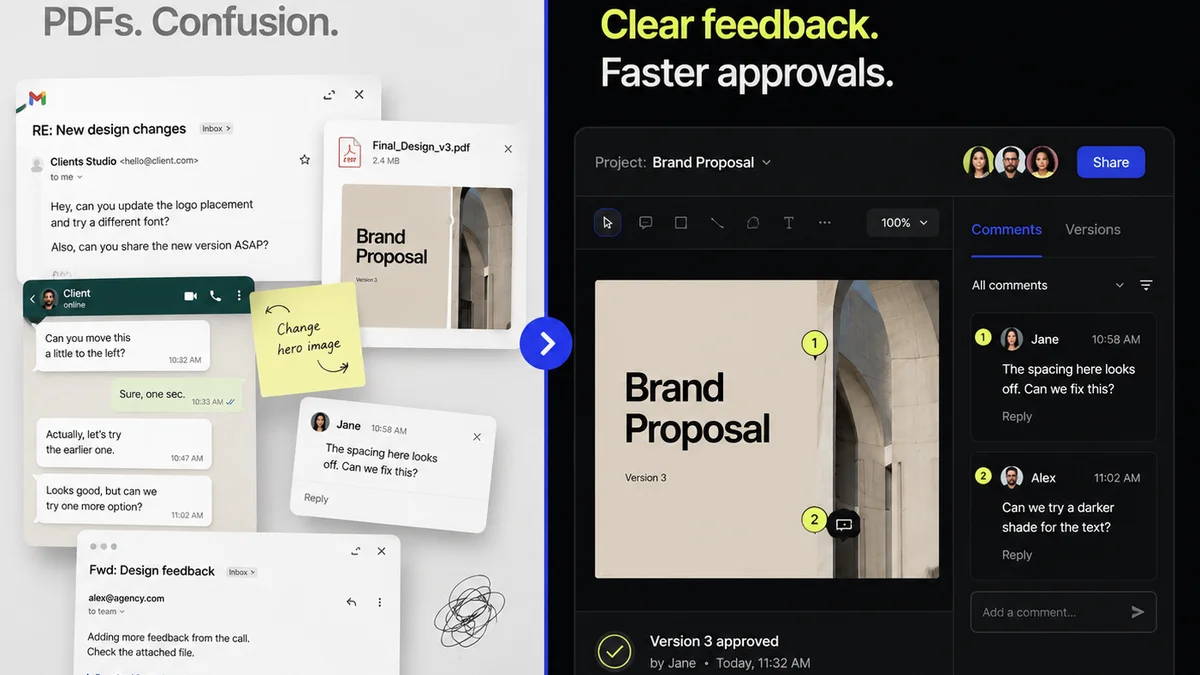
You’re looking for creative approval workflow software. You think it’s about faster proofs and fewer emails. Maybe even a slicker client experience.
None of that is wrong. But it’s incomplete.
The hard truth? The right software doesn’t just speed up approvals; it fundamentally reshapes your agency’s operational efficiency and profitability. It’s not just a tool; it’s a system for managing creative output at scale.
1. Beyond Basic Proofing: The Core of Collaboration
Most tools offer some form of visual proofing. That’s table stakes. What separates the good from the great is how they handle the *entire* feedback loop.
Centralized Feedback Management
Scattered feedback across email threads, Slack messages, and random documents is a death sentence for project timelines. Your software needs to be the single source of truth.
- All client comments, designer responses, and stakeholder approvals live in one place.
- Context is preserved: feedback is tied directly to the creative asset.
- Version control is clear: no more guessing which revision is the latest.
Revision Tracking and Version History
This isn’t just about seeing who said what. It’s about understanding the evolution of a piece of creative work.
You need to easily track every iteration. This is crucial for:
- Auditing decisions and understanding scope creep.
- Resolving disputes when a client doubles back on feedback.
- Providing clear historical context for future projects.
Stakeholder Permissions and Roles
Not everyone needs to see everything. Or have the power to approve everything. Granular permissions are vital for keeping projects on track and preventing unauthorized changes.
Think about:
- Assigning specific reviewers to specific assets or stages.
- Setting up approval gates that require sign-off from key stakeholders.
- Limiting access for clients or external partners to only what they need to see.
2. Efficiency Gains: Streamlining the Process
Speed is often the primary driver for seeking new software. But true efficiency comes from eliminating bottlenecks, not just accelerating one step.
Automated Notifications and Reminders
Chasing down feedback is a massive time sink. Your system should do the chasing for you.
- Automated alerts when new feedback is ready.
- Automated reminders for overdue approvals.
- Notifications to designers when revisions are complete.
This keeps momentum high without constant manual follow-up.
Clear Decision Trails
Ambiguity kills creative projects. Your workflow software needs to enforce clarity.
- Every comment requires a response or action.
- Approvals are explicit, not implied.
- Decision logs are automatically generated.
This minimizes misunderstandings and the dreaded, “I thought you meant…” conversations.
Integration with Existing Tools
Your agency doesn’t operate in a vacuum. The best workflow software plays well with others.
Consider:
- Does it connect with your project management tools?
- Can it integrate with design software like Adobe Creative Cloud or Figma?
- Does it sync with communication platforms?
Seamless integration reduces context switching and manual data transfer, saving valuable hours.
3. Quality Control: Ensuring the Best Output
The ultimate goal is delivering exceptional creative work. Workflow software plays a critical role in maintaining quality standards.
Pre-flight Checks and Compliance
This is where many agencies fall short. They rely on manual checklists that are easily forgotten.
Advanced software can incorporate automated checks for:
- Brand guideline adherence (color palettes, logos, typography).
- Technical specifications (file types, resolutions, bleed).
- Accessibility standards (e.g., contrast ratios, alt text prompts) – referencing resources like the Web Content Accessibility Guidelines (WCAG) is crucial here.
Streamlined QA Processes
Quality assurance shouldn’t be an afterthought. It needs to be built into the workflow.
Look for features that allow for:
- Dedicated QA stages within the approval process.
- Checklists for common quality issues.
- A clear handoff from creative to QA, and then to final delivery.
This prevents errors from reaching the client and reduces costly post-delivery revisions.
4. Client Experience: Building Trust and Transparency
Happy clients are repeat clients. Your internal processes directly impact their perception of your agency.
Intuitive Client Interface
Clients shouldn’t need a manual to provide feedback. The interface must be simple and straightforward.
- Easy commenting and annotation tools.
- Clear visibility of their own feedback and the team’s responses.
- A professional, branded experience.
Transparent Progress Tracking
Clients appreciate knowing where things stand. Providing this visibility builds trust.
Your software should enable clients to see:
- The current stage of the project.
- Who is responsible for the next step.
- The history of feedback and revisions (if appropriate).
This transparency reduces anxiety and the need for clients to constantly ask for updates.
Where Revue Fits In
Revue is built for the realities of creative agency workflows. It’s designed to move beyond simple proofing and address the core operational challenges you face daily.
We focus on centralizing client feedback, making it clear, actionable, and auditable. Our system provides unparalleled visibility into the revision and approval process, ensuring that every stakeholder knows exactly where a project stands and what’s required next.
For quality checks, Revue helps standardize your review process, ensuring assets meet technical and brand requirements before they ever reach final delivery. This isn’t just about faster approvals; it’s about creating a more predictable, profitable, and quality-driven creative output.
5. Scalability and Future-Proofing
Your agency isn’t static. Your workflow software needs to grow with you.
Adaptability to Different Project Types
Can the software handle everything from a single social media graphic to a complex website build?
- Configurable workflows for various project scopes.
- Support for different file types and media.
- Flexibility in user roles and permissions.
Performance and Reliability
When you’re on a tight deadline, downtime isn’t an option. The software must be robust and dependable.
Consider:
- Uptime guarantees.
- Performance under load (many users, large files).
- Regular updates and maintenance.
Vendor Support and Development Roadmap
Choosing a software provider is a partnership. You need a team that’s responsive and forward-thinking.
- Quality of customer support.
- Frequency and relevance of new feature releases.
- The vendor’s long-term vision for the product.
Final Thought
The search for creative approval workflow software often starts with a desire for speed. But the real value lies in the operational resilience, quality assurance, and client trust that a well-chosen system provides. Are you looking for a faster proofing tool, or a strategic asset for managing your agency’s creative engine?
Frequently asked questions
What's the difference between proofing software and workflow software?
Proofing software typically focuses on the visual review of assets, allowing for annotations and comments. Workflow software encompasses this but also manages the entire process, including task assignment, revision tracking, stakeholder approvals, notifications, and integration with other business tools, aiming to optimize the entire creative lifecycle.
How can workflow software improve client communication?
By providing a centralized platform for feedback and approvals, workflow software enhances transparency. Clients can see exactly where their feedback is in the process, view revisions, and understand decisions, reducing the need for constant check-ins and minimizing miscommunication.
Is creative approval workflow software only for large agencies?
No, workflow software is highly beneficial for agencies of all sizes. Smaller agencies can gain significant efficiency by automating manual tasks and reducing errors, while larger agencies can manage complex projects and multiple teams more effectively.
How does workflow software help with scope creep?
Workflow software creates an auditable trail of all feedback, requests, and approvals. This makes it easier to identify when new requests fall outside the original project scope, allowing agencies to have informed conversations with clients about additional time or budget.