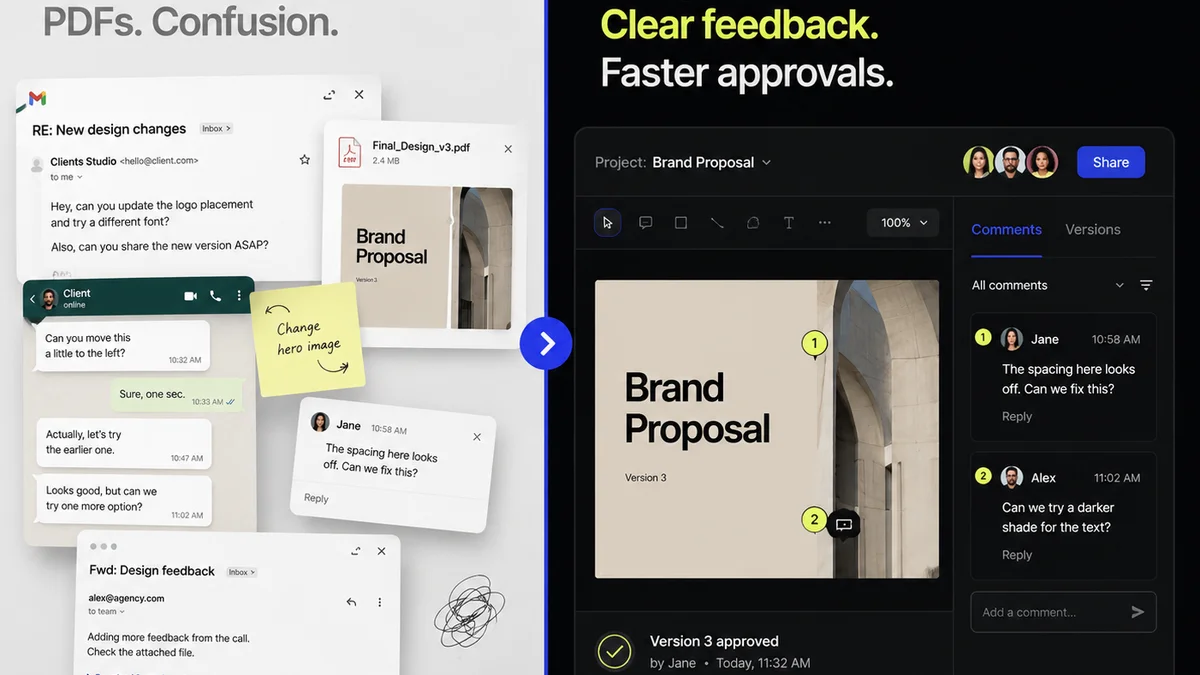
Everyone talks about creative collaboration software. You hear buzzwords like 'real-time editing,' 'cloud-based workflows,' and 'integrated asset management.' It sounds like magic. Like it will instantly transform your team into a well-oiled creative machine.
None of that is wrong. But it’s incomplete.
The hard truth? Most creative collaboration software doesn't solve your core problems. It just digitizes them. The real value isn't in the features; it's in how the software forces you to rethink and optimize your actual workflow. That’s where the rubber meets the road.
1. The Illusion of Real-Time
Real-time editing is often pitched as the holy grail. Being able to see your colleague type on the same document, or move elements on a design file simultaneously. It feels futuristic.
But in agency life, what does 'real-time' truly mean? It means someone is working on something, and you're waiting for them to finish before you can even start your part. Or worse, you're both working on it, and the system's latency or conflicting edits create more chaos than collaboration.
The Bottleneck Isn't Speed, It's Clarity
The bottleneck in creative projects is rarely the speed at which someone can type or drag a box. It's the lack of clear direction, ambiguous feedback, and endless revision cycles.
- Is this the final copy?
- Did they approve the last round of changes?
- Who is responsible for the next step?
- What version are we even looking at?
Software that just offers more ways to simultaneously 'edit' doesn't inherently answer these questions. It can even make them harder to track.
Focus on Asynchronous Clarity
What you actually need is superior asynchronous collaboration. Tools that allow team members to contribute, review, and approve at their own pace, with absolute clarity on the status and requirements.
This means robust version control, clear annotation capabilities directly on the creative asset, and definitive approval tracking. It’s about making sure the right person has the right information at the right time, not necessarily at the exact same second.
2. Asset Management: More Than Just Storage
Many platforms boast 'integrated asset management.' They promise a central repository for all your files. Sounds good, right?
But if it's just a glorified Dropbox or Google Drive with a fancier UI, it's not solving the problem. Creative assets aren't static documents. They are living, evolving pieces of work that go through multiple states and versions.
The Problem Isn't Finding Files, It's Context
The real challenge isn't finding the latest Photoshop file. It's understanding the context around that file:
- Who requested this version?
- What feedback was given on the previous version?
- What are the specific client-approved requirements for this iteration?
- Is this asset approved for final delivery, or is it still in review?
- What are the usage rights and expiration dates for this asset?
A system that merely stores files fails to connect the asset to its history, its purpose, and its current status within the project lifecycle.
Centralized, Contextualized, Controlled
Effective asset management in creative collaboration software needs to be:
- Centralized: One source of truth for all project assets.
- Contextualized: Every asset linked to its project, feedback history, and approval status.
- Controlled: Clear permissions, versioning, and audit trails.
Think of it less as a file cabinet and more as a project timeline where each asset has its place and its story.
3. Feedback Loops: The Unseen Drain
Client feedback. Agency feedback. Internal reviews. This is where projects often go to die. Email chains get lost, comments are misinterpreted, and 'quick chats' are forgotten.
Creative collaboration software often promises to 'streamline feedback.' But how? By offering another inbox? Another comment thread that's disconnected from the actual work?
The Cost of Ambiguity
Ambiguous feedback is a project killer. It leads to:
- Wasted hours on revisions that miss the mark.
- Frustrated clients who feel unheard.
- Demoralized creative teams working in circles.
- Missed deadlines and blown budgets.
If your software doesn't actively combat ambiguity, it's part of the problem, not the solution.
Structured, Actionable, Traceable
The best systems facilitate feedback that is:
- Structured: Comments linked directly to specific elements on the creative asset (e.g., an annotation on a specific paragraph of copy, or a highlight on a particular design element).
- Actionable: Clear tasks or action items derived from feedback, assigned to team members.
- Traceable: A complete history of feedback, revisions, and approvals, visible to all stakeholders.
This isn't about having more places to leave comments; it's about ensuring every comment is precise, understood, and acted upon correctly.
4. Approvals: Making Them Stick
Getting client approval is a milestone. Getting *documented*, *verifiable* client approval is a necessity.
Many tools treat approvals as a checkbox. A button to click. But in practice, what does that 'approval' really mean?
The 'Approved, But Actually No' Syndrome
You've seen it. The client 'approves' a design, only to come back a week later with a completely new set of requirements because 'they didn't really like that blue after all.' Or the internal stakeholder gives a verbal 'looks good' that doesn't hold up when the project is questioned later.
This lack of a firm, documented decision point creates endless loops and scope creep.
Defining the 'Done'
True approval functionality in creative collaboration software should:
- Clearly define what is being approved (a specific version, a set of deliverables).
- Require explicit action from authorized approvers.
- Record the date, time, and identity of the approver.
- Lock down the approved version, making subsequent changes require a new review cycle.
- Maintain an immutable audit trail for compliance and accountability.
This creates a clear handoff point and protects both the agency and the client from ambiguity and scope creep.
5. Quality Assurance: Beyond the Final Check
Quality assurance (QA) is often an afterthought. A final once-over before delivery.
But QA isn't just about catching typos or broken links. It's about ensuring the creative output meets all project requirements, brand guidelines, and technical specifications.
The Cost of Rushing QA
Cutting corners on QA leads to:
- Embarrassing errors in client-facing materials.
- Technical issues that impact user experience.
- Brand inconsistencies across touchpoints.
- Costly redeliveries and reputational damage.
A good system integrates QA into the workflow, not just at the end.
Integrated Checklists and Compliance
Creative collaboration software can elevate QA by:
- Allowing for the creation and application of customizable QA checklists.
- Enabling QA tasks to be assigned and tracked like any other project task.
- Providing a space for QA feedback that is distinct from client feedback, ensuring technical and brand standards are met.
- Automating checks where possible (e.g., link validation, basic accessibility checks).
This transforms QA from a final hurdle into a continuous process that safeguards the quality of the work.
Where Revue Fits In
This is where tools like Revue come into play. We understand that creative collaboration isn't about chasing the latest shiny feature. It's about creating clarity, accountability, and efficiency in your actual day-to-day operations.
Revue is built to address the core challenges:
- Centralized Feedback: All client and stakeholder feedback lives in one place, directly attached to the version of the creative asset being reviewed. No more digging through emails or Slack messages.
- Revision and Approval Visibility: See exactly who has reviewed, who needs to review, and who has approved each version. Clear status tracking prevents confusion and ensures accountability.
- Quality Assurance Workflows: Implement structured QA processes with customizable checklists, ensuring every deliverable meets your standards before it goes out the door.
We focus on making the complex simple, so your team can spend less time managing the process and more time doing great creative work.
Final Thought
The next time you evaluate creative collaboration software, look past the feature list. Ask yourself: Does this tool fundamentally improve clarity? Does it create accountability? Does it streamline the *process*, or just digitize the chaos? The answer will tell you everything you need to know.
Frequently asked questions
What is the biggest misconception about creative collaboration software?
The biggest misconception is that the software itself will magically fix workflow problems. In reality, the software is only as good as the processes it supports. It digitizes your workflow; it doesn't inherently optimize it without thoughtful implementation and process design.
Why is 'real-time' editing often less important than asynchronous collaboration for agencies?
For agencies, clarity and accountability are paramount. 'Real-time' editing can sometimes lead to conflicting edits or bottlenecks. Asynchronous collaboration, supported by clear version control and feedback, allows team members to contribute effectively without waiting for others, ensuring progress and reducing errors.
How can asset management software go beyond basic file storage?
Effective asset management software connects files to their context. This includes linking assets to specific project requirements, storing the history of feedback and revisions, tracking approval statuses, and managing version control. It's about understanding the 'story' of the asset, not just its location.
What makes feedback 'actionable' in creative collaboration tools?
Actionable feedback is specific, contextual, and leads to clear tasks. In creative collaboration software, this means comments are directly tied to elements on the asset (e.g., annotations), and can be converted into assigned tasks for team members to address, ensuring clarity and accountability.