Everyone talks about creative ops software as the magic bullet. The solution to all your agency’s workflow woes. That’s not wrong. But it’s incomplete.
The real truth? The software is only as good as your understanding of what it needs to *do*. Without a clear operational framework, even the best tools become expensive shelfware. You need a checklist, not just a feature list.
1. Centralized Project Hub: The Single Source of Truth
Your creative ops software must be the central nervous system for every project. This isn’t just about task management; it’s about creating a unified ecosystem where all project-related information resides.
Information Silos Are the Enemy
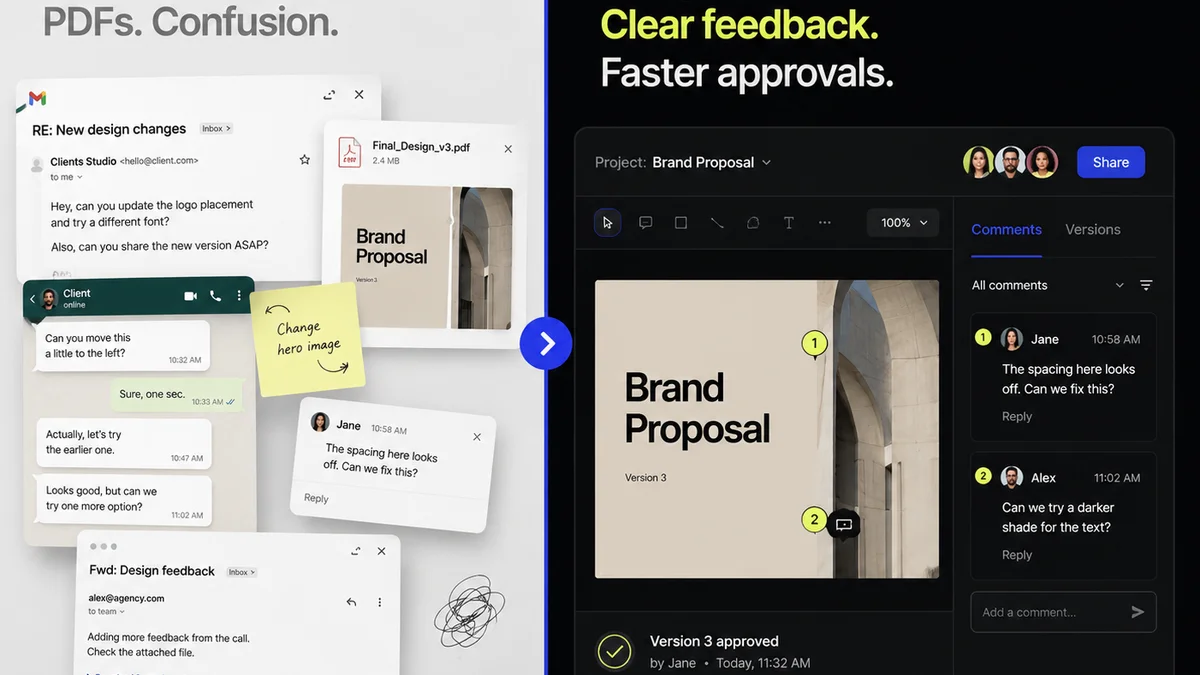
Think about the typical project lifecycle. Briefs, assets, feedback, revisions, approvals, final delivery. Where does this all live now? Scattered across email, Slack, Google Drive, internal servers, and maybe a PM tool that doesn’t quite fit?
This fragmentation is a productivity killer. It breeds confusion, delays, and errors. Your ops software needs to eliminate this.
Key Capabilities to Look For:
- Unified Dashboard: A clear, at-a-glance view of all active projects, their status, and upcoming deadlines.
- Centralized Asset Management: Secure storage and version control for all creative files, easily searchable and accessible.
- Integrated Communication: A way to keep project-specific conversations attached to the relevant tasks or assets, reducing reliance on external chat apps.
- Client Portal (Optional but Recommended): A dedicated space for clients to view progress, provide feedback, and approve deliverables, maintaining a clear audit trail.
This hub prevents the endless “Where are we with X?” and “Did you see the feedback on Y?” emails.
2. Streamlined Feedback & Revision Workflow
This is where most creative projects stumble. Unclear feedback, endless revision cycles, and the dreaded “client change of mind” are workflow killers.
Your ops software needs to bring structure and clarity to this chaotic process.
The Problem with Ambiguity
Vague feedback like “make it pop” or “I don’t like it” is useless. Worse, it’s subjective and leads to wasted hours trying to guess the client’s intent.
Your system must facilitate specific, actionable feedback tied directly to the creative asset.
Capabilities for Better Feedback Loops:
- Annotation Tools: The ability for stakeholders (internal and external) to leave comments directly on images, videos, or documents.
- Version Comparison: Easy side-by-side or overlay comparison of different revision stages to track changes clearly.
- Approval Tracking: A formal mechanism for sign-off, moving a deliverable from revision to approved status. This should include timestamps and user attribution.
- Feedback Consolidation: A way to aggregate all feedback on a specific asset or task, preventing conflicting instructions from different stakeholders.
This structured approach turns subjective opinions into actionable tasks.
3. Robust Approval & Sign-off Processes
Getting a final “yes” is critical. But informal approvals via email or Slack are risky. They lack an audit trail and can be easily disputed.
Your creative ops software must formalize the approval process.
The Risk of Informal Approvals
An email thread can get buried. A Slack message can be missed. When a client later claims they never approved something, you have no solid proof. This can lead to scope creep, billing disputes, and damaged client relationships.
What a Solid Approval System Looks Like:
- Clear Approval Statuses: Differentiate between ‘Pending Review’, ‘Approved’, ‘Needs Revision’, and ‘Rejected’.
- Digital Signatures/Confirmation: A system that requires a user to actively confirm their approval, logging who, what, and when.
- Automated Notifications: Reminders for reviewers and notifications to the project team once an approval is secured.
- Revision History: A complete log of all approvals and rejections tied to specific versions of an asset.
This isn’t about bureaucracy; it’s about protecting your agency and ensuring project momentum.
4. Quality Assurance & Handoff
The final stage is crucial. Delivering a polished, error-free asset is paramount to client satisfaction and your agency’s reputation.
Your ops software should support, not hinder, this final quality check.
The Cost of Cutting Corners
Skipping QA to meet a deadline is a false economy. Typos, broken links, incorrect specs, or unoptimized files reflect poorly on your agency and can lead to costly fixes down the line.
Essential QA and Handoff Features:
- Checklist Functionality: Customizable QA checklists that can be applied to project types or specific deliverables.
- File Naming & Organization Standards: Tools or enforced processes to ensure files are named and organized according to established conventions before delivery.
- Delivery Tracking: Confirmation that the final asset has been delivered and received by the client.
- Integration with Delivery Platforms: (Optional) Direct integration with cloud storage or delivery services.
This step ensures you’re not just delivering *an* asset, but the *right* asset.
5. Reporting & Analytics for Operational Insight
You can’t improve what you don’t measure.
Your creative ops software should provide insights into your team’s performance and project efficiency.
Beyond Basic Project Tracking
It’s not enough to know if a project is on time. You need to understand *why*. Are certain types of feedback causing delays? Are specific team members overloaded? Where are the bottlenecks?
Leverage Data for Improvement:
- Time Tracking & Utilization Reports: Understand how time is spent across projects and clients.
- Bottleneck Identification: Reports that highlight stages or individuals where tasks are consistently delayed.
- Resource Allocation Visibility: See team capacity and workload to prevent burnout and optimize assignments.
- Client Feedback Trends: Analyze the nature and volume of feedback to identify areas for process improvement with specific clients.
Data-driven decisions lead to smarter operations and healthier profit margins.
Where Revue Fits In
The operational framework above is precisely what Revue is built to support. We understand that the core challenge in creative operations is managing the flow of information and feedback efficiently.
Revue acts as that centralized hub. It brings structure to the chaos of client feedback, making the entire revision and approval process transparent and manageable. You can consolidate comments, track versions, and get clear sign-offs, all within a single platform. This directly addresses the need for streamlined feedback loops and robust approval processes.
By centralizing these critical functions, Revue helps eliminate the ambiguity and delays that plague creative workflows, allowing your teams to focus on creating great work, not chasing down information.
Final Thought
The best creative ops software doesn’t just track tasks; it enforces best practices. It guides your team and your clients toward a more efficient, less painful creative process. Are you using your tools to their full potential, or are they just adding another layer of complexity?
Frequently asked questions
What is the primary goal of creative ops software?
The primary goal is to streamline the creative production process by centralizing project information, managing feedback and revisions, and facilitating approvals, ultimately improving efficiency and reducing errors.
Why is a centralized project hub crucial?
A centralized hub acts as a single source of truth, preventing information silos that lead to confusion, delays, and missed feedback. It ensures all project-related assets, communication, and status updates are in one accessible location.
How can creative ops software improve client feedback?
By providing annotation tools, version comparison, and structured feedback consolidation, the software allows for specific, actionable feedback directly on assets, reducing ambiguity and the need for endless revision cycles.
What makes an approval process robust in creative ops software?
A robust approval process includes clear status indicators, digital confirmation or sign-offs with timestamps, automated notifications, and a complete revision history, providing an auditable trail and preventing disputes.
How does reporting and analytics benefit creative operations?
Reporting and analytics provide critical insights into team performance, project bottlenecks, resource allocation, and client feedback trends. This data allows agencies to make informed decisions, optimize workflows, and improve profitability.