Everyone's looking for the best creative project management software. They scan comparison charts, tick off feature lists, and agonize over integrations. They think the tool with the most buttons is the answer. None of that is wrong. But it’s incomplete.
The hard truth? The best software doesn't magically fix bad processes. It amplifies them. If your workflow is broken, the most advanced PM tool will just make you better at messing things up, faster.
1. The Real Bottleneck: Communication Chaos
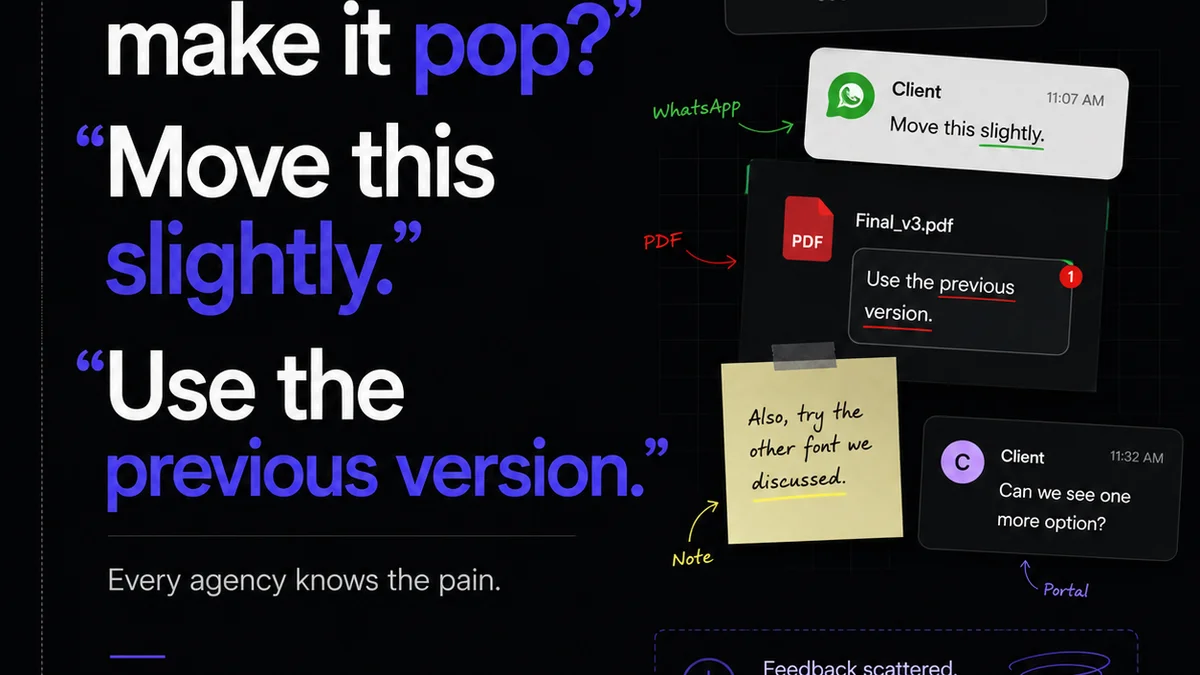
Creative projects live and die by communication. Emails get lost. Slack threads go cold. Feedback is buried in comment chains on files scattered across cloud storage. Sound familiar?
This isn't a software problem. It's a human problem, amplified by outdated tools.
Scattered Feedback Loops
Imagine a client giving feedback via email, then a follow-up call, then a separate Slack message. Your team has to collate all of it. That’s friction. That’s wasted time.
Your team ends up guessing what the client *really* wants.
Version Control Nightmares
Which is the final version? The one in Dropbox? Google Drive? A client's desktop?
Every missed version costs hours in rework and confusion. It erodes client trust.
Approval Paralysis
Getting a sign-off shouldn't feel like pulling teeth. If approvals are buried in endless email chains or require a formal meeting for every minor tweak, your project grinds to a halt.
This is where most creative project management software falls short: it focuses on task tracking, not the messy, human element of collaboration and approval.
2. Workflow Visibility: Seeing the Forest, Not Just the Trees
You need to see the entire project lifecycle, not just individual tasks. Where is the bottleneck? Who is holding things up? Is the client responsive?
Good software provides a clear, visual overview.
Dashboards That Actually Inform
Forget static Gantt charts. You need dynamic dashboards that show project health at a glance. What's on track? What's at risk? What requires immediate attention?
This means seeing:
- Overall project progress
- Individual task status
- Team member workload
- Client engagement levels
- Upcoming deadlines and milestones
The Power of Centralization
All project-related communication, files, feedback, and approvals should live in one place. One source of truth.
This isn't just about convenience; it's about efficiency. It reduces the cognitive load on your team and eliminates the need to hunt for information.
3. Revision & Approval Management: The Unsung Hero
This is the most critical, yet often the most neglected, part of creative project management.
If your software doesn't streamline revisions and approvals, you're leaving money and sanity on the table.
Inline Annotation and Feedback
The ability for clients and stakeholders to provide feedback directly on the creative asset (image, video, PDF, website page) is non-negotiable. No more vague comments like "make it pop more.".
Look for tools that allow:
- Clickable annotations
- Drawing tools
- Text comments tied to specific areas
- Ability to @mention team members
Clear Approval Workflows
Define who needs to approve what, and when. Automate notifications and reminders.
A clear, auditable trail of approvals is essential. This protects your agency and ensures everyone is aligned.
Version Comparison
Allowing users to easily compare different versions of an asset side-by-side highlights changes and makes it easier to track the evolution of feedback.
This saves arguments and ensures everyone is looking at the same iteration.
4. Quality Assurance and Oversight
Creative work needs rigorous quality checks before it goes to the client. This isn't just about catching typos; it's about ensuring the work meets strategic goals and brand standards.
Checklists and Templates
Standardize your QA process. Use customizable checklists for different types of projects (e.g., website launch, social media campaign, print collateral).
This ensures consistency and thoroughness.
Asset Management and Archiving
A centralized repository for all final assets makes them easy to find, reuse, and archive. This avoids the "where did that final logo file go?" panic.
Think of it as your agency's organized digital library.
5. Integration and Scalability: The Future-Proofing Factor
Your software stack shouldn't be a patchwork quilt of disconnected tools. It needs to work together seamlessly.
And it needs to grow with your agency.
API Access and Key Integrations
Does the software integrate with the tools you already use? Think design software like Adobe Creative Cloud, file storage, communication platforms, and accounting software.
A robust API is key for custom integrations.
Customization and Flexibility
Agencies are not one-size-fits-all. Your project management tool should adapt to your unique workflows, not force you into its rigid structure.
Can you customize fields, statuses, and views?
Where Revue Fits In
The best creative project management software doesn't just manage tasks; it streamlines the entire creative lifecycle. It centralizes feedback, provides clear visibility into revisions and approvals, and facilitates robust quality checks.
Revue is built for this reality. It’s designed to cut through the noise and bring clarity to client collaboration.
- Centralized Feedback: Consolidate all client comments and approvals in one place, directly on the creative assets. No more hunting through emails or Slack.
- Revision Visibility: Track every iteration, compare versions, and understand the evolution of feedback with clear audit trails.
- Quality Checks: Implement standardized review processes with checklists to ensure every piece of creative meets your agency's high standards before delivery.
It’s about eliminating friction, so your team can focus on what they do best: creating amazing work.
Final Thought
The search for the "best" creative project management software often leads us down a rabbit hole of features. But the most impactful tools are the ones that address the fundamental challenges of creative collaboration: communication, clarity, and control.
Are you investing in software that truly solves your workflow problems, or just one that looks good on paper?
Frequently asked questions
What is the most important factor when choosing creative project management software?
The most important factor is how well the software streamlines your specific creative workflow, particularly communication, feedback consolidation, and approval processes. Features are secondary to how well it solves your team's real-world bottlenecks.
How can software improve client feedback and approvals?
Software with inline annotation, version comparison, and clear approval workflows allows clients to provide precise feedback directly on assets. It creates an auditable trail, reducing confusion and speeding up the sign-off process.
Why is version control so critical in creative projects?
Mismanaged versions lead to rework, confusion, and wasted time. Centralized software with clear version tracking ensures everyone is working on and approving the correct iteration of an asset, maintaining project integrity.
Can project management software help with quality assurance?
Yes, by enabling the use of customizable checklists and standardized review processes. This ensures that all creative work undergoes consistent quality checks before client delivery, catching errors and ensuring brand compliance.