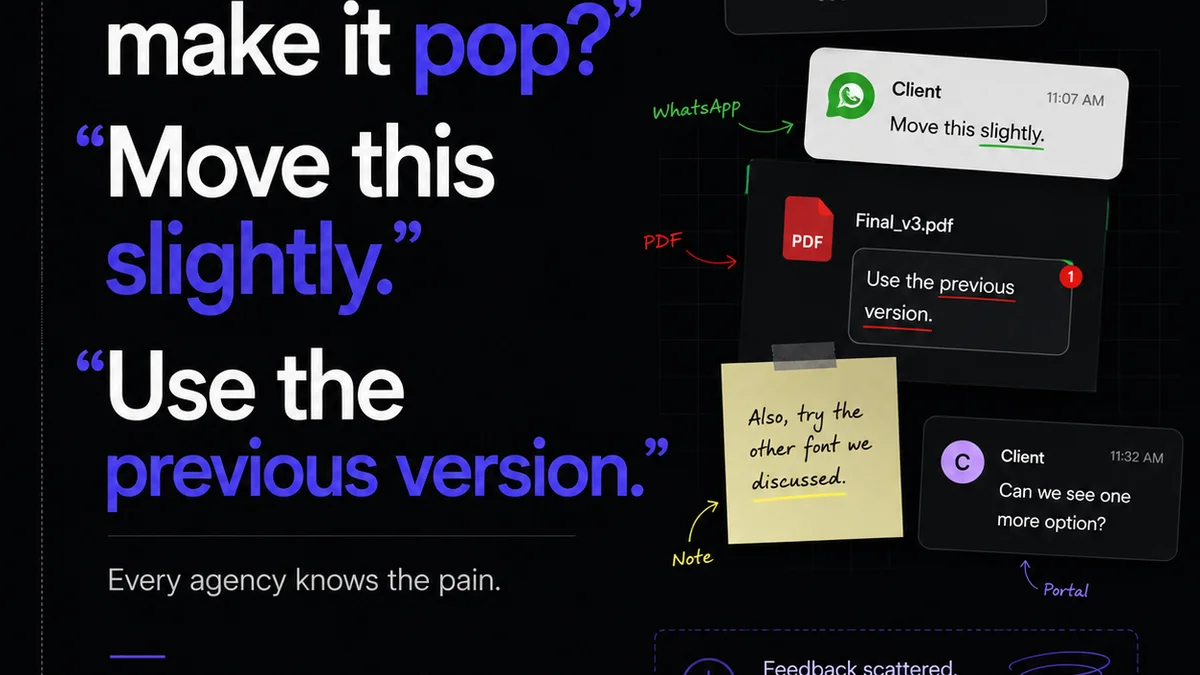
Everyone agrees: design reviews are critical. They’re where great ideas get refined, where feedback sharpens the final product. The assumption is that more eyes, more meetings, and more emails equal better quality. That’s not entirely wrong. But it’s dangerously incomplete.
The hard truth is that most design review processes are broken. They’re slow, inefficient, and actively hinder creativity. They create bottlenecks, foster miscommunication, and lead to endless, unproductive revisions. True design review automation isn't about removing human judgment; it's about removing the operational drag so human judgment can shine.
1. The Cost of Slow Feedback Loops
Think about your last project. How long did it take for a piece of creative to get from initial draft to final approval? Days? Weeks?
Each day of delay has a ripple effect.
- Missed deadlines
- Increased project costs
- Client frustration
- Team burnout
- Lost competitive edge
This isn't just about feeling busy. It's about the tangible impact on profitability and client relationships. Slow feedback loops are a silent killer of agency efficiency.
2. Why Traditional Design Reviews Fail
What does a typical design review look like? A meeting. Maybe an email chain. Perhaps a shared document with scattered comments.
This is where the real problems start to surface.
The Meeting Morass
Scheduled meetings often become echo chambers or battlegrounds. Key stakeholders might not be present, leading to further delays. Actionable feedback gets lost in conversation. Decisions are postponed.
Email Chaos
Email threads multiply. Versions get confused. It's impossible to track who said what, when, and what was actually implemented. This creates a documented history of confusion, not clarity.
Scattered Feedback
Comments in PDFs, notes in Slack, scribbles on a whiteboard – they all represent a disconnect. The designer has to manually collate feedback from disparate sources, a tedious and error-prone task.
This fragmentation is the enemy of efficient design review.
3. What 'Design Review Automation' Actually Means
Let’s be clear: we’re not talking about AI magically approving designs. That’s science fiction. Design review automation is about streamlining the *process* around feedback and approvals.
Centralizing Communication
Instead of scattered emails and meetings, all feedback and discussion happens in one place. This provides a single source of truth for every asset and every version.
Standardizing Workflows
Automated workflows ensure that creative assets move through defined stages. Feedback requests go to the right people at the right time. Approvals are clearly tracked.
Improving Visibility
Everyone involved can see the status of a design, who has provided feedback, and what the next steps are. This transparency reduces anxiety and guesswork.
Enhancing Accountability
When feedback and approvals are logged digitally, there’s a clear audit trail. This holds stakeholders accountable for their input and decisions.
4. Implementing Smarter Review Processes
Moving towards automation requires a shift in mindset and toolset.
Define Your Stages
Map out your typical project lifecycle. Identify key review points: concept approval, draft review, final sign-off. What needs to happen at each stage?
Assign Roles and Permissions
Who provides feedback? Who approves? Who needs to be notified? Clearly defining these roles prevents confusion and ensures the right input is gathered.
Leverage Technology
This is where design review platforms come in. Tools that allow for:
- Visual annotation directly on designs
- Version control and comparison
- Automated notification systems
- Clear approval tracking
- Centralized project dashboards
These aren't just nice-to-haves; they are the building blocks of efficient, automated review processes.
Automate Notifications and Reminders
Don't rely on individuals to remember to follow up. Set up automated reminders for pending feedback or approvals. This keeps projects moving without constant manual chasing.
Integrate with Existing Tools
Your review process shouldn't live in a vacuum. Ideally, your tools should integrate with your design software, project management systems, and communication platforms.
5. Where Revue Fits In
Revue is built to tackle the operational friction inherent in creative workflows. For design reviews, it provides the structure that traditional methods lack.
Imagine this:
- You upload a new design draft.
- Revue automatically notifies the designated reviewers.
- Reviewers can add contextual comments directly on the design using visual annotation tools.
- They can mark feedback as needing attention, clarification, or approval.
- Once feedback is gathered, you can easily track which comments have been addressed.
- Approvals are logged digitally, creating a clear record.
- If revisions are needed, the process restarts smoothly with clear context from the previous round.
This isn't about replacing the creative director's eye or the client's strategic input. It's about ensuring that valuable input isn't lost in translation or buried under mountains of irrelevant communication. Revue centralizes this entire process, giving you visibility and control.
It transforms design review from a chaotic, time-consuming burden into a structured, efficient part of the creative process. You get clearer feedback, faster approvals, and ultimately, better creative output.
6. The Human Element in Automated Reviews
It’s crucial to reiterate: automation doesn’t replace human connection or critical thinking. It enhances it.
By taking the administrative overhead out of the review process, your team can focus on what truly matters:
- Providing insightful, constructive feedback
- Collaborating effectively
- Making strategic decisions
- Pushing creative boundaries
When feedback is clear, timely, and contextual, designers can iterate more effectively. When approvals are transparent, clients feel more confident and involved.
The goal isn't to disconnect people; it's to connect them more effectively around the work itself.
Final Thought
Are your design reviews a bottleneck or a catalyst for creativity? If you’re still relying on a patchwork of emails, meetings, and shared docs, you’re likely losing valuable time and creative energy. It’s time to move beyond the assumption that more process equals better results. Focus on smarter, automated workflows that empower your team and elevate your creative output. What’s one small step you can take this week to streamline your design review process?
Frequently asked questions
What is design review automation?
Design review automation refers to using technology and structured workflows to streamline the process of gathering feedback, managing revisions, and obtaining approvals for creative assets. It focuses on improving efficiency and clarity, not replacing human judgment.
How can automation improve creative team productivity?
Automation reduces the time spent on administrative tasks like chasing feedback, collating comments from various sources, and tracking approvals. This frees up designers and project managers to focus on creative work and strategic thinking, leading to higher productivity.
Isn't design review inherently a human process?
Yes, critical evaluation and strategic input are human-driven. However, the *process* surrounding design reviews can be automated. This means using tools to manage communication, track versions, and log approvals, making the human interaction more efficient and effective.
What are the key benefits of automating design reviews?
Key benefits include faster turnaround times, reduced miscommunication, clearer audit trails for feedback and approvals, improved collaboration, and ultimately, higher quality creative output due to more focused design iterations.