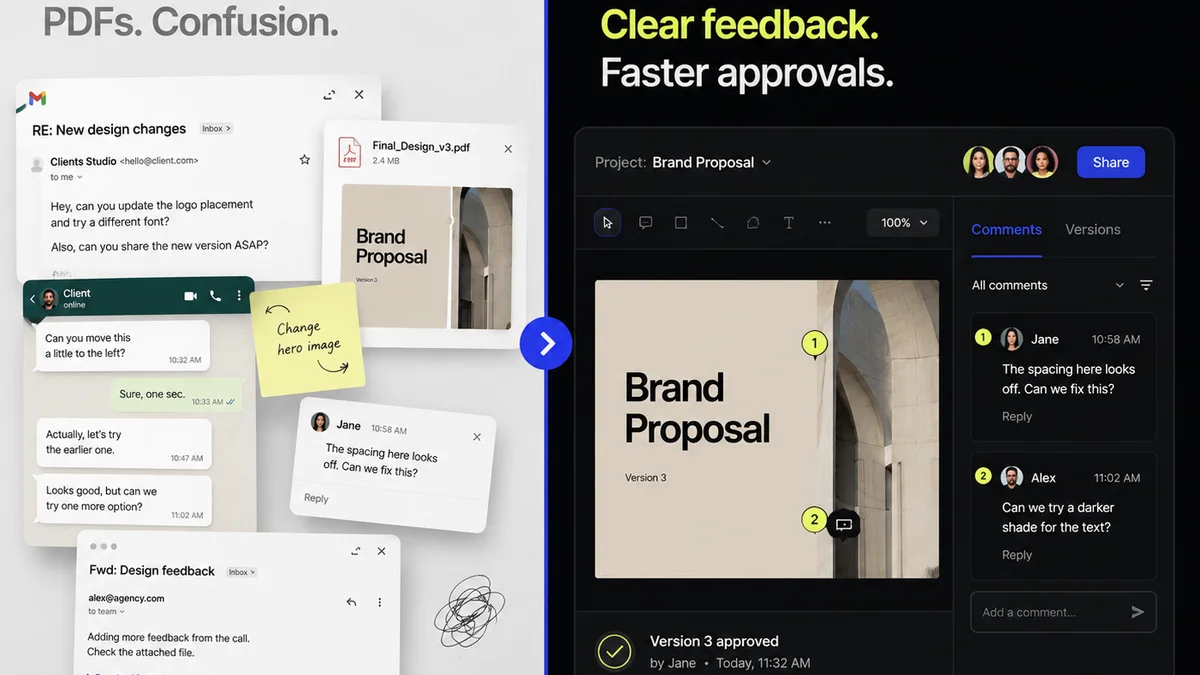
Everyone says you need design revisions software. That it will magically fix your feedback loops and speed up approvals. None of that is wrong. But it’s incomplete.
The hard truth? Most agencies struggle with revision tools because they focus on the wrong things. They treat it like a digital filing cabinet, not a strategic workflow engine.
1. Beyond Basic Annotation: Context is King
Clicking and scribbling on a static image is the bare minimum. Good design revisions software does more. It provides context. It answers the unspoken questions.
Think about it. A client leaves a comment like “Make this pop more.” What does that even mean?
The Problem with Vague Feedback
- It’s subjective.
- It lacks actionable direction.
- It leads to endless back-and-forth.
Your revision tool should help surface the underlying need. Can it link comments to specific design elements? Can it track the history of a particular change request? Does it allow for threaded conversations around each feedback point, so the full context is preserved?
This isn't just about marking up a PDF. It's about understanding the 'why' behind the 'what'.
2. Version Control That Doesn't Suck
File naming conventions are a joke. `Final_v3_really_final_THIS_ONE.ai` is not a strategy; it’s a cry for help.
Your design revisions software needs robust version control. Not just saving new files, but intelligently managing them.
What to Look For
- Automatic version stacking: See all iterations of a design in one place.
- Clear visual diffs: Easily spot what changed between versions.
- Rollback capabilities: Revert to a previous version if a new direction proves problematic.
- Activity logs: Track who uploaded what and when.
This isn't about appeasing a client. It's about protecting your team from lost work and wasted time. It’s about having a clear, auditable trail of every creative decision.
3. Streamlining Approvals, Not Just Collecting Them
Many tools let clients click an “Approve” button. Great. But what happens next?
True approval workflow management goes deeper. It’s about clarity, accountability, and efficiency.
Key Features for Approvals
- Customizable approval stages: Define multi-step reviews (e.g., Internal Review -> Client Review -> Legal Sign-off).
- Automated notifications: Keep stakeholders informed without manual chasing.
- Clear status indicators: Everyone knows where a project stands at a glance.
- Digital signatures: For formal sign-offs on final assets.
The goal is to move projects forward, not just get a rubber stamp. It’s about reducing bottlenecks and ensuring everyone is aligned before the final handoff.
4. Integrating with Your Existing Stack
A new tool that doesn’t talk to your other systems is just more work. Your design revisions software should fit seamlessly into your existing workflow.
Consider integrations.
Essential Connections
- Project management tools (e.g., Asana, Monday.com): Link feedback directly to tasks.
- Cloud storage (e.g., Google Drive, Dropbox): Pull assets in and push approved versions out.
- Communication platforms (e.g., Slack): Get notified of key updates without leaving your chat app.
This isn't about fancy add-ons. It's about reducing context switching and manual data transfer. It’s about making your tools work *for* you, not against you.
5. Security and Permissions That Matter
You’re dealing with client assets. Confidentiality and control are non-negotiable.
Your revisions software must offer granular control over who sees what.
Security Considerations
- Role-based access: Define permissions for internal team members and external clients.
- Secure sharing options: Control download permissions and expiry dates for shared links.
- Audit trails: Track all access and activity for security and compliance.
Protecting client IP builds trust. It’s a fundamental part of being a professional agency.
Where Revue Fits In
This is why we built Revue. We saw agencies drowning in email chains and scattered feedback.
Revue is designed to centralize client feedback, making it clear, contextual, and actionable. Our platform streamlines the revision and approval process, giving you visibility into every stage. It ensures quality checks are thorough and documented, reducing errors and saving time.
We focus on making the entire feedback loop efficient, so your team can focus on great creative work, not administrative overhead.
Final Thought
The right design revisions software isn’t just a tool for collecting comments. It’s a strategic asset that can fundamentally improve your agency’s efficiency, client relationships, and profitability. Are you using yours to its full potential, or is it just another piece of digital clutter?
Frequently asked questions
What is the primary benefit of using design revisions software?
The primary benefit is streamlining the feedback and approval process. It centralizes communication, reduces back-and-forth, clarifies version control, and speeds up project delivery, ultimately saving time and reducing errors.
How does version control in design revisions software help agencies?
Robust version control automatically tracks all iterations of a design, allows for easy comparison between versions (diffs), and enables rollback to previous states. This prevents lost work, clarifies decision history, and provides an auditable trail.
Why is contextual feedback important in a revisions tool?
Contextual feedback ensures comments are linked to specific design elements and that the 'why' behind the feedback is understood. This moves beyond vague instructions like 'make it pop' to actionable direction, reducing misinterpretation and rework.
What kind of integrations should I look for in design revisions software?
Look for integrations with your existing project management tools (like Asana), cloud storage (like Google Drive), and communication platforms (like Slack). These integrations reduce context switching and manual data transfer, making your workflow more efficient.