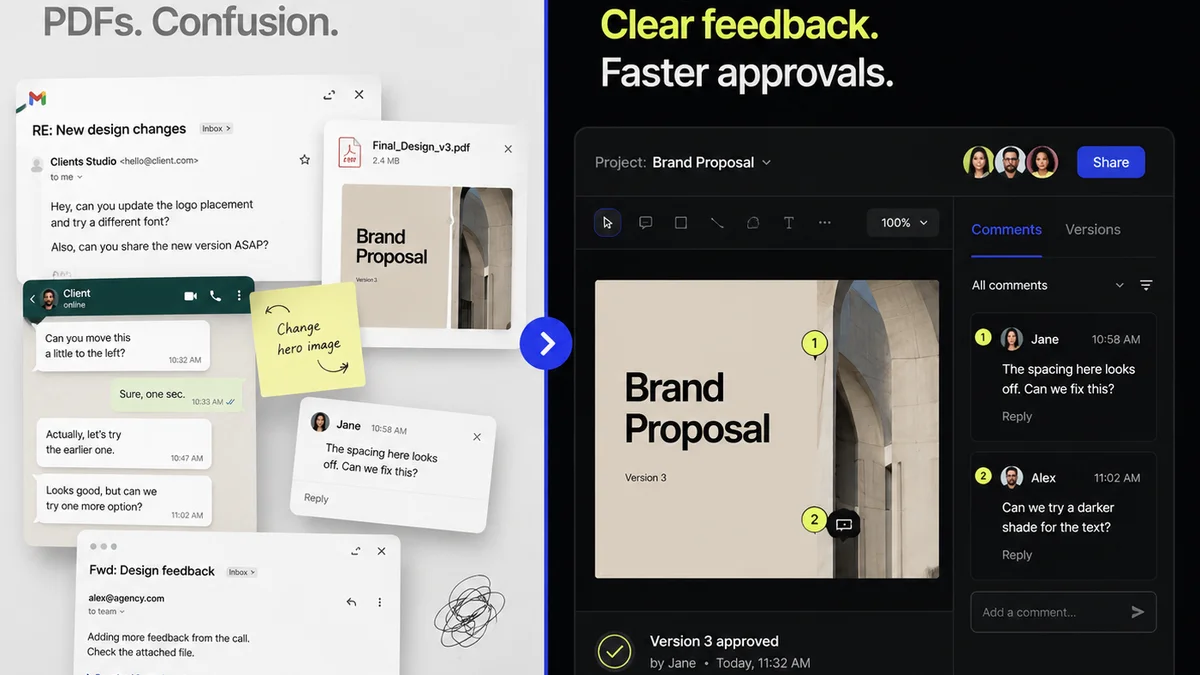
Everyone knows you need to collect client feedback on designs. It’s the bedrock of agency work. You probably think a simple checklist for Figma feedback is just about ticking boxes: 'Did they approve the logo?' 'Did they comment on the color palette?'
None of that is wrong. But it’s incomplete.
The hard truth is that collecting feedback is easy. The real challenge — the thing that breaks workflows and tanks profitability — is *managing* that feedback effectively. A basic checklist misses the operational nuances that turn client comments from a necessary evil into a driver of successful projects.
1. The Assumption: Comments = Clarity
We assume that when a client leaves a comment in Figma, it’s clear, actionable, and unambiguous. This is often not the case. Clients might:
- Use vague language: “Make it pop more.”
- Provide conflicting direction: “I like the blue, but can we try a different shade of green?”
- Focus on subjective preferences: “This font feels too serious.”
- Miss critical details: Overlooking a typo or a broken link because they’re focused on a larger aesthetic point.
This ambiguity is where most feedback cycles go off the rails.
2. The Hard Truth: Feedback is a Conversation, Not a Statement
Your checklist needs to facilitate a conversation, not just record a transaction. It’s about *how* feedback is gathered, contextualized, and acted upon. The goal isn't just to get comments; it's to get the *right* comments, understood correctly, and implemented efficiently.
This requires a structured approach that goes beyond simply looking at the comment count in Figma.
3. Structuring Your Figma Feedback Process
A robust Figma feedback checklist isn't just a list of questions. It’s a framework for ensuring quality and efficiency at every stage. Consider these elements:
3.1. Pre-Feedback Briefing
Before clients even see the design, set expectations. Your checklist should prompt:
- Clear Objectives: What are the goals of this design iteration? What specific questions does the client need to answer?
- Scope Definition: What areas are up for feedback? What is considered final?
- Feedback Method: How should feedback be submitted? (e.g., directly in Figma, a separate document, a call). Specify the tool if you want to avoid scattered comments.
- Response Timeline: When is feedback due? When will revisions be delivered?
3.2. In-Figma Commenting Guidelines
If comments are coming directly into Figma, guide your clients. Your checklist prompts:
- Be Specific: Instruct clients to link comments to specific elements.
- Explain the ‘Why’: Encourage clients to briefly explain the reasoning behind their suggestion.
- Prioritize: Ask clients to indicate critical vs. minor feedback.
- Use the Right Tools: Point them to the comment tool, not just random annotations.
3.3. Internal Review & Triage
This is crucial and often overlooked. Before presenting feedback to the design team, someone needs to:
- Consolidate: Gather feedback from all sources (Figma, email, calls) into one place.
- Clarify Ambiguities: Flag comments that need further discussion with the client.
- Prioritize & Group: Bundle similar feedback, identify critical path items.
- Estimate Effort: Roughly gauge the time and resources needed for revisions.
- Identify Conflicts: Note any feedback that contradicts previous approvals or project goals.
3.4. Revision & Re-Approval
Once revisions are made, the cycle repeats, but with added rigor:
- Clear Documentation: Ensure all changes are logged and easily traceable.
- Focused Review: Clients should review the *changes* made, not just the entire design again from scratch.
- Final Sign-off: Establish a clear process for final approval that prevents scope creep.
4. Beyond the Checklist: The Operational Layer
A checklist is a tool. Its effectiveness depends on the system it supports. You need more than just a list of questions to ask.
4.1. Centralizing Feedback
Scattered feedback is a productivity killer. Comments in Figma, emails, Slack messages, and transcribed calls all create noise. You need a single source of truth.
This is where tools designed for creative workflows shine. They can ingest feedback from various channels and present it coherently.
4.2. Managing Revisions with Visibility
Clients often forget what they’ve approved or what changes were made. This leads to endless back-and-forth. A system that tracks revisions, links them to feedback, and provides a clear audit trail is essential.
Your team needs to see the history. The client needs to see the history. Everyone benefits from transparency.
4.3. Ensuring Quality Checks
Feedback isn’t just about client taste. It’s also about technical accuracy, usability, and brand consistency. A robust process embeds quality checks throughout.
This means verifying that feedback aligns with project goals and doesn't introduce new issues. It's proactive problem-solving.
5. Where Revue Fits In
A Figma feedback checklist is a great start. But managing the entire feedback loop requires a more integrated solution. Revue is built for this operational layer.
Instead of juggling multiple tools and spreadsheets, Revue centralizes client feedback, discussion, and approvals for creative projects. You can streamline the process of collecting comments directly from Figma, manage revisions with clear visibility, and conduct thorough quality checks before final sign-off.
This reduces ambiguity, prevents scope creep, and ensures your team spends less time chasing feedback and more time creating great work.
6. Common Pitfalls to Avoid
Even with a checklist, agencies stumble. Watch out for:
- Feedback Overload: Too many cooks in the kitchen, or too many stakeholders giving conflicting input.
- Lack of Ownership: No clear person responsible for consolidating and clarifying feedback.
- Ignoring the ‘Why’: Implementing changes without understanding the client’s underlying goal.
- Endless Revisions: Failing to define scope and establish clear approval gates.
- Tool Misuse: Relying on a tool without proper process or training for the client.
7. Building Your Custom Checklist
Your checklist should evolve. Here’s a template to get you started, focusing on operational clarity:
7.1. Pre-Feedback Phase
- Project Goals Confirmed?
- Scope for This Round Defined?
- Client Briefed on Feedback Process?
- Feedback Deadline Set?
- Key Stakeholders Identified?
7.2. During Feedback Collection
- Feedback Submitted Via Agreed Method?
- Comments Specific & Actionable?
- Client Provided Rationale for Major Changes?
- Feedback Prioritized (Critical/Minor)?
- Ambiguous Comments Flagged for Clarification?
7.3. Post-Feedback Triage (Internal)
- All Feedback Consolidated?
- Conflicting Feedback Identified?
- Revision Effort Estimated?
- Action Plan Created?
7.4. Revision & Approval Phase
- Revisions Implemented Accurately?
- Changes Clearly Communicated?
- Client Review Focused on Revisions?
- Final Approval Obtained?
8. Final Thought
A Figma feedback checklist is more than just a document; it’s a commitment to clarity and efficiency. Are you treating client feedback as a critical operational process, or just another email in the inbox? The difference is profitability.
Frequently asked questions
What is the primary goal of a Figma client feedback checklist?
The primary goal is to move beyond simply collecting comments in Figma. It aims to ensure feedback is clear, actionable, and managed efficiently, turning the feedback process into a structured operational workflow that drives better creative outcomes and prevents costly misunderstandings or scope creep.
How can I ensure clients provide specific and actionable feedback in Figma?
Your checklist should prompt you to brief clients on commenting guidelines *before* they start. This includes instructing them to be specific, link comments to elements, explain their reasoning ('the why'), and prioritize their feedback. Clearly communicating these expectations upfront is key.
What should I do with ambiguous or conflicting feedback?
A robust checklist includes an internal review and triage phase. Flag ambiguous comments for clarification with the client. For conflicting feedback, document the conflict, assess its impact on project goals, and proactively propose a solution or recommendation to the client for resolution.
How does a checklist help prevent scope creep?
By clearly defining the scope for each feedback round, documenting what was requested and what was changed, and establishing clear approval gates, a checklist helps manage expectations. It provides a reference point to distinguish between requested revisions and new, out-of-scope requests.
Can a checklist replace a dedicated feedback management tool?
A checklist is a crucial part of a process, but it's not a complete system. For complex projects or high volumes of feedback, a dedicated tool like Revue can centralize comments from various sources (including Figma), track revisions, and provide an audit trail, significantly enhancing the efficiency and clarity that a standalone checklist can't achieve alone.