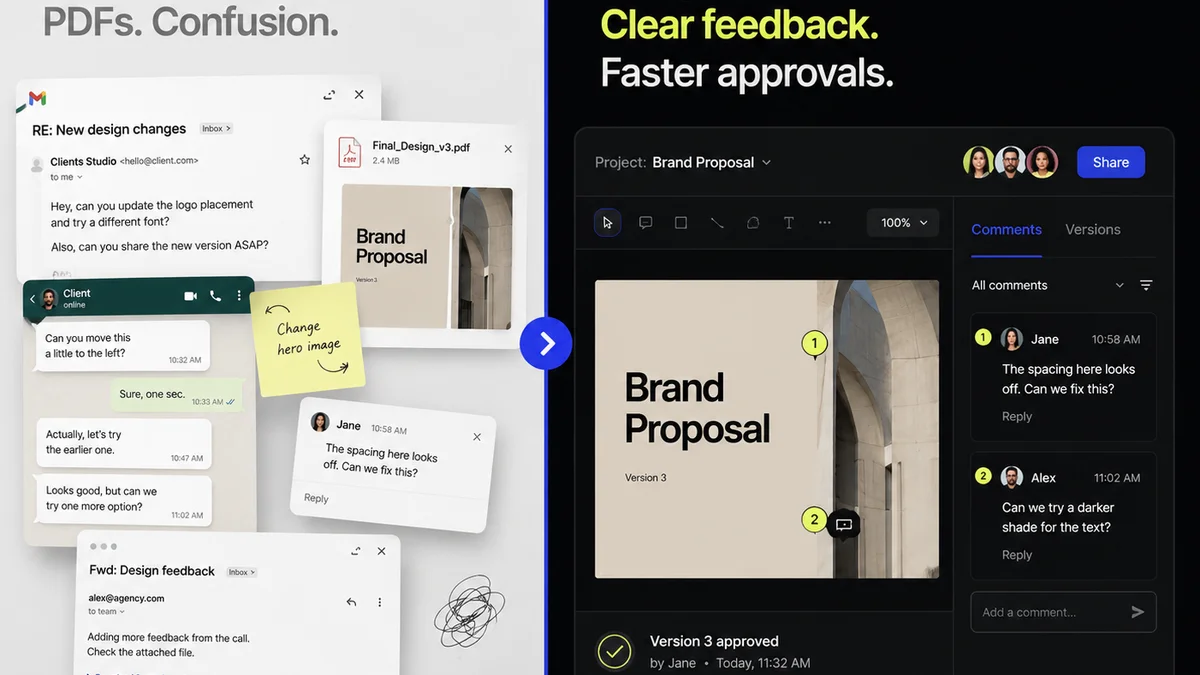
Everyone agrees that good design feedback is crucial. Clients say it, creatives nod along. We all want clear, actionable critiques that help us build better work.
But here’s the hard truth: most design feedback is garbage.
Not because clients are malicious or creatives are lazy. It’s because the systems for collecting and acting on feedback are broken. We treat feedback like a river, letting it flow wherever it wants, only to realize at the end that it’s carved a useless canyon.
What if you could channel that river? What if you could turn vague sentiments into concrete actions? Improving design feedback isn't about better communication skills alone; it’s about process and tools.
1. The Root Cause: Feedback Chaos
Think about the last time a client sent feedback. Where did it come from?
- An email chain with 50 replies?
- A Slack message buried under a dozen other alerts?
- A hastily scribbled note on a PDF?
- A call where someone said, “Just make it pop more”?
This is the default. It’s disorganized, easily lost, and impossible to track. You’re left trying to decipher meaning from disconnected comments across multiple platforms.
This chaos leads to wasted time.
It leads to endless revision cycles.
It leads to frustration on both sides.
And it almost always leads to a final product that misses the mark, because the *real* intent got lost somewhere in the noise.
2. Define 'Good' Feedback: Beyond Subjectivity
We often blame the sender for bad feedback. But the receiver plays a role too. What are *you* asking for?
“Make it better” is not a request. It’s a cop-out.
Good feedback is:
- Specific: It points to a particular element or aspect.
- Actionable: It suggests a clear path forward.
- Contextual: It explains *why* something needs changing, referencing project goals.
- Objective (where possible): It ties back to user needs, brand guidelines, or usability principles, not just personal taste.
This is why design systems matter. They provide an objective framework. Material Design principles, for example, offer a shared language for critique.
The 'Why' Behind the 'What'
When a client says, “I don’t like this blue,” what’s the real problem?
Is it:
- Too dark?
- Too bright?
- Clashing with other elements?
- Not aligning with brand colors?
- Evoking the wrong emotion?
Your job isn't just to change the blue. It’s to ask clarifying questions to uncover the *why*. This is where the real improvement happens.
“Can you tell me more about what isn’t working with this blue? Are we aiming for a more energetic feel, or something more subdued?”
This simple question shifts the dynamic from a command to a collaboration.
3. Standardize Your Feedback Process
Chaos thrives where there are no rules. You need a defined process for how feedback is given and received.
Start with the brief.
The Brief as a Feedback Compass
A well-defined brief is your first line of defense against vague feedback. It should include:
- Clear project goals and objectives.
- Target audience definition.
- Key messaging.
- Brand guidelines (colors, typography, tone of voice).
- Examples of what success looks like.
When feedback contradicts the brief, you have a solid reference point.
Establish Feedback Channels
Decide *where* feedback will be collected. One place. Not five.
This might be:
- A dedicated project management tool.
- A visual collaboration platform.
- A client portal.
Communicate this channel clearly to clients *before* the project starts. Explain that all feedback must be submitted here to ensure it’s seen and addressed.
Set Feedback Cadence and Response Times
When will feedback be requested? How long does the client have to provide it? What’s your turnaround time for addressing it?
Clear expectations prevent delays and misunderstandings.
“We’ll send over the first concepts by Friday EOD. Please provide consolidated feedback by Tuesday COB, and we’ll incorporate it into the next round, due Thursday.”
This structured approach makes feedback a predictable part of the workflow, not a disruptive force.
4. Leverage Technology for Clarity
Human communication is imperfect. Tools can bridge the gaps.
The right technology centralizes feedback, making it visible, trackable, and organized. This is fundamental to improving design feedback.
Think about the tools you use:
- Email: Terrible for visual feedback. Prone to version control issues.
- Spreadsheets: Static. Hard to link comments to specific design elements.
- Generic PM tools: Often lack visual annotation capabilities.
Visual feedback tools are game-changers. They allow stakeholders to comment directly on mockups, prototypes, or even live websites. This context is invaluable.
Imagine a client clicking on a button in a prototype and typing, “This call to action isn’t clear enough. It should encourage sign-ups.” That’s specific. That’s actionable.
It’s miles better than an email saying, “The homepage needs work.”
5. Where Revue Fits In
This is precisely why Revue was built. To cut through the feedback chaos and bring order to creative workflows.
Revue acts as a single source of truth for your creative projects.
- Centralized Feedback: All client comments, annotations, and approvals live in one place, attached to the specific creative asset. No more hunting through email chains or Slack messages.
- Revision and Approval Visibility: Track the entire history of feedback and revisions. See who said what, when, and what actions were taken. This transparency builds trust and accountability.
- Quality Assurance Tools: Ensure that feedback has been addressed correctly and that the final output meets project requirements before it goes live or to the client.
By structuring the feedback loop, Revue helps transform subjective opinions into objective progress. It ensures that every piece of feedback is captured, understood, and acted upon efficiently. This dramatically improves the quality of the final design and the efficiency of your team.
6. Train Your Clients (and Your Team)
Don't assume clients know how to give good feedback. They're experts in their business, not necessarily in design critique.
You need to guide them.
- Onboarding: Explain your feedback process during project kickoff.
- Education: Share examples of good vs. bad feedback.
- Proactive Guidance: When feedback is vague, gently prompt for more detail using the principles discussed earlier (specific, actionable, contextual).
Your internal team needs training too. Ensure everyone understands the process and knows how to solicit and interpret feedback effectively.
7. Embrace Iteration, Not Perfection
The goal of feedback isn't to get it perfect on the first try. It’s to iterate towards the best possible solution.
Think of feedback as data.
You collect data points (comments), analyze them (understand the 'why'), and adjust your approach (make revisions).
This iterative process, fueled by clear feedback, is how truly great work is made. It requires patience and a systematic approach.
Final Thought
Improving design feedback isn't a magical fix. It's a deliberate, process-driven discipline. It requires structure, the right tools, and a commitment to clarity from everyone involved.
Are you ready to stop managing feedback chaos and start driving design excellence?
Frequently asked questions
What are the key characteristics of good design feedback?
Good design feedback is specific, pointing to particular elements; actionable, suggesting clear steps; contextual, explaining the 'why' in relation to project goals; and objective, grounding critiques in user needs or established principles rather than just personal taste.
How can I prevent vague feedback from clients?
Start with a clear, detailed brief that outlines project goals and success metrics. During the feedback process, actively ask clarifying questions to uncover the 'why' behind their comments, guiding them towards specificity and actionability.
What is the best way to collect design feedback?
The most effective method is to centralize feedback in a single, dedicated platform. This prevents comments from getting lost in email chains or scattered across multiple channels. Visual feedback tools that allow annotation directly on designs are particularly useful.
How does technology help improve design feedback?
Technology, especially visual collaboration and project management tools, centralizes feedback, provides context through annotations, tracks revisions, and ensures accountability. This structure transforms chaotic, subjective comments into organized, actionable data.