Everyone thinks remote creative collaboration is about finding the right software. Slack, Figma, Asana, Miro – the list of essential tools grows by the day. And none of that is wrong. But it’s incomplete.
The hard truth? The tools are the easy part. The real challenge, the thing that separates functional remote teams from dysfunctional ones, is how you engineer communication, manage feedback, and build trust across distances. It’s about process, not just platforms.
1. Establish Crystal-Clear Communication Protocols
When you’re not sharing a physical space, ambiguity in communication becomes a creativity killer. Assumptions run wild, and tasks get dropped. You need explicit rules of engagement.
Define Your Channels
Not every message needs a meeting. Not every question needs a Slack DM. Decide what goes where.
- Urgent: Direct message or quick call.
- Project Updates: Dedicated project channel or task management tool.
- Broad Questions/Discussions: Team channel or asynchronous forum.
- Formal Decisions/Feedback: Email or a dedicated feedback tool.
This prevents important information from getting lost in the noise.
Set Response Time Expectations
Remote work can blur the lines between always-on and effectively offline. Agree on reasonable response times for different communication types. This reduces anxiety and ensures momentum isn’t lost waiting for an answer.
Embrace Asynchronous Workflows
Not everyone needs to be online at the same time. Design workflows that allow team members to contribute on their own schedules, especially across different time zones. This respects individual focus time and prevents meeting fatigue.
Use detailed briefs, well-documented feedback, and clear task assignments. Tools like Figma excel here, allowing for commented designs that don’t require real-time discussion for every point.
2. Standardize Your Feedback and Approval Loops
This is where creative projects often derail, especially remotely. Unstructured feedback leads to endless revisions and unhappy clients. A standardized process is non-negotiable.
Centralize All Feedback
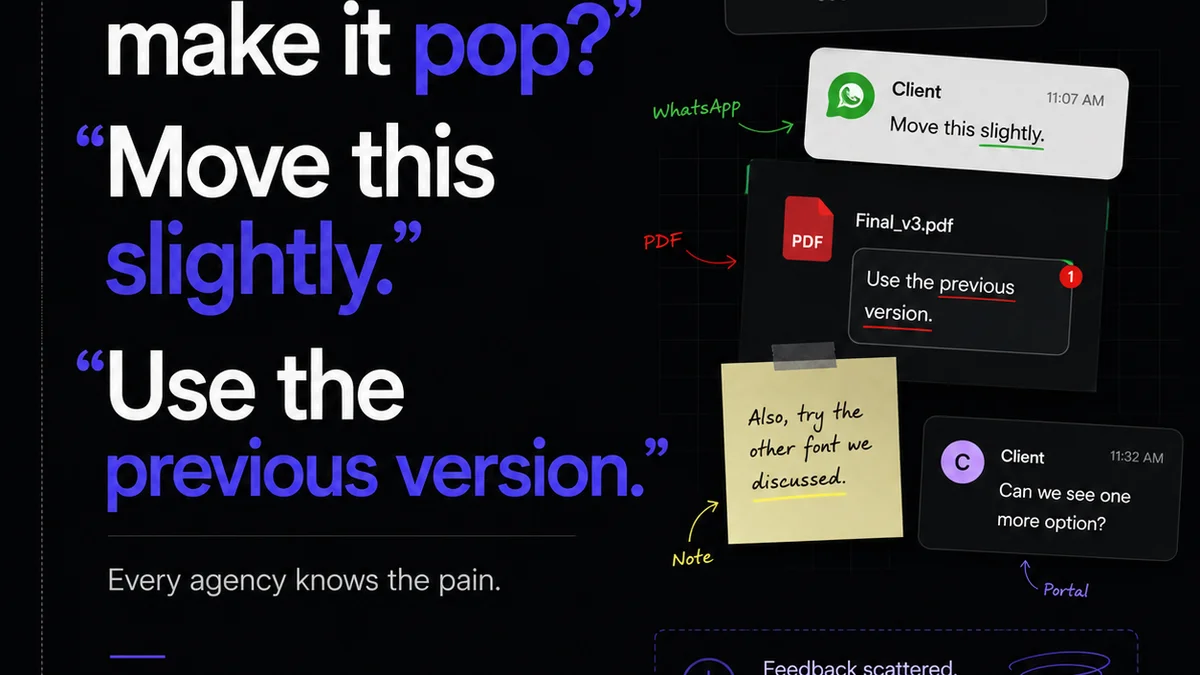
Scattered feedback across emails, Slack messages, and random documents is a recipe for disaster. All feedback, from internal reviews to client approvals, needs a single source of truth. This ensures nothing is missed and everyone is working from the latest version.
Define Feedback Granularity
What kind of feedback is useful? Vague comments like “I don’t like it” are useless. Train your team and clients to provide specific, actionable feedback tied to project goals.
- Focus on the *why* behind the suggestion.
- Reference specific elements.
- Propose solutions where possible.
Design systems and style guides become even more critical here, providing objective criteria for feedback.
Implement Version Control Rigorously
Every revision, every approval, every change needs to be tracked. Without clear version history, you’ll waste hours hunting down the “final” file or debating which iteration is current.
This isn’t just about saving time; it’s about maintaining accuracy and accountability.
3. Foster Trust and Psychological Safety
Collaboration thrives on trust. Remote work can make building and maintaining that trust harder. It requires intentional effort.
Create Virtual Water Cooler Moments
Informal chats build rapport. Schedule short, optional virtual coffee breaks or use dedicated Slack channels for non-work topics. These small interactions replicate the serendipitous connections of an office.
Assume Positive Intent
When communication is text-based, it’s easy to misinterpret tone. Encourage team members to assume that colleagues have good intentions, even if a message seems abrupt. If unsure, ask for clarification rather than jumping to conclusions.
Recognize and Celebrate Contributions
In a remote setting, it’s easy for good work to go unnoticed. Make a point of publicly acknowledging individual and team achievements. This reinforces positive behavior and boosts morale.
Psychological safety means team members feel safe to speak up, take risks, and admit mistakes without fear of punishment or humiliation. This is foundational for innovation.
4. Optimize Your Project Management Workflow
Remote collaboration demands a more structured approach to project management. Visibility is key.
Break Down Large Tasks
Complex projects can feel overwhelming when viewed from a distance. Deconstruct them into smaller, manageable tasks with clear owners and deadlines. This provides a sense of progress and makes it easier to track.
Utilize Kanban or Agile Methodologies
Visualizing workflow helps everyone understand the project status at a glance. Tools like Trello or Jira, when used effectively, provide this transparency. Seeing tasks move from ‘To Do’ to ‘In Progress’ to ‘Done’ keeps the team aligned.
Conduct Regular, Focused Stand-ups
Keep them brief and to the point. What did you accomplish yesterday? What will you work on today? Are there any blockers? This syncs the team and quickly surfaces issues that need addressing.
The goal is alignment, not just reporting.
5. Invest in the Right Technology Stack (Wisely)
Tools are enablers, not solutions. Choose them strategically, ensuring they integrate and support your established processes.
Prioritize Integration
A fragmented tech stack creates friction. Tools that talk to each other reduce manual data entry and streamline workflows. For example, integrating your design tool with your project management system can automate status updates.
Ensure Accessibility and Ease of Use
Complex software with steep learning curves will hinder adoption. Choose tools that are intuitive and accessible to all team members, regardless of their technical proficiency.
Consider Security and Compliance
Especially when handling client data, security is paramount. Ensure your tools meet industry standards for data protection and privacy.
The WCAG guidelines, for instance, are crucial for ensuring digital accessibility, a consideration that should extend to your internal tools as well.
Where Revue Fits In
Effective remote creative collaboration hinges on seamless communication, streamlined feedback, and clear visibility. This is precisely where Revue excels.
Revue acts as the central nervous system for your creative feedback and approval process. Instead of chasing down comments across disparate platforms, all stakeholder feedback—from clients to internal reviewers—is consolidated in one place. This provides an unambiguous record of decisions and revisions.
Our platform simplifies the management of revisions and approvals, offering clear visibility into project status. This reduces the back-and-forth, minimizes misunderstandings, and ensures everyone is working from the most up-to-date assets. By centralizing this critical workflow, Revue empowers your team to focus on creative execution rather than getting bogged down in administrative friction.
Final Thought
Remote creative collaboration isn't a technological puzzle to be solved; it's a human dynamic to be cultivated. The tools are merely the scaffolding. The real construction happens through intentional communication, robust processes, and a culture of trust.
Are you investing more in software than in the systems and culture that make that software effective? The answer might be the key to unlocking your team's true remote potential.
Frequently asked questions
What are the biggest challenges of remote creative collaboration?
The biggest challenges often stem from communication breakdowns, managing feedback effectively across distances, maintaining team cohesion and trust, and ensuring project visibility without constant meetings. Relying too heavily on tools without addressing these underlying process and culture issues is a common pitfall.
How can I improve client feedback in a remote setting?
Standardize the feedback process by centralizing all comments in one platform, defining clear guidelines for constructive and actionable feedback, and ensuring clients understand the review cycle. Use tools that allow for annotation directly on creative assets.
What is the role of asynchronous communication in remote collaboration?
Asynchronous communication allows team members to contribute on their own schedules, respecting different time zones and individual focus periods. It requires clear documentation, detailed briefs, and well-structured updates to ensure everyone stays informed without needing real-time interaction for every task.
How do I build trust with a remote creative team?
Build trust by fostering psychological safety, encouraging open communication, assuming positive intent in messages, and creating opportunities for informal social interaction. Recognizing and celebrating individual and team contributions also plays a vital role.