Everyone knows you need a system for managing creative revisions. It’s the bedrock of client work. You probably think that means just saving files with dates, using cloud storage, or maybe a shared spreadsheet.
None of that is wrong. But it’s incomplete.
The hard truth? Without a dedicated revision management strategy, your agency is bleeding time, money, and goodwill. Those ad-hoc methods create chaos, not control. They invite errors, slow down approvals, and frustrate everyone involved.
Effective revision management isn't just about keeping track of file versions. It's about streamlining communication, ensuring clarity, and building a reliable workflow that protects your team and your clients.
1. Define Your Revision Workflow
Before you even look at software, map out your ideal revision process. What are the stages? Who is involved at each stage? What are the triggers for moving to the next stage?
This isn't a theoretical exercise. This is about understanding the actual steps your projects take, from initial concept to final sign-off.
The Core Stages
- Briefing and Kick-off
- First Draft Presentation
- Client Feedback Round 1
- Internal Review/Revisions
- Client Feedback Round 2 (and so on)
- Final Approval
- Asset Handoff
Each of these stages needs clear ownership and defined deliverables. Who provides the feedback? Who makes the changes? Who approves the final output?
Document this. Make it visible. This becomes your agency’s playbook.
2. Centralize All Feedback
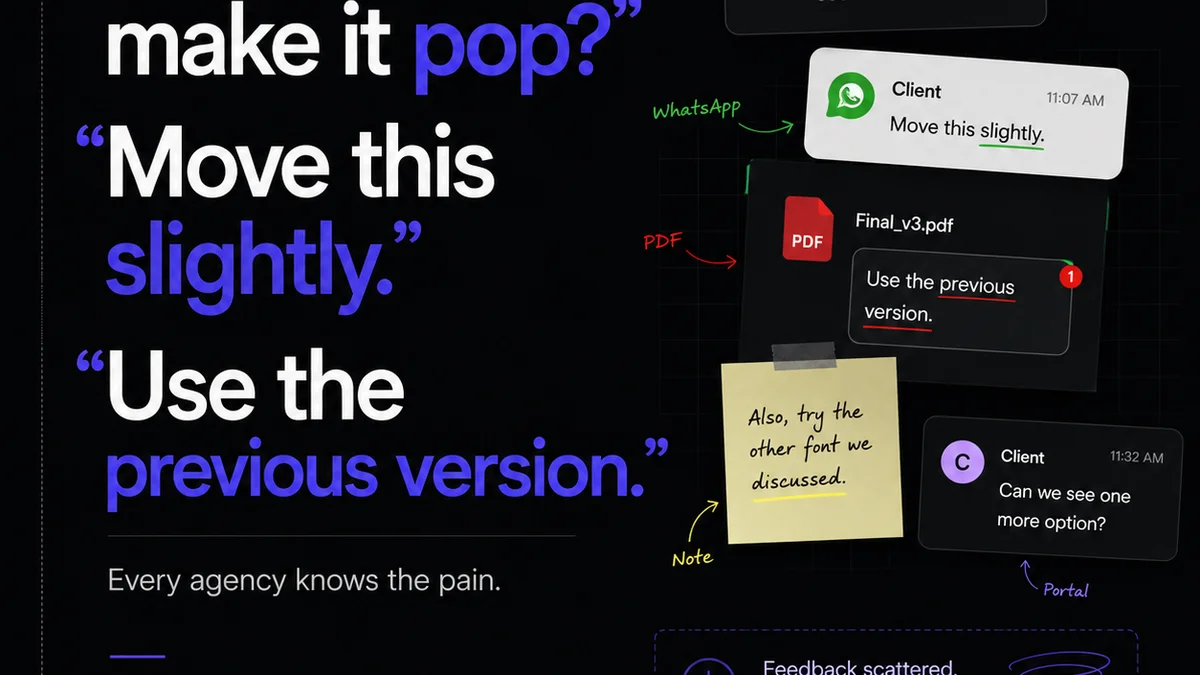
Scattered feedback is the death knell of efficient revision management. Emails, Slack messages, random Word documents, scribbled notes on printouts – this is a recipe for disaster.
Your primary goal should be to get all client feedback into one, accessible place. This eliminates the “I thought you said X” conversations that derail projects.
The Dangers of Scattered Feedback
- Missed comments or instructions
- Conflicting feedback from different stakeholders
- Wasted time searching for information
- Difficulty tracking what has been actioned
- Increased risk of errors and misinterpretations
A centralized system provides a single source of truth. Every comment, every mark-up, every approval lives in one digital space, linked directly to the creative asset it pertains to.
3. Establish Clear Feedback Protocols
Clients, bless their hearts, don't always know how to give constructive feedback. They might be vague, overly personal, or provide conflicting direction.
Your revision management software needs to facilitate clear, actionable feedback. This means guiding the client (and your internal team) on how to provide input effectively.
Best Practices for Feedback
- Be Specific: Instead of “I don’t like it,” try “The headline font feels too aggressive for this audience.”
- Be Actionable: Feedback should suggest a change or a problem that can be solved.
- Be Concise: Long, rambling critiques are hard to follow.
- Be Objective: Focus on the brief, the goals, and the audience, not personal taste.
- Designate a Point Person: Have one primary client contact responsible for consolidating feedback.
Your chosen software should support these protocols. Features like annotation tools, threaded comments, and version comparison are crucial here.
4. Streamline Approval Processes
Revisions aren't done until they're approved. This final step is often the bottleneck. Delays here can have a ripple effect through your entire project timeline.
Your revision management system needs to make approvals clear and unambiguous. No more vague emails saying “looks good.”
Key Approval Features
- Digital Sign-offs: A formal, trackable approval button or status.
- Version History: Clear visibility of what was approved and when.
- Notifications: Automated alerts to stakeholders when an item is ready for approval or has been approved.
- Deadline Management: Setting clear timelines for feedback and approvals.
When an approval is locked in, everyone knows it. There’s no ambiguity. This protects your agency from scope creep and ensures you’re working from a signed-off baseline.
5. Version Control and Audit Trails
This is where many DIY systems fall apart. How do you know exactly which version of the design the client approved? What if a change was made after approval?
Robust version control is non-negotiable. Every iteration of a creative asset needs to be stored and easily accessible.
What a Good Audit Trail Provides
- Complete History: Every version, every change, every comment, every approval, timestamped.
- Rollback Capability: The ability to revert to previous versions if necessary.
- Accountability: Clear who made what changes and when.
- Dispute Resolution: Proof of what was agreed upon, protecting you from “scope creep” accusations or client disputes.
This isn't just about organization; it's about risk management. A clear audit trail is your best defense when questions arise.
6. Integrate with Your Existing Tools
Your revision management software shouldn't live in a silo. The best solutions integrate with the tools your team already uses daily.
Think about your design software, your project management tools, and your communication platforms.
Integration Benefits
- Reduced Context Switching: Less jumping between apps means more focus.
- Automated Workflows: Trigger actions in one tool based on events in another.
- Data Consistency: Ensuring information is up-to-date across all platforms.
- Efficiency Gains: Automating repetitive tasks saves significant time.
Look for integrations with platforms like Adobe Creative Cloud, Figma, Sketch, Asana, Jira, Slack, and others relevant to your agency’s stack.
7. Prioritize Security and Permissions
You’re dealing with sensitive client assets. Protecting that intellectual property is paramount.
Your revision management system must offer granular control over who can see, comment on, or approve specific projects and assets.
Key Security Considerations
- User Roles and Permissions: Define who has access to what.
- Secure Storage: Ensure your data is protected with robust encryption.
- Compliance: Understand any industry-specific data protection requirements.
- Access Logs: Track who accessed what and when.
This ensures that only authorized individuals can view or modify project files, safeguarding both your agency's and your clients' interests.
Where Revue Fits In
Managing creative revisions effectively is about more than just file versions. It's about a seamless flow of communication, clear accountability, and verifiable approvals. It’s about ensuring the final output meets the brief and delights the client.
Revue is built to address these core challenges head-on. It provides a centralized hub for all client feedback, transforming chaotic email chains and Slack messages into actionable comments tied directly to your creative assets.
With Revue, you gain unparalleled visibility into the revision and approval process. Every stakeholder can see the latest version, leave precise feedback, and formally approve deliverables. This eliminates ambiguity and accelerates sign-offs.
Our robust version control and audit trails ensure you always have a clear record of what was discussed, changed, and approved. This protects your agency, streamlines quality checks, and builds client trust.
By integrating feedback, revisions, and approvals into a single, intuitive platform, Revue empowers creative teams to spend less time managing the process and more time creating great work.
Final Thought
The tools you use to manage creative revisions aren't just about organization. They are strategic assets that directly impact your agency's profitability, client satisfaction, and the quality of your output.
Are you merely organizing files, or are you actively mastering the revision process?
Frequently asked questions
What is the main benefit of using revision management software?
The main benefit is streamlining the entire feedback and approval process. This leads to fewer errors, faster turnaround times, better communication, and increased client satisfaction by providing a single source of truth for all project feedback and changes.
How does revision management software help prevent scope creep?
By centralizing feedback and requiring formal digital approvals, revision management software creates a clear audit trail. This documentation makes it easy to identify and manage requests that fall outside the original project scope, providing a basis for discussing additional work and costs.
Can revision management software improve client relationships?
Yes. By providing a transparent and organized way to manage feedback and revisions, clients feel more informed and in control. Clear communication, timely updates, and a structured approval process reduce frustration and build trust, leading to stronger relationships.
What are the essential features to look for in revision management software?
Key features include centralized feedback tools (like annotation and comments), clear version control with audit trails, streamlined digital approval workflows, user permission controls, and integration capabilities with other creative and project management tools.