You're looking for a way to manage client feedback. You’ve probably heard of tools like Filestage. They promise to streamline approvals and make revisions less painful. None of that is wrong. But it’s incomplete.
The hard truth is that most feedback tools are just that: feedback tools. They capture comments. They track versions. But they don't fundamentally change the underlying workflow chaos that plagues creative agencies and in-house teams. The real difference isn't in the annotation features; it's in how a platform integrates feedback into a complete project lifecycle.
1. The Feedback Black Hole
It’s a familiar scene. The client uploads a PDF. The team annotates it. The client approves it. Or maybe they don't.
But what happens to that feedback *after* it’s logged?
Often, it gets copied and pasted into spreadsheets. It gets summarized in emails. It gets lost in Slack threads. The original context is stripped away. The clear line of sight between the client's comment and the designer's action becomes a tangled mess.
This isn't a minor inconvenience. It’s a systemic breakdown.
The Symptoms of Feedback Chaos
- Endless clarification emails: "What exactly did you mean by this?"
- Missed feedback: Critical notes buried under less important ones.
- Scope creep disguised as revisions: Because it's hard to track what's new vs. what was already agreed.
- Delayed approvals: Waiting for someone to hunt down the latest version and the correct feedback.
- Designer burnout: Trying to decipher ambiguous or conflicting instructions.
This is where many standalone feedback platforms hit their ceiling. They solve the *input* problem – getting comments onto the asset. They barely touch the *processing* and *output* problem – turning that feedback into actionable work and verifiable sign-offs.
2. Version Control: More Than Just Numbers
Every creative project goes through iterations. You upload a new draft, the client reviews, you revise again. It sounds simple.
But the reality is often far more complex.
How do you ensure everyone is looking at the *same* version? How do you track which version contained which feedback? How do you prevent accidental approvals on outdated drafts?
Standalone feedback tools often treat versioning as a simple file-naming convention or a sequential numbering system. They allow you to upload new versions, but the connection between feedback and the specific version it relates to can become fragile.
The Pitfalls of Basic Versioning
- Client approves Version 3, but the team is working off Version 4.
- Conflicting feedback across multiple versions is hard to reconcile.
- Difficulty in auditing: Which feedback led to which final output?
- Wasted time: Re-explaining context to clients who are confused about versions.
True version control needs to be integrated. It needs to be the backbone of the review process, not an afterthought. It should clearly delineate what is being reviewed, what was approved, and what changes were made between states.
3. Approval Management: The Bottleneck
Client approval is the finish line. But getting there is often a marathon of back-and-forth.
Many tools offer a simple 'Approve' or 'Reject' button. This is a good start, but it rarely captures the nuance required for complex creative projects.
What if the client approves, but with minor, easily fixable notes? Does that require a whole new review cycle?
What if there are multiple stakeholders with different approval levels? How is that managed?
The approval process is often a major bottleneck because it's treated as a binary event, not a managed workflow.
Common Approval Roadblocks
- Lack of clear approval hierarchies.
- Ambiguous 'approvals' that still contain requested changes.
- Difficulty in tracking who approved what, and when.
- No clear audit trail for compliance or dispute resolution.
- The dreaded "silent approval" where no explicit sign-off is given, leading to future disputes.
Effective approval management isn't just about a button. It's about a defined process that ensures clarity, accountability, and a verifiable record.
4. The Cost of Disconnected Workflows
Using separate tools for feedback, versioning, and approvals creates operational friction. This friction costs time, money, and morale.
Think about the manual steps involved:
- Exporting a design from Figma or Adobe Creative Cloud.
- Uploading it to a feedback tool.
- Copying feedback notes into a task management system.
- Updating spreadsheets with approval statuses.
- Communicating changes back to the team via Slack or email.
Each of these steps is a potential point of failure. Each requires context switching. Each adds to the overall project timeline.
This disconnected approach is often driven by the assumption that a specialized tool for each task is the most efficient. In reality, the integration cost outweighs the specialized benefit.
Where Revue Fits In
This is where a platform like Revue shifts the paradigm. It’s not just a feedback tool; it’s an integrated workflow solution designed for the realities of creative production.
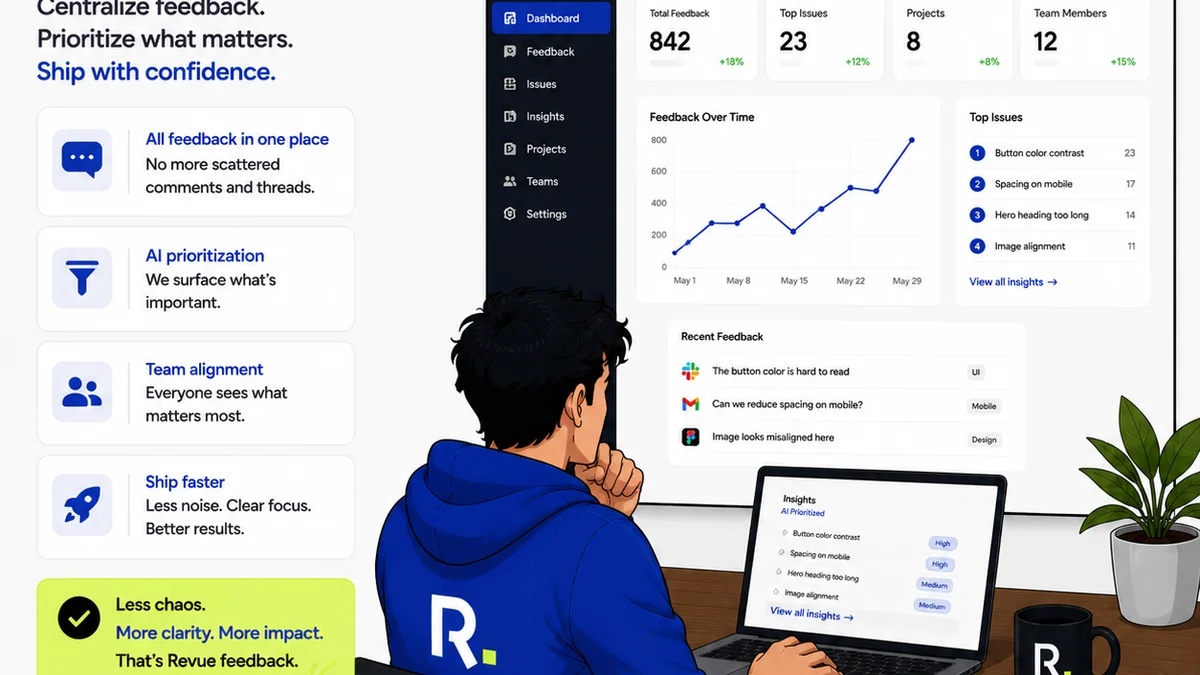
Revue centralizes the entire review and approval process. Instead of juggling multiple applications, your team works within a single environment.
- Centralized Feedback: All client comments, annotations, and discussions live with the asset. No more hunting through emails or chat logs.
- Clear Revision Tracking: Every version is linked. You can see exactly what changed from one iteration to the next, with feedback tied to the specific version it pertains to. This makes revision management precise.
- Streamlined Approvals: Define clear approval workflows. Track who needs to approve what, and get verifiable sign-offs that create an undeniable audit trail.
- Quality Assurance: Built-in checklists and review stages help ensure that work meets standards *before* it goes to the client, reducing back-and-forth.
By connecting feedback directly to revisions and approvals within a single system, Revue eliminates the operational friction. It turns a series of disconnected tasks into a fluid, transparent process.
5. The Operational Truth: Integration is Key
The fundamental difference between a tool like Filestage and a platform like Revue isn't the features list. It's the underlying philosophy.
Filestage and similar tools are point solutions. They aim to do one thing exceptionally well: collect feedback on an asset.
Revue is an integration solution. It aims to solve the broader problem of creative project lifecycle management, where feedback is just one critical piece of a larger puzzle.
The operational truth for any agency or in-house team is that disconnected tools create silos. They introduce manual workarounds. They obscure progress. They make accountability difficult.
The future of creative operations isn't more specialized tools; it's smarter integration that connects the dots.
Choosing the Right Path
- If your primary pain point is simply getting comments onto a PDF: A dedicated feedback tool might seem sufficient.
- If your pain point is project delays, unclear revisions, approval bottlenecks, and a lack of visibility across the entire review cycle: You need an integrated solution.
The question isn't whether you need a feedback tool. The question is whether you can afford to treat feedback as an isolated event, disconnected from the rest of your workflow.
Final Thought
Many agencies are still operating with a patchwork of tools, each solving a small piece of the puzzle. This approach feels familiar, perhaps even comfortable. But is it truly effective in the fast-paced, client-driven world of creative work?
Consider this: If your feedback tool doesn't inherently manage versions and approvals as part of its core function, are you really streamlining, or just digitizing the chaos?
Frequently asked questions
What is the main difference between Revue and Filestage?
Filestage is primarily a client feedback tool, focused on collecting annotations and comments on creative assets. Revue is a more comprehensive platform that integrates feedback collection with version control, revision management, and approval workflows, aiming to manage the entire review lifecycle.
Can Filestage handle version control and approvals?
Filestage offers features for uploading new versions and basic approval functionalities. However, its core strength is feedback collection. Revue is designed from the ground up to manage the entire process, ensuring feedback is intrinsically linked to specific versions and verifiable approvals.
Why is integrated workflow important for creative teams?
Integrated workflows reduce friction, minimize manual workarounds, prevent errors from context switching, improve transparency, and create a clear audit trail. This leads to faster project completion, better client communication, and reduced team stress.
Does Revue replace design software like Figma or Adobe?
No, Revue is designed to work alongside your existing creative tools. It integrates with them by providing a centralized platform for managing the review, feedback, and approval stages of your projects, ensuring that work from Figma or Adobe can be efficiently reviewed and approved.