Everyone says Notion is the future of education. That it's the ultimate digital workspace, replacing everything from lesson plans to student portfolios. None of that is wrong. But it’s incomplete.
The hard truth is that while Notion is a powerful tool for individual learning and team organization, it often falls short when it comes to the specific, high-stakes demands of creative feedback and client-agency workflows within educational settings. For creative programs, managing feedback, revisions, and approvals requires a different kind of system.
1. The All-in-One Illusion
Notion promises a single source of truth for everything. For students, this might mean class notes, assignment trackers, and project boards. For instructors, it could be syllabi, grading rubrics, and communication logs.
It's incredibly flexible. You can build databases for student work, embed videos, create wikis, and even manage schedules. The appeal is undeniable: one place for all your educational needs.
But this flexibility comes with a cost. When the primary goal shifts from personal organization to collaborative creative review, the limitations become stark.
The Feedback Bottleneck
Creative work lives and dies by feedback. In an educational context, this means instructors critiquing student projects, peer reviews, and even external critiques for capstone projects or portfolio reviews.
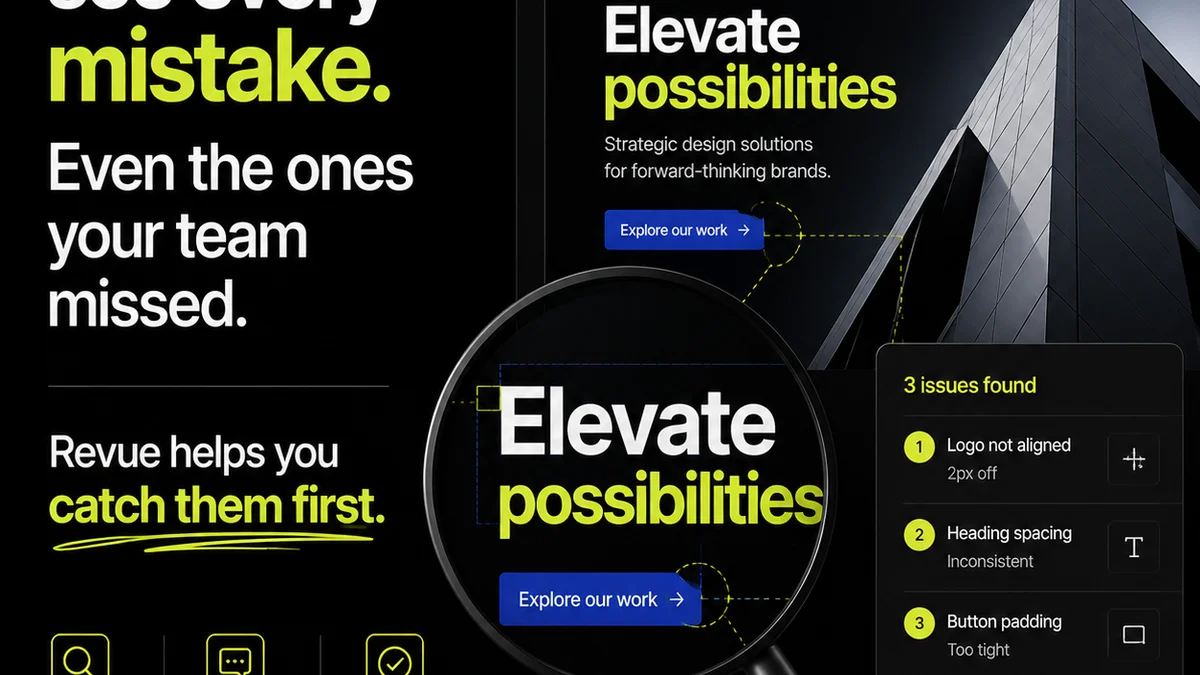
Notion's commenting system is basic. It's good for general discussion, but it lacks the granular, visual context needed for design feedback. Trying to pinpoint a specific element on an image or video within Notion is clunky.
This leads to:
- Vague feedback that's hard to act on.
- Endless back-and-forth emails trying to clarify comments.
- Lost context as feedback gets buried in general discussion threads.
2. Creative Workflow Realities
Educational institutions, especially those with creative programs (design, art, media, architecture), face unique workflow challenges that Notion doesn't inherently address.
Think about a student submitting a digital painting. The instructor needs to provide feedback directly on the artwork, highlighting specific areas, suggesting color palette changes, or commenting on composition. This isn't just text; it's visual annotation.
Or consider a group project where students are developing a marketing campaign. They need a clear way to present their work, receive feedback, make revisions, and get final approval from their professor. This is a linear, iterative process.
The Revision Maze
Notion can house project files, but it doesn't offer a dedicated system for managing the revision and approval lifecycle.
How do you track version history effectively when multiple students are contributing or when an instructor provides feedback across several iterations? How do you ensure the latest version is the one being reviewed?
This is where specialized tools shine. They are built from the ground up to handle these specific steps:
- Clear submission points for creative assets.
- Visual annotation tools for precise feedback.
- Version control that automatically tracks changes.
- Streamlined approval workflows.
3. The Specter of Scope Creep
Notion's strength—its infinite customizability—can also be its greatest weakness. When you try to make it do too many things, it often does none of them perfectly.
For a creative department or an entire university, managing Notion instances can become an administrative nightmare. Each professor, department, or student group might build their own system, leading to fragmentation and inconsistency.
This is the scope creep problem. What starts as a simple note-taking app becomes a complex, custom-built ERP that requires significant ongoing maintenance and training.
This is especially true for creative feedback:
- Students don't know where to submit work for review.
- Instructors struggle to consolidate feedback from various Notion pages.
- Tracking the status of revisions becomes a manual, error-prone task.
Where Revue Fits In
This is where a tool like Revue becomes essential, not as a replacement for Notion, but as a specialized complement for creative workflows within education.
Revue is built for managing creative assets and the feedback loop. Imagine a student uploading their latest design mock-up. Instead of a generic comment box, they get a dedicated space for visual feedback.
Instructors can:
- Annotate directly on images, PDFs, and videos.
- Provide clear, contextual feedback that eliminates ambiguity.
- Track the entire revision history for each asset.
- Manage approval statuses with a clear overview.
This centralized approach ensures that feedback is actionable, revisions are tracked efficiently, and final approvals are documented. It cuts through the noise of a general-purpose tool and focuses on the critical path of creative development.
Streamlining the Creative Process
For creative agencies, managing client feedback is paramount. Educational institutions with creative programs face remarkably similar challenges.
Students need to learn how to receive and act on professional-grade feedback. Instructors need efficient ways to deliver that feedback and track progress.
Revue provides the structure needed for this critical educational component:
- Centralized Feedback: All comments and annotations live with the asset.
- Revision Visibility: Easily see what changed between versions.
- Approval Tracking: Clear status for submitted and approved work.
- Quality Control: Ensure work meets defined standards before final submission.
This focus allows educators to dedicate more time to teaching and less time to managing chaotic feedback processes. It also prepares students for the realities of professional creative industries.
4. The Long-Term Cost of 'Free'
Many educational institutions leverage Notion's free or educational tiers. This seems like a cost-effective solution upfront.
However, the hidden costs of inefficiency, lost time, and potential errors can far outweigh the subscription fees of a specialized tool.
When you factor in the time instructors spend trying to wrangle feedback in a non-visual system, or the time students waste trying to decipher ambiguous comments, the
Frequently asked questions
Can Notion handle creative feedback effectively?
Notion's commenting is basic and lacks visual annotation capabilities, making it difficult to provide precise feedback on creative work like designs or videos. For granular, visual feedback, specialized tools are more effective.
What are the main differences between Revue and Notion for educational projects?
Notion is a general-purpose workspace great for notes and organization. Revue is specifically designed for managing creative assets, visual feedback, revisions, and approvals, making it ideal for creative programs.
Is Notion too complex for students to manage?
While Notion is flexible, its complexity can lead to scope creep and inconsistent usage across different students or classes. This can create administrative overhead for both students and educators trying to maintain a unified system.
How can Revue improve the feedback process in creative education?
Revue allows instructors to annotate directly on creative assets, track revisions clearly, and manage approval statuses, ensuring feedback is actionable and the revision process is transparent. This prepares students for professional industry workflows.