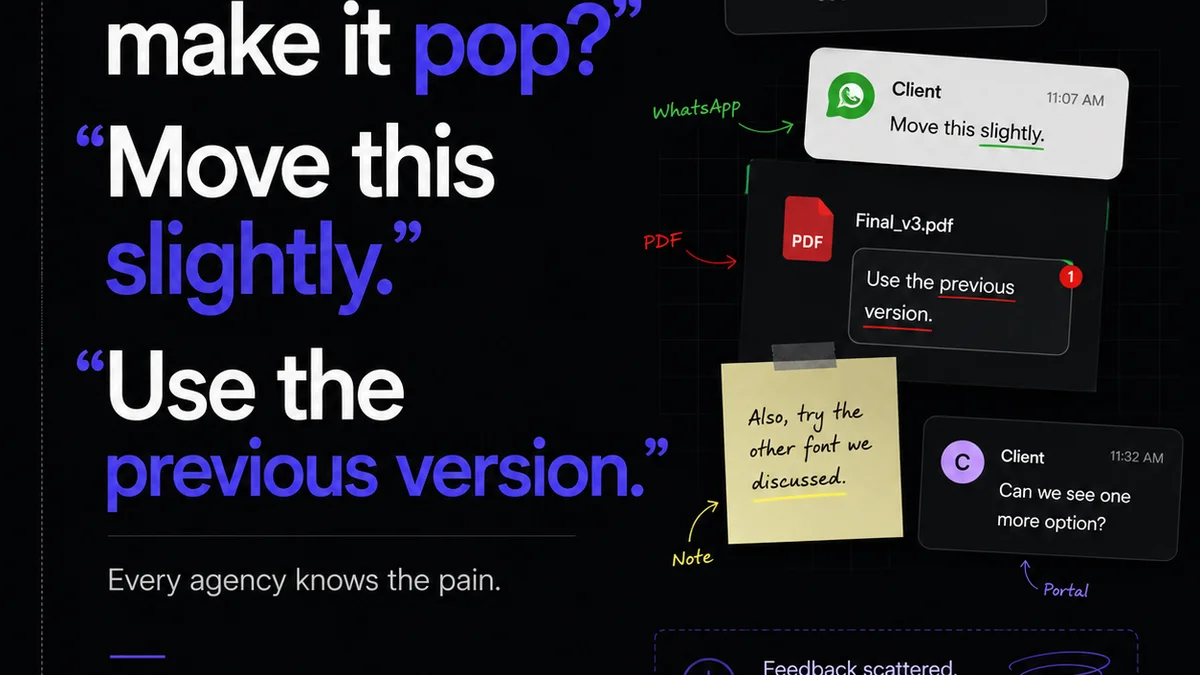
Everyone talks about creative collaboration. They point to shared documents, real-time editing, and instant messaging as the pillars of modern teamwork. And they're not wrong. But they're missing a critical piece of the puzzle.
The real bottleneck isn't communication; it's clarity. Specifically, the clarity of feedback on visual work. Without it, your team is drowning in ambiguity, leading to endless revisions and missed deadlines. This is where visual annotation becomes indispensable.
1. The Myth of 'Good Enough' Feedback
Many agencies and in-house teams operate under the assumption that as long as feedback is delivered, it's actionable. An email here, a Slack message there, a quick note in a shared drive. It feels productive.
It's not.
This fragmented approach breeds confusion. A designer receives a comment like, "Make the logo pop more." What does that even mean? Brighter color? Bigger size? Different placement? Without context, it's a guessing game.
The hard truth is that vague feedback is often worse than no feedback at all. It wastes time, erodes trust, and ultimately degrades the quality of the final creative asset. It turns what should be a collaborative process into a frustrating exchange.
The Symptoms of Poor Visual Feedback
- Endless rounds of revisions on the same elements.
- Creative directors and clients disagreeing on what was previously agreed.
- Designers guessing at intent, leading to off-target work.
- Missed deadlines due to rework and clarification cycles.
- Frustration and burnout among creative teams.
- A feeling of disconnect between the client's vision and the delivered asset.
2. The Power of Contextual Clarity
Visual annotation cuts through the noise by anchoring feedback directly to the element it concerns. Think of it as drawing a red circle around the problem, adding a specific note, and attaching it directly to the image, video, or PDF.
This direct link provides crucial context that plain text often lacks.
When a client or reviewer can click on a specific area of a design and see the comment associated with it, ambiguity evaporates. "This blue is too muted for the brand guidelines" is infinitely more useful than "Change the blue."
This is especially critical for:
- Web and App Design: Pinpointing specific UI elements, button states, or interaction flows.
- Marketing Materials: Highlighting specific copy edits, image crops, or layout adjustments on brochures, ads, or social posts.
- Video Production: Marking exact frames for cuts, color grading adjustments, or audio cues.
- Brand Guidelines: Ensuring logo usage, color palettes, and typography are applied correctly across all assets.
This level of specificity ensures everyone is on the same page, reducing the need for lengthy clarification calls or lengthy email chains trying to describe a visual problem.
3. Streamlining Revisions and Approvals
The revision and approval process is where visual annotation truly shines. It transforms a chaotic, often paper-trail-heavy process into a structured, transparent workflow.
Imagine a client reviewing a website mockup. Instead of emailing a list of general comments, they can use an annotation tool to:
- Click on a header image and note, "Please use the alternate version of the logo."
- Select a paragraph of text and request, "Shorten this by 20%."
- Draw a box around a button and state, "This CTA needs to be more prominent."
This structured feedback allows creative teams to:
- Prioritize: See all comments at a glance and tackle them systematically.
- Track Progress: Mark comments as resolved once addressed, providing clear visibility to everyone.
- Reduce Scope Creep: Clearly define what needs changing versus what's a new request.
- Maintain a Clear Audit Trail: Have a record of all feedback, discussions, and approvals.
This clarity is not just about efficiency; it's about building confidence. When reviewers know their feedback is seen, understood, and acted upon precisely, they feel more invested in the outcome.
4. Elevating Quality Control
Beyond client feedback, visual annotation is a powerful internal tool for quality assurance. Before any asset goes to a client, it should undergo rigorous internal review.
Team leads, art directors, and project managers can use annotation to:
- Check Against Briefs: Ensure all project requirements and objectives are met.
- Enforce Brand Consistency: Verify adherence to brand guidelines across all creative outputs.
- Catch Errors: Identify typos, alignment issues, color inconsistencies, or other technical flaws.
- Provide Constructive Criticism: Offer specific, actionable feedback to junior designers for growth.
This internal vetting process acts as a crucial gatekeeper, catching potential issues before they reach the client. It ensures that what the client sees is polished, professional, and perfectly aligned with their expectations.
Tools that allow for layered comments and version tracking are particularly effective here, enabling teams to compare different iterations and ensure no feedback has been missed.
5. Where Revue Fits In
Managing visual feedback and approvals can quickly become overwhelming without the right system. Emails get lost, spreadsheets become outdated, and it's hard to track who said what and when.
Revue is built to centralize this entire process. It provides a single source of truth for all client feedback on creative assets.
Instead of juggling multiple tools and communication channels, your team can use Revue to:
- Centralize Feedback: Receive and organize all client comments directly within the platform, linked to specific versions of your creative work.
- Manage Revisions Visibly: Track the status of each feedback item, from 'Open' to 'Resolved,' giving everyone clear visibility into the revision process.
- Streamline Approvals: Ensure all stakeholders have provided their sign-off, with a clear audit trail of who approved what and when.
- Maintain Project Context: Keep all communication, feedback, and versions related to a specific project in one accessible place.
This eliminates the guesswork and the manual effort of piecing together feedback from disparate sources. It allows your team to focus on the creative work, not on managing the communication around it.
Final Thought
Visual annotation isn't just a feature; it's a fundamental shift in how creative teams should operate. It moves beyond the assumption that communication equals clarity and embraces the reality that precision is paramount.
By grounding feedback in the visual itself, you eliminate ambiguity, accelerate approvals, and elevate the quality of your output.
Are you still relying on scattered notes and email chains, or are you leveraging the power of precise, visual feedback to drive your team's success?
Frequently asked questions
What is visual annotation?
Visual annotation is the process of adding comments, notes, markups, or drawings directly onto an image, video, PDF, or other visual asset. This provides specific context for feedback, making it clear exactly what element is being discussed.
Why is visual annotation important for creative teams?
It eliminates ambiguity in feedback, reduces the number of revision cycles, accelerates the approval process, and improves overall communication clarity. This leads to more efficient workflows and higher quality creative output.
How does visual annotation differ from email feedback?
Email feedback is often text-based and lacks direct visual context, leading to misinterpretations. Visual annotation links comments directly to specific parts of the asset, ensuring everyone understands the feedback precisely as intended.
Can visual annotation help with internal quality control?
Absolutely. Internal teams can use visual annotation to check creative work against briefs, enforce brand consistency, catch errors, and provide specific, actionable feedback to designers before client review.