Everyone’s talking about AI for design. They show you stunning images generated from a few words. They promise revolutionary new tools that will automate everything.
None of that is wrong. But it’s incomplete.
The real operational shift AI brings to design teams isn’t about generating assets faster. It’s about fundamentally changing how feedback is managed, revisions are tracked, and creative quality is maintained at scale.
The hard truth? AI’s immediate impact on your bottom line comes not from its generative power, but from its ability to streamline the messy, human parts of the creative process.
1. The Illusion of Automation
The narrative around AI in design often focuses on the shiny object: image generation, text creation, even basic layout suggestions. These tools are impressive, no doubt.
But they often distract from the more profound, less glamorous applications that actually move the needle for agencies and in-house teams.
Think about it. How much time does your team spend:
- Chasing down feedback from scattered emails?
- Manually compiling revision notes from multiple stakeholders?
- Ensuring the latest approved version is actually the one being worked on?
- Running quality checks for consistency across deliverables?
These are the operational bottlenecks. And this is where AI, applied intelligently, offers the most immediate, tangible benefits.
AI as a Feedback Synthesizer
Imagine AI analyzing client feedback across various channels. It could identify recurring themes, flag contradictory requests, and even suggest potential solutions based on past project data.
This isn’t about replacing human judgment. It’s about augmenting it, surfacing critical information that might otherwise get lost in the noise.
AI for Revision Tracking
The version control nightmare is real. AI can help. By analyzing changes made between design iterations, AI could flag significant deviations from the brief or previous approvals.
It can also help identify patterns in revision requests, pointing to areas where client expectations might be misaligned or where the initial brief was unclear.
2. Enhancing, Not Replacing, Creative Directors
A common fear is that AI will make creative directors obsolete. That’s a misunderstanding of what a CD actually does.
A CD isn’t just the person who says “make it pop.” They are the strategic thinkers, the client whisperers, the quality gatekeepers, and the team mentors.
AI can assist with some of the *tasks* a CD performs, but it can’t replicate the *judgment* or the *vision*.
AI for Trend Analysis and Inspiration
AI tools can sift through vast amounts of data to identify emerging design trends, color palettes, or stylistic shifts. This can provide a CD with a richer, data-informed starting point for creative strategy.
Instead of spending hours manually browsing Behance and Pinterest, a CD can get AI-curated summaries of relevant visual directions.
AI as a Quality Assurance Layer
For complex projects, ensuring brand consistency and adherence to guidelines can be a monumental task. AI can act as an automated QA checker.
It can scan designs for logo usage, color palette adherence, font consistency, and other crucial brand elements. This frees up the CD to focus on higher-level creative direction and strategic alignment.
This isn’t about letting AI make final calls. It’s about using AI to catch the small errors so the CD can focus on the big picture.
AI for Project Scoping and Resource Allocation
By analyzing historical project data, AI can help predict the time and resources required for new projects. It can identify potential scope creep early on by comparing current progress against similar past projects.
This data can inform more accurate quoting and better resource planning, preventing burnout and missed deadlines.
3. The Unsexy Power of Data Integration
The true power of AI in a design workflow lies in its ability to process and make sense of the data generated by that workflow. This means integrating AI with your existing tools.
Think about the flow of information:
- Client brief received.
- Initial designs created.
- Feedback gathered (often chaotically).
- Revisions made.
- Approvals sought.
- Final assets delivered.
Each step generates data. Emails, comments, timestamps, file versions, approval records. Most of this data sits siloed, or worse, is lost.
AI for Predictive Analytics
By analyzing past project performance – timelines, client satisfaction scores, revision cycles – AI can predict potential risks for new projects. It can flag projects that are likely to go over budget or miss deadlines.
This early warning system is invaluable for proactive management.
AI for Process Optimization
AI can identify bottlenecks in your workflow by analyzing the time spent at each stage of the design process. It can highlight which types of clients or projects tend to generate more revisions, or which team members are consistently overloaded.
This isn’t about micromanagement; it’s about understanding your operational capacity and identifying areas for improvement.
AI in Communication Analysis
AI can analyze communication patterns within project teams and with clients. It can identify if communication is becoming fragmented, if key stakeholders are being left out, or if the tone of communication is becoming negative.
This can help managers intervene before small communication issues become major project derailers.
Where Revue Fits In
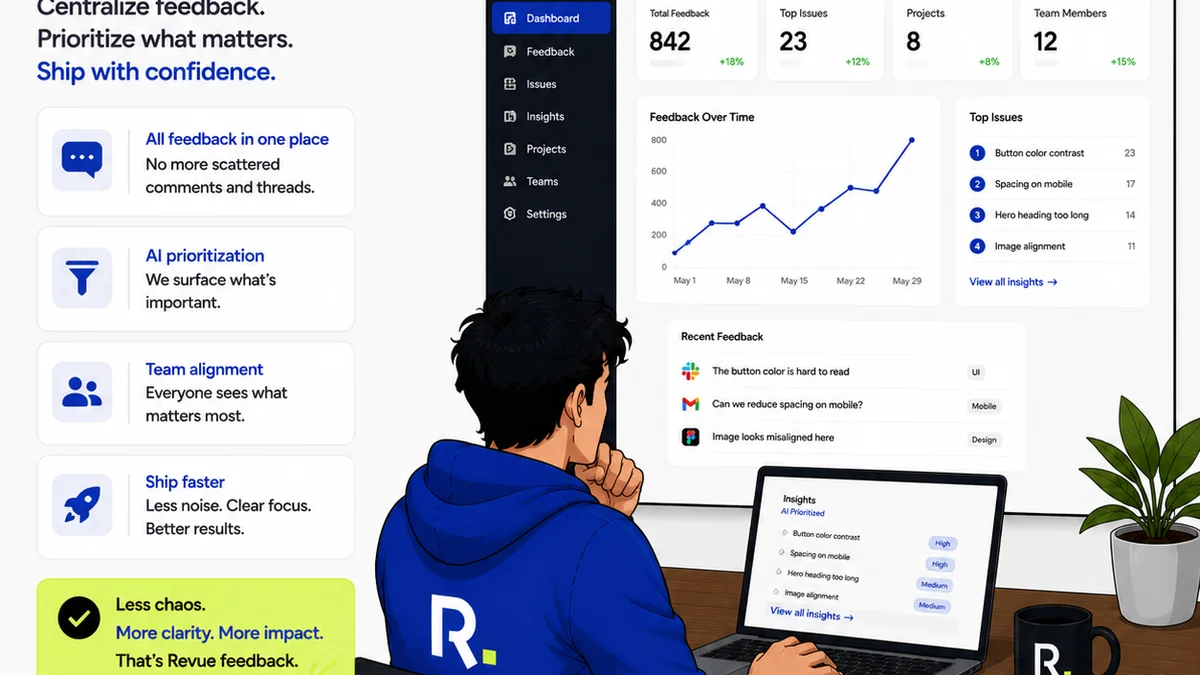
This is where tools like Revue become critical infrastructure for leveraging AI effectively. AI thrives on structured, accessible data. Your creative workflow generates a lot of data, but it’s often messy and disorganized.
Revue acts as the central nervous system for your creative projects. It’s the platform where client feedback is consolidated, revisions are clearly documented, and approvals are tracked with certainty.
By centralizing feedback, you create a clean dataset for AI to analyze. Instead of sifting through hundreds of email threads, AI can work with precise, contextualized comments logged directly on the creative assets within Revue.
When AI analyzes revision patterns, it can do so with the actual history of changes, comments, and approvals stored in Revue. This provides a level of accuracy and actionable insight that simply isn’t possible with scattered data.
Furthermore, Revue’s quality check features inherently create structured data around asset finalization. This data can be fed into AI models to learn what constitutes a
Frequently asked questions
How can AI help manage client feedback?
AI can analyze feedback across multiple sources, identify recurring themes, flag contradictory requests, and even suggest solutions based on past project data, helping to synthesize complex input into actionable insights.
Will AI replace creative directors?
No. AI can automate certain tasks and provide data-driven insights to assist creative directors, but it cannot replace the strategic vision, human judgment, and leadership essential to the role.
What are the 'unsexy' but important applications of AI in design?
Beyond generative capabilities, AI excels at tasks like analyzing communication patterns, optimizing workflows, predicting project risks, and ensuring brand consistency—areas that directly impact operational efficiency and profitability.
How does a platform like Revue support AI in design?
Revue centralizes feedback, revisions, and approvals, creating structured, clean data that AI tools can effectively analyze. This integration allows AI to provide accurate insights into workflow bottlenecks and project performance.