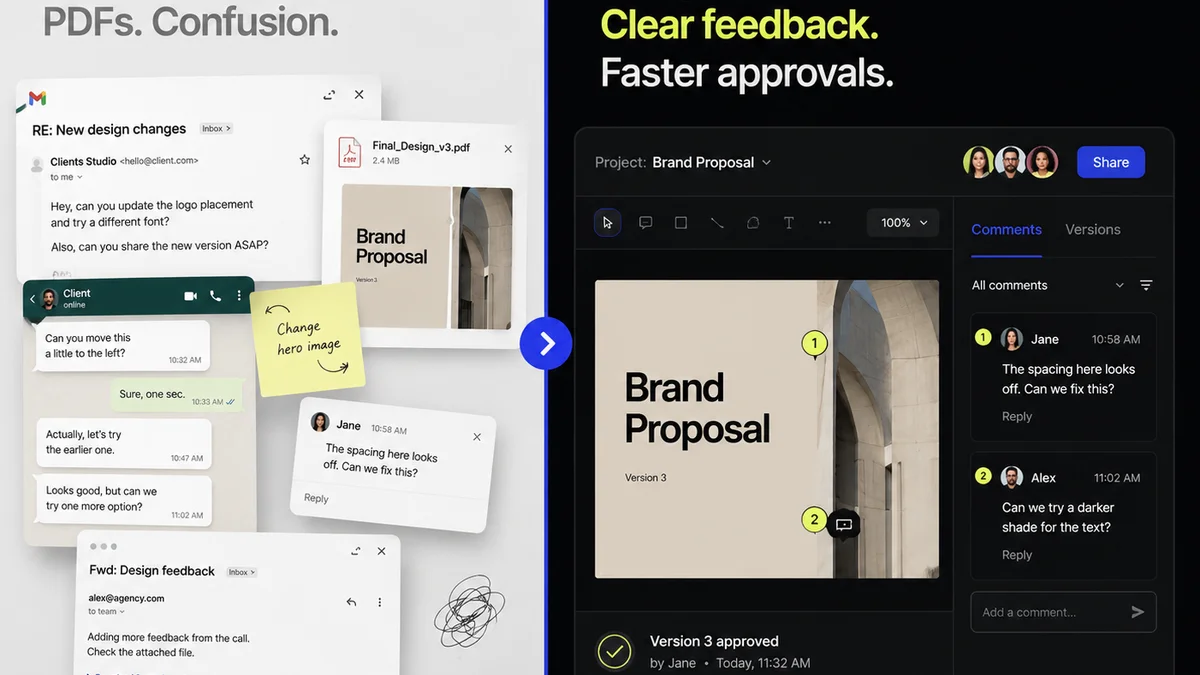
Everyone wants the best tools for art director design reviews. You see the slick demos, the endless feature lists, the promise of seamless collaboration. It’s easy to think that picking the right software is the hard part. That’s the assumption, anyway.
None of that is wrong. But it’s incomplete.
The hard truth? The tool itself is secondary. The real challenge lies in how it integrates into your existing workflow, how it enables clear communication, and how it speeds up, rather than slows down, the actual review process for US teams. This isn't about finding the most features; it's about finding the most effective way to get feedback and approvals.
1. Defining "Best" for Creative Reviews
What does "best" even mean in the context of art director design reviews? It's not just about pretty interfaces or endless annotation options. It's about efficiency, clarity, and actionable outcomes.
For US-based creative teams, this often translates to tools that:
- Support diverse file types common in agency work (web, print, video, motion graphics).
- Facilitate rapid feedback loops with clients and internal stakeholders.
- Provide clear version control and revision history.
- Integrate with existing project management or communication stacks.
- Offer robust security and compliance features, especially when dealing with client assets.
- Are intuitive enough for non-designers to use effectively.
The Pitfall of Feature Overload
Many tools bombard you with features you’ll never use. Think complex permission settings for a simple client PDF review, or advanced versioning for a quick banner ad approval. This complexity adds friction.
It forces your team and your clients to learn a new system, often leading to confusion and more time spent figuring out the tool than reviewing the actual design.
Focus on the Core Problem: Feedback Velocity
The primary goal of a design review tool is to accelerate the feedback and approval process. If a tool adds more steps, more confusion, or more time to that cycle, it's failing, regardless of how many bells and whistles it has.
2. Key Capabilities for Design Review Tools
When evaluating tools, go beyond the surface. Look for capabilities that directly impact the speed and quality of your design reviews.
Streamlined Feedback Capture
This is non-negotiable. Can stakeholders easily leave comments directly on the design? Are these comments tied to specific elements?
Look for:
- Click-to-comment functionality.
- Annotation tools (drawing, highlighting).
- Ability to tag specific team members.
- Centralized comment threads for discussion.
Version Control and Revision Management
This is where projects often go off the rails. Without clear versioning, teams can end up reviewing outdated assets or getting lost in a sea of revisions.
Essential features include:
- Clear visual indicators of current vs. previous versions.
- Easy rollback to previous versions if needed.
- A history log of all changes and approvals.
- The ability to compare versions side-by-side.
Approval Workflows
Moving from feedback to final approval needs to be a clear, defined process. This prevents endless back-and-forth and ensures accountability.
Consider tools that offer:
- Configurable approval stages (e.g., Internal Review, Client Review, Final Approval).
- Digital sign-off capabilities.
- Automated notifications for pending approvals.
Asset Management and Organization
Where are the files stored? How easy is it to find the latest version or a specific asset from a past project?
Good systems offer:
- Centralized cloud storage.
- Folder structures or tagging for organization.
- Search functionality.
Integration Capabilities
No tool exists in a vacuum. How well does it play with your other essential software?
Look for integrations with:
- Project management tools (Asana, Monday.com, Jira).
- Communication platforms (Slack, Microsoft Teams).
- Cloud storage services (Google Drive, Dropbox).
- Design software (Figma, Adobe Creative Cloud – though direct integration here is less common for review tools).
3. Common Tools and Their Roles
While this article focuses on the *principles* of effective review tools, it's helpful to know what's out there. Many tools excel in specific areas, and the
Frequently asked questions
What is the primary goal of a design review tool?
The primary goal is to accelerate the feedback and approval process for creative work, ensuring clarity, efficiency, and timely delivery.
How important is version control in design review tools?
Version control is critical. It prevents confusion by clearly indicating the latest asset, tracks revisions, and allows for easy rollback if necessary, maintaining a clear history of the project's evolution.
Should I choose a tool based on its features or its workflow integration?
Workflow integration is more important. A tool with fewer features but that fits seamlessly into your team's existing processes will be more effective than a feature-rich tool that disrupts your workflow.
Can a design review tool help with client communication?
Yes, many tools streamline client communication by providing a centralized platform for feedback, reducing the need for lengthy email chains and ensuring all comments are contextualized and actionable.