Everyone agrees that having a central place for your creative assets is crucial. It’s the bedrock of efficiency, right? You save time searching, avoid duplication, and ensure everyone’s working from the latest versions. That’s the common wisdom. That’s what every software vendor tells you.
None of that is wrong. But it’s incomplete.
The hard truth is, most teams get asset management wrong because they focus entirely on the *storage* and not enough on the *workflow* that surrounds it.
1. The Illusion of the "Single Source of Truth"
You’ve heard it a million times: “We need a single source of truth.” And sure, a centralized repository is part of that. But just dumping everything into a DAM or a shared drive doesn’t magically create a unified source of truth if the processes around it are broken.
What happens when:
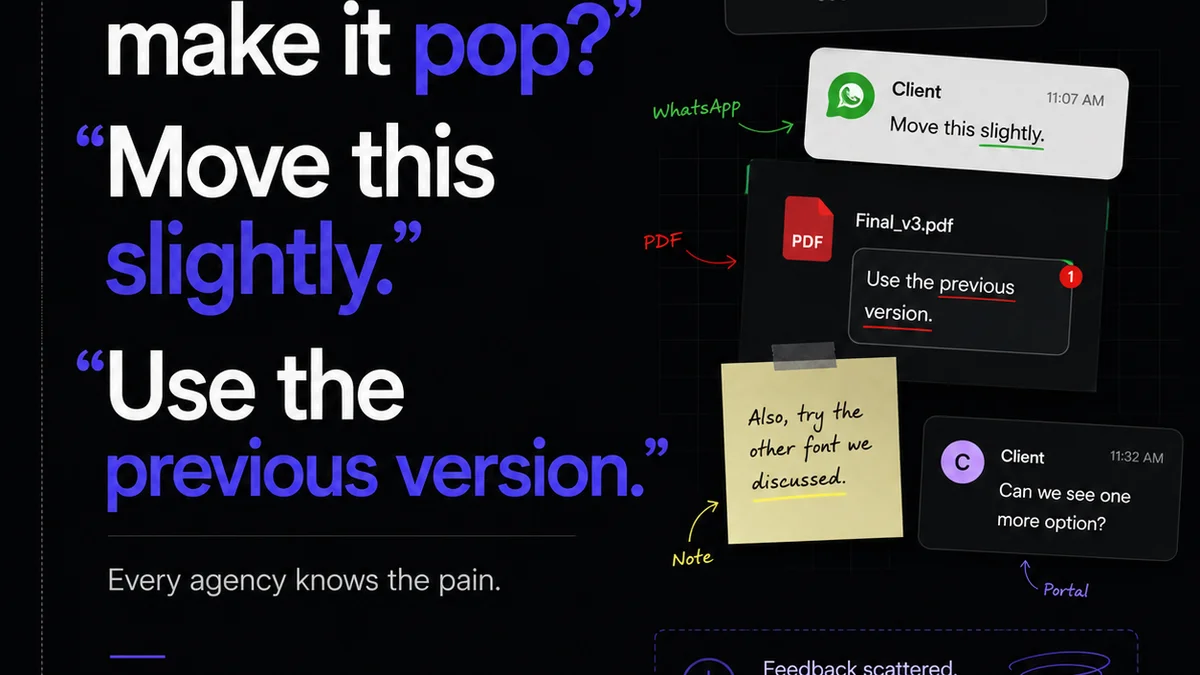
- Feedback is given verbally or in a Slack message, not linked to the asset?
- Revisions are made locally without updating the master file?
- Approvals are given via email, buried under other communications?
- New versions are uploaded with confusing naming conventions?
Your “single source of truth” becomes a graveyard of outdated files and conflicting information. It’s a source of confusion, not truth.
The Real Problem: Context Collapse
The real issue isn't the tool; it's the lack of integrated workflow. Assets live in one place, feedback in another, approvals somewhere else entirely. This context collapse is where efficiency dies.
2. Over-reliance on Folder Structures
The default approach for many teams is a meticulously crafted folder structure. Project A, Client B, Campaign C, Phase 1, Assets, Final, Final_v2, FINAL_REALLY.
It feels organized. It feels logical.
Until it isn’t.
Folder structures are rigid. They break down when projects have multiple stakeholders, cross-functional dependencies, or evolving deliverables. Trying to force every asset into a predefined hierarchical box is like trying to fit a square peg into a round hole, over and over again.
The Danger of Static Organization
What happens when a new client joins? Or a project spans multiple campaigns? You end up with nested folders so deep they’re impossible to navigate, or you start creating parallel structures that defeat the whole purpose.
It’s an administrative nightmare waiting to happen.
3. Neglecting Version Control and Audit Trails
This is where things get truly dangerous. Teams often upload new versions without a clear system for tracking changes, who made them, or when.
This leads to:
- Accidentally using an old logo on a client proposal.
- Presenting a draft to a client that was already rejected.
- Wasting hours searching for that *one specific revision* requested weeks ago.
- Disputes over who approved what and when.
A robust asset management system needs more than just storage; it needs a built-in audit trail. You need to know the history of every file.
The Cost of Lost History
Without a clear history, you can't learn from past mistakes. You can't easily roll back. You can't definitively prove compliance or adherence to brand guidelines. It’s a blind spot that can cost you time, money, and client trust.
4. Treating Assets as Static Objects, Not Living Files
Many teams view assets as final deliverables. Upload them, store them, done. But creative assets are rarely static. They evolve. They get adapted for different channels, different sizes, different languages.
If your system isn’t built to handle this evolution, you create friction.
The Challenge of Dynamic Usage
Consider a campaign image. It needs to be resized for social media, cropped for a banner ad, and potentially translated for international markets. If each of these variations is treated as a separate, manually managed file, you’re setting yourself up for version chaos.
The system should support the *lifecycle* of an asset, not just its final resting place.
5. The Unseen Cost of Inefficient Feedback and Approvals
This is arguably the biggest leak in creative operations. Teams often have a DAM or a shared drive, but feedback and approvals happen elsewhere. Email threads, Slack channels, even printed documents.
Then, someone has to manually collate all that feedback and update the relevant asset. This is a time-consuming, error-prone process.
It’s a bottleneck.
The Feedback Loop Black Hole
When feedback isn't directly linked to the asset being reviewed, it gets lost. Or misinterpreted. Or ignored.
This leads to endless revision cycles, frustrated clients, and burnt-out creative teams.
The efficiency gains from a “centralized repository” are completely negated if the critical communication layer is missing.
Where Revue Fits In
Revue isn’t just another place to dump files. It’s designed to solve the workflow problems that plague traditional asset management.
Think of it as the intelligent layer on top of your storage.
- Centralized Feedback: Clients and stakeholders can leave feedback directly on the creative assets within Revue. No more hunting through email chains or Slack messages.
- Revision Visibility: Every version, every annotation, every approval is tracked. You can see exactly how an asset evolved and who signed off on each stage.
- Streamlined Approvals: Formalize your approval process. Get clear sign-offs directly within the platform, reducing ambiguity and speeding up turnaround.
- Quality Assurance: Ensure that only approved, final assets are moved forward, preventing outdated or incorrect versions from being used in client-facing materials.
Revue connects the dots between your assets, your feedback, and your approvals, creating a truly unified and efficient workflow.
Final Thought
Asset management isn't just about having a nice, tidy digital filing cabinet. It's about the messy, human process of creation, feedback, and iteration.
Are you managing your assets, or are your assets managing you?
Frequently asked questions
What is the biggest mistake teams make in asset management?
The biggest mistake is focusing solely on where to store assets (e.g., a DAM or shared drive) and neglecting the surrounding workflow. This includes how feedback is given, revisions are tracked, and approvals are managed, leading to confusion and inefficiency.
How do folder structures fail in asset management?
Folder structures are too rigid. They break down when projects become complex, involve multiple stakeholders, or have evolving deliverables. This often results in overly deep nesting, parallel structures, or difficulty in finding specific files as projects grow.
Why is version control so important for creative assets?
Version control is critical because creative assets evolve. Without it, teams risk using outdated logos, presenting rejected drafts, wasting time searching for specific revisions, and facing disputes over approvals. A clear audit trail is essential.
How can feedback and approvals be improved in asset management?
Feedback and approvals should be directly linked to the assets being reviewed, ideally within the same platform. This prevents communication from getting lost in separate channels like email or Slack, reduces errors, and speeds up revision cycles.