Everyone agrees that clear processes are the bedrock of a successful creative agency. SOPs, checklists, templates – the usual suspects. You probably have some of these in place already. Maybe you’ve even tried to formalize your review and approval workflows.
None of that is wrong. But it’s incomplete.
The hard truth? Most agencies treat SOPs as documentation. A nice-to-have reference. The real power of SOPs, especially for something as critical and often chaotic as creative review, isn’t in the document itself. It’s in how you *build* them to actively automate the process, not just describe it.
1. The Myth of the Static SOP
We often think of SOPs as static documents. Write them once, file them away, and occasionally refer to them. Like a user manual for a VCR.
This is a mistake. Especially in a fast-moving agency environment.
Your review and approval process isn’t a fixed point. It evolves. Client needs change. Team members come and go. Tools get updated. A static SOP becomes outdated the moment you save it.
The goal isn’t to document your current process. It’s to design a process that works, and then build your SOPs to enforce and improve that process automatically.
The Real Goal: A Living, Breathing Workflow
Think of your SOPs less like a rulebook and more like the operating system for your review process. They should be dynamic, integrated, and actively guiding actions.
- What triggers the next step?
- Who is responsible?
- What information is required?
- What does 'done' look like?
If your SOPs can’t answer these questions automatically, they’re just paperwork.
2. Designing for Automation, Not Just Description
This is where most agencies fall down. They write down what they think*they do, rather than designing what they *should* do and then building the SOP around that ideal.
Let’s break down the typical review process and inject automation at each stage.
The Pre-Flight Checklist: Setting Expectations
Before any creative even gets to the client, there’s a crucial internal review. This is where many issues are caught, but it’s often a free-for-all.
The Assumption: A quick Slack message or email chain is enough to get feedback.
The Hard Truth: This is a black hole for feedback. It’s unorganized, untrackable, and leads to endless back-and-forth.
SOP for Automation:
Define clear criteria for what constitutes a 'ready for review' asset. This isn't just about file format. It's about:
- Completeness: Are all required elements present?
- Brand Compliance: Does it meet style guide requirements?
- Technical Specs: Does it adhere to platform requirements?
- Objective Alignment: Does it meet the brief’s core objectives?
Your SOP should dictate that an asset cannot move to client review until these internal checks are passed. This is often managed via project management tools or dedicated review platforms.
The Client Feedback Loop: Structured Input
This is the most common pain point. Clients provide feedback that is vague, contradictory, or simply missed.
The Assumption: Clients know how to give good feedback, or we can decipher it.
The Hard Truth: Clients are not designers. They think in terms of feelings and broad strokes. It’s our job to translate that into actionable tasks.
SOP for Automation:
Your SOP must mandate a structured feedback system. This means:
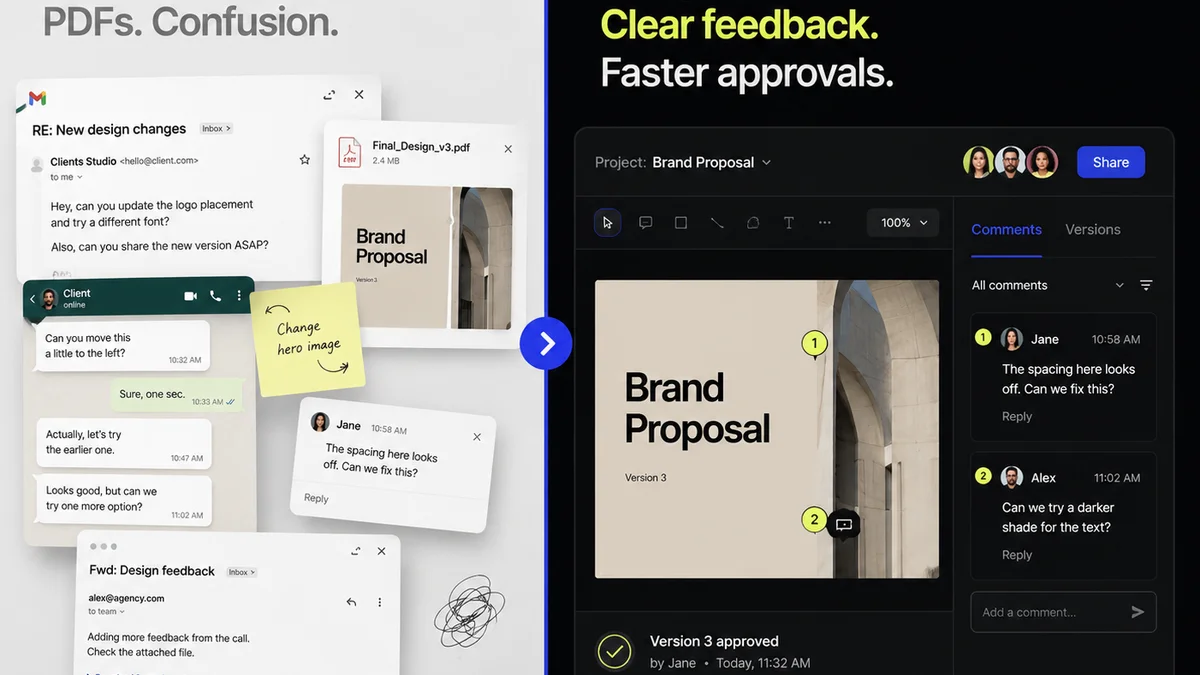
- Centralized Feedback: All feedback goes into ONE place. No scattered emails, Slack messages, or scribbled notes.
- Contextual Annotations: Feedback should be tied directly to the specific element it refers to. A comment on a logo shouldn't be lost among comments on body copy.
- Clear Actionability: The system should prompt the client to categorize feedback (e.g., 'Change Request', 'Question', 'Minor Tweak', 'Approval').
- Defined Reviewers: Specify exactly who on the client side has approval authority and who can provide input.
- Time-Bound Responses: Set clear expectations for turnaround times for feedback and approvals.
This isn't about being difficult; it's about ensuring clarity and efficiency for everyone involved.
The Revision Cycle: Tracking and Iteration
Revisions are where projects get bogged down. Multiple rounds, conflicting changes, and scope creep are rampant.
The Assumption: We just make the changes the client asked for and send it back.
The Hard Truth: Without a clear system, revisions become a game of telephone, leading to wasted time and frustration.
SOP for Automation:
Your SOP needs to define the revision process:
- Change Log: Every revision request must be logged. What was changed? Why? Who requested it?
- Version Control: Clearly label and track different versions of the creative. No more 'final_final_v3.ai'.
- Re-Review Workflow: Once revisions are made, the asset must go through a defined re-review process, both internally and externally.
- Limited Rounds: Define the number of revision rounds included in the project scope and the process for exceeding it (e.g., change orders).
Automation here means ensuring each step is triggered, tracked, and visible.
The Final Approval: A Clear Gate
The finish line. But sometimes, the finish line moves.
The Assumption: Once the client says 'looks good,' it's done.
The Hard Truth: 'Looks good' can mean different things. We need explicit confirmation tied to the agreed-upon scope.
SOP for Automation:
Formalize the approval:
- Explicit Sign-off: Require a clear, unambiguous approval action within the system.
- Scope Confirmation: The approval should confirm that the work meets the agreed-upon brief and the latest set of revisions.
- Archiving: Approved assets should be automatically archived with their full revision history.
3. Building Your Automation SOPs: The Practical Steps
Okay, so how do you actually build these automated SOPs? It’s not about hiring a consultant or buying expensive software (though good tools help immensely). It starts with a mindset shift.
Step 1: Map Your Current (Messy) Process
Before you can automate, you need to understand what’s happening now. Don't sugarcoat it.
Gather your team. Grab a whiteboard or a shared doc. Map out, step-by-step, how creative moves from concept to final delivery.
Where are the bottlenecks? Where does feedback get lost? When do arguments erupt?
Be brutally honest.
Step 2: Identify Automation Opportunities
Look at your mapped process. For each step, ask:
- Can this step be triggered automatically?
- Can the required information be standardized or templated?
- Can responsibility be clearly assigned by the system?
- Can the output of this step automatically feed into the next?
- Can we use notifications to keep people on track?
Think about recurring tasks that are manual and prone to error.
Step 3: Define Your Ideal State
Now, redesign the process with automation in mind. Don't just fix the current problems; imagine a better way.
What would the *perfect* review and approval process look like? How could technology facilitate it?
This is where you define the rules of engagement.
Step 4: Document the Rules (and Build Them In)
This is where the SOP comes to life. It’s not just a document; it’s the configuration of your tools.
- Project Management: Use task dependencies, automated assignments, and status updates.
- Communication Tools: Set up channels and templates for specific types of feedback or requests.
- Review Platforms: Configure approval workflows, annotation tools, and version history.
Your SOP becomes the blueprint for setting up these systems.
Step 5: Train, Implement, and Iterate
No SOP is effective if the team doesn’t use it. Train your team on the new process and the tools that support it.
Launch it. Monitor it. Gather feedback.
And then? Iterate. Your automated SOPs are never truly 'finished'. They are living systems that need continuous refinement.
Where Revue Fits In
Building automated SOPs requires a central hub. A place where feedback is organized, revisions are tracked, and approvals are clear.
Revue is designed for this. It centralizes client feedback, bringing all comments and annotations into one visual space. This eliminates the ambiguity of scattered communication.
Our platform helps you manage revision cycles with clear version tracking, ensuring everyone is working from the latest iteration. Automated notifications keep stakeholders informed and accountable, moving the process forward without manual chasing.
Ultimately, Revue helps you enforce your automated SOPs by providing the structured environment needed for efficient creative review and approval. It turns your documented procedures into a functional, automated workflow.
Final Thought
Are your Standard Operating Procedures truly operating, or are they just sitting on a server somewhere?
The difference is automation. It’s the difference between a process that describes work and a process that does work.
What’s one small step you can take today to make your review process more automated, and less about manual handoffs?
Frequently asked questions
What is the main benefit of automating creative review SOPs?
The main benefit is increased efficiency and reduced errors. By automating the process, you eliminate manual handoffs, minimize miscommunication, ensure all necessary steps are followed, and free up your team's time to focus on creative work rather than administrative tasks.
How can I make sure clients follow the automated feedback process?
Clearly communicate the process and its benefits to clients upfront. Use a centralized platform that makes providing structured, contextual feedback easy and intuitive. Set clear expectations for turnaround times and the consequences of not adhering to the process (e.g., project delays).
What tools are essential for automating review SOPs?
While specific tools vary, essential categories include project management software (for task tracking and dependencies), communication platforms (for notifications and team coordination), and dedicated creative review and approval platforms (for centralized feedback, annotation, and version control).
How many revision rounds should be included in an SOP?
This is project-dependent and should be defined in your project scope and SOP. Typically, agencies include 1-2 rounds of revisions in their base fee and then require a change order or additional fee for subsequent rounds to manage scope creep effectively.