Everyone thinks they know what a client feedback form is. It’s that document—digital or paper—you send after a creative deliverable. The one with boxes to tick, lines to fill. A necessary evil, right?
None of that is wrong. But it’s incomplete.
The hard truth is, by 2026, the client feedback form isn’t just a collection tool. It’s a strategic interface. A poorly designed form doesn’t just waste time; it actively degrades the creative process. It breeds ambiguity, fuels scope creep, and erodes client relationships.
1. The Anatomy of an Outdated Form
Most forms today are relics. They’re built on assumptions that no longer hold water in fast-paced, iterative creative workflows.
Think about it. What do most forms ask for?
- “Overall thoughts?” (Vague to the point of uselessness.)
- “Any revisions?” (A black hole for undefined changes.)
- “Approve/Reject?” (Binary choices that ignore nuance.)
- “Comments?” (A free-for-all that often leads to subjective opinions masquerading as objective feedback.)
These forms treat feedback as a single, monolithic event. They don’t account for the layered nature of creative work or the diverse communication styles of clients.
They’re passive.
2. The Shifting Sands of Client Expectations
Clients in 2026 aren’t just looking for deliverables. They’re looking for partnership and clarity.
They expect:
- Real-time visibility: They want to see where their project stands, not just at the end, but throughout.
- Contextual feedback: Comments tied directly to specific elements, not lost in a general text box.
- Streamlined communication: Less back-and-forth, more direct understanding.
- Data-driven insights: They want to understand *why* certain creative choices are being made, and how feedback impacts them.
Your feedback form needs to evolve to meet these expectations. If it doesn’t, you’re creating friction where there should be flow.
3. Designing for Clarity, Not Just Compliance
The future of client feedback forms is about proactive design. How can the form itself guide better input?
Structured Input Fields
Move beyond open text boxes for critical feedback. Use:
- Specific rating scales: For elements like clarity, impact, or alignment with brief.
- Dropdowns for common issues: Pre-defined options for things like “font size,” “color palette,” or “call to action.”
- Checkboxes for specific requirements: Ensuring essential elements are addressed.
Visual Annotation Integration
This is non-negotiable. Clients need to point directly at what they mean. A form that requires them to describe a specific pixel or paragraph is a broken form.
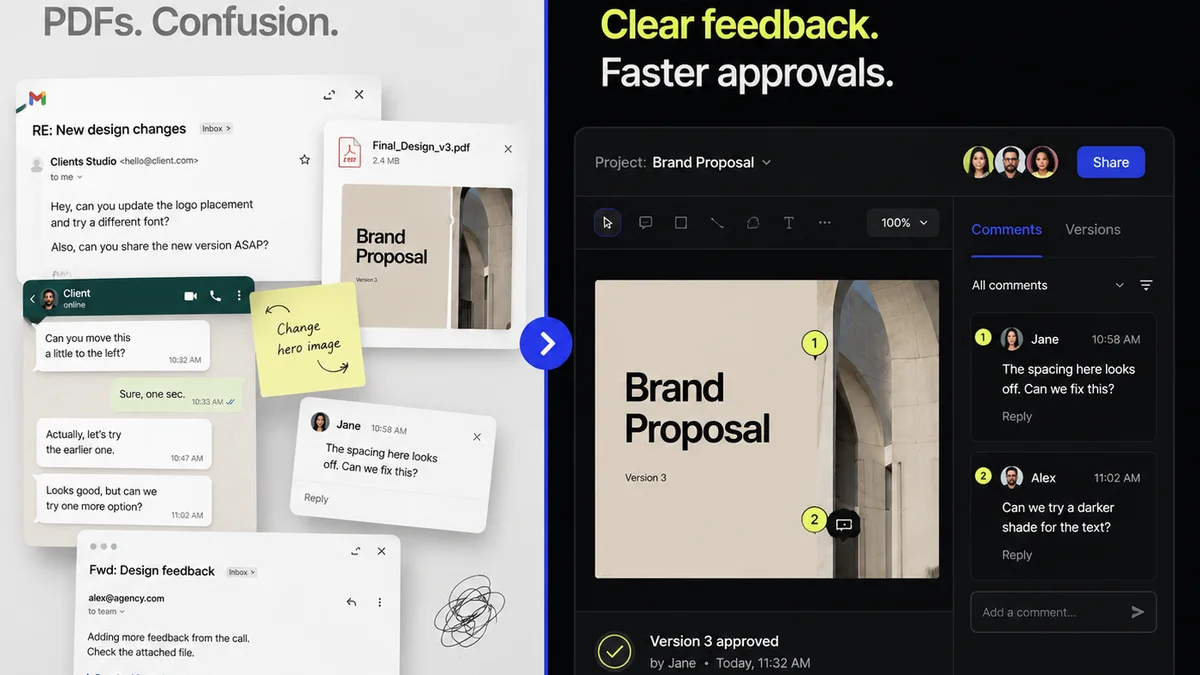
Imagine a client wanting to adjust a headline. Instead of typing, “Can we make the main headline punchier, maybe the third line down?” they can simply click on the headline and type their revision directly. This eliminates guesswork.
Status Indicators
Beyond approve/reject, what are the intermediate steps?
- Needs clarification: The client isn’t sure about a specific element.
- Minor edits required: Small tweaks are needed, but the core concept is sound.
- Major revisions needed: Significant changes are necessary, potentially requiring a re-brief.
- On hold: A pause in the process for external reasons.
These statuses provide immediate context and reduce ambiguity.
Brief Alignment Prompts
Reference the original brief. Questions like:
- “How well does this element align with the primary objective stated in the brief?”
- “Does this design address the target audience as defined?”
This keeps the conversation grounded in strategic goals, not fleeting preferences.
4. The Role of Technology in Smarter Feedback
Static PDFs and clunky email chains are destined for the archive. By 2026, dynamic, integrated tools will be standard.
Consider:
- Real-time collaboration platforms: Where feedback can be given and responded to within the design environment.
- AI-assisted feedback analysis: Tools that can flag conflicting comments, identify subjective language, or even suggest revisions based on past successful projects.
- Version control and audit trails: Every piece of feedback, every revision, logged and accessible.
This isn't about replacing human judgment. It's about augmenting it with efficiency and clarity.
5. Where Revue Fits In
Managing client feedback effectively is a core operational challenge for agencies and creative teams. This is where a centralized platform like Revue becomes critical.
Instead of disparate email threads, scattered annotation tools, and guessing games about revision status, Revue offers a unified environment.
- Centralized Feedback Hub: All client comments, approvals, and revision history live in one place, linked directly to the creative asset. No more hunting through inboxes.
- Clear Revision Tracking: See exactly what changed, who requested it, and when. This transparency prevents miscommunication and scope creep.
- Streamlined Approvals: Move clients through the approval stages with clear, trackable actions, reducing bottlenecks.
- Quality Control Integration: Use the structured feedback and revision data to identify patterns and improve internal processes, ensuring higher quality output over time.
Revue helps transform the messy reality of client feedback into a manageable, transparent workflow. It’s about making the process work *for* you, not against you.
6. Future-Proofing Your Feedback Loop
The client feedback form of 2026 is not a passive questionnaire. It’s an active, intelligent component of the creative process.
It’s a tool that:
- Guides clients towards constructive input.
- Provides clear, actionable context for creative teams.
- Builds stronger, more transparent client relationships.
- Ultimately, leads to better creative work.
Are you ready to evolve your feedback process?
Final Thought
What if your feedback system wasn't a source of frustration, but a catalyst for innovation? What if, by simply rethinking how you ask for input, you could unlock a new level of client collaboration and creative excellence?
Frequently asked questions
How can I make client feedback more specific?
Use structured input fields like dropdowns, rating scales, and checkboxes for common issues, rather than relying solely on open-ended text boxes. Integrate visual annotation tools so clients can pinpoint exactly what they want to change.
What's the biggest mistake agencies make with feedback forms?
Treating feedback as a one-time, passive event. Outdated forms fail to account for iterative workflows, lack context, and often lead to subjective, unhelpful input. They become a bottleneck rather than a tool.
How will technology change client feedback by 2026?
Expect more real-time collaboration platforms, AI-assisted analysis of feedback to identify subjectivity or conflicts, and robust version control. The goal is greater efficiency, clarity, and data-driven insights.
Can a feedback form improve client relationships?
Yes. By providing clarity, context, and a streamlined process, a well-designed feedback system builds trust and demonstrates professionalism. Transparency in revisions and approvals fosters stronger partnerships.