Everyone thinks a solid client feedback workflow is about clear communication. That’s part of it. But it’s not the whole story.
The hard truth? A truly effective client feedback workflow is about systemization. It’s about building guardrails that protect your creative process and your sanity.
1. The Assumption: Feedback is Just Words
You get comments back. You make changes. Simple, right?
Wrong.
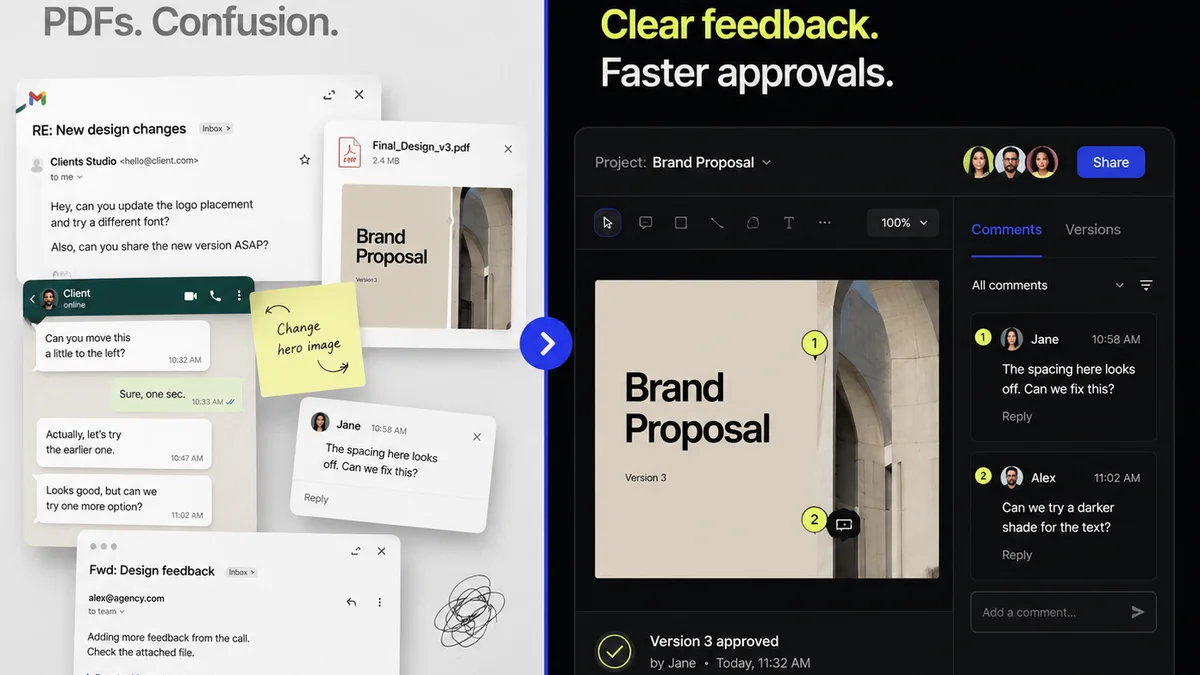
Client feedback isn’t just input; it’s data. And like any data, it needs to be collected, processed, and analyzed systematically. Without a system, feedback becomes noise.
The Cost of Noise
- Endless email chains that bury crucial details.
- Scattered comments across multiple platforms (email, Slack, docs, even text messages).
- Subjective interpretations leading to scope creep.
- Missed revisions and approvals, causing delays.
- Frustrated clients and demotivated teams.
This isn’t just inefficient; it’s a direct hit to your bottom line and your team’s morale.
2. The Foundation: Standardizing Your Process
A robust workflow starts before the first piece of creative even goes out the door.
Define the Rules of Engagement
Your clients need to know how feedback works. Don’t assume they do.
- Who provides feedback? Identify key stakeholders.
- When is feedback due? Set clear deadlines for each review round.
- How should feedback be given? Specify the preferred method (e.g., via a dedicated tool, marked up directly on the asset).
- What constitutes a revision vs. a new request? This is crucial for scope management.
Document these rules. Share them upfront. Make them part of your onboarding or project kickoff.
Establish Review Rounds
Structure your project with defined review stages. Common stages include:
- Concept/Wireframe Review
- Design Mockup Review
- Content Review
- Final QA/Pre-launch Review
Each stage should have a clear objective and a defined turnaround time.
3. The Mechanism: Centralizing Feedback
This is where most agencies stumble. They might have defined stages, but the feedback itself is still a mess.
Scattered feedback is the enemy of efficient revisions.
Why Centralization Matters
When feedback lives in one place, you gain:
- Clarity: All comments, annotations, and approvals are visible and linked to the specific asset version.
- Context: Understanding the 'why' behind a comment is easier when it’s attached to the visual.
- Accountability: It’s clear who said what and when.
- Efficiency: No more hunting through emails or deciphering Slack messages.
Tools for the Job
Spreadsheets and email can’t handle this. You need a tool designed for creative review. Look for platforms that offer:
- Direct annotation on images, videos, and PDFs.
- Version control to track revisions clearly.
- Centralized comment threads tied to specific elements.
- User roles and permissions for different stakeholders.
- Integrations with your existing creative stack.
This isn’t about adding another tool; it’s about consolidating your workflow into one source of truth.
4. The Control: Managing Revisions and Approvals
Collecting feedback is one thing; managing the resulting changes is another.
The Revision Cycle
Every revision request needs a clear path:
- Receive Feedback: Logged centrally.
- Clarify (if needed): Direct conversation to ensure understanding.
- Implement Changes: Work is updated.
- Upload New Version: Replaces the previous one in the system.
- Notify Client: Prompting the next review.
This cycle needs to be fast. Delays here ripple through the entire project timeline.
The Approval Gate
Don’t just assume feedback means approval. Have a distinct sign-off mechanism.
- A formal ‘Approve’ button.
- A timestamped record of who approved what version.
- Clear delineation between ‘feedback’ and ‘final approval’.
This prevents the dreaded ‘Oh, I thought we could change that after approval’ conversation.
5. The Quality Check: Beyond Just Making Changes
A mature feedback workflow includes a final gate for quality assurance.
The Pre-Flight Check
Before launching or delivering, you need a dedicated QA phase.
- Technical Checks: Are all links working? Is the code clean? Are assets optimized?
- Brand Consistency: Does it align with brand guidelines?
- Usability: Is the user flow intuitive? (Referencing usability principles is key here).
- Accessibility: Does it meet accessibility standards? (e.g., WCAG guidelines).
This isn’t the client’s job; it’s yours. It’s your final opportunity to catch errors before they impact users or damage your agency’s reputation.
Where Revue Fits In
Managing feedback, revisions, and approvals can quickly become chaotic. Tools designed for this chaos are essential.
Revue provides a centralized hub for all your creative assets and client feedback. You can upload versions, gather annotated feedback directly on designs, track revision history, and manage approvals all in one place.
This streamlines the entire process, ensuring clarity, accountability, and efficiency for both your team and your clients.
Final Thought
Is your client feedback process a source of friction or a catalyst for better work?
The difference lies not in hoping for better communication, but in building a better system.
Frequently asked questions
What are the key stages of a client feedback workflow?
A typical workflow includes concept/wireframe review, design mockup review, content review, and a final QA/pre-launch review. Each stage should have defined objectives and turnaround times.
Why is centralizing client feedback important?
Centralizing feedback ensures clarity, provides context, establishes accountability, and significantly improves efficiency by eliminating the need to hunt for comments across multiple platforms.
How can agencies manage scope creep from client feedback?
Clearly define what constitutes a revision versus a new request in your initial client communication. Use a system that tracks versions and approvals, making scope changes explicit and requiring formal sign-off.
What is the role of a quality assurance (QA) phase in the workflow?
The QA phase is your agency's final check before delivery. It ensures technical correctness, brand consistency, usability, and accessibility, protecting both the client and your agency's reputation.