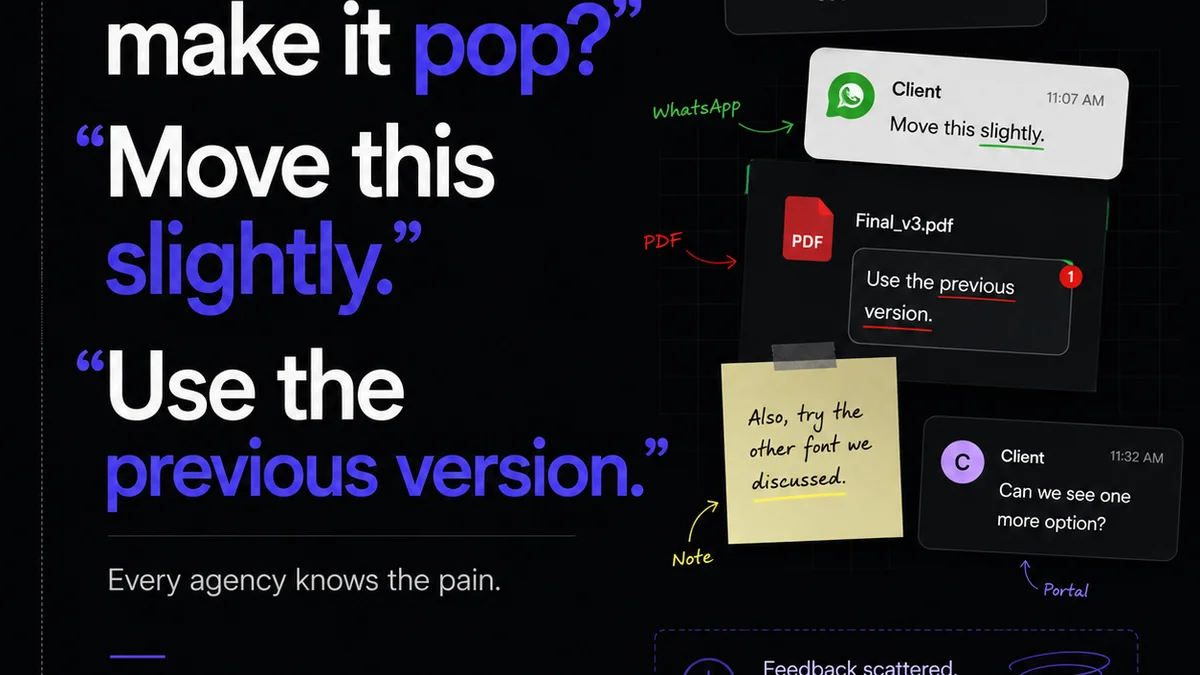
Everyone talks about getting client feedback. They say you need clear briefs, set expectations, and follow up. None of that is wrong. But it’s incomplete.
The hard truth? A chaotic feedback process is a direct drain on your agency’s profitability and your team’s sanity. It’s not just about getting the right comments; it’s about how you collect, manage, and act on them.
1. Beyond the Email Thread: Why Centralization is Non-Negotiable
Your inbox is a black hole for feedback. Clients send comments via email, Slack, text messages, and sometimes even voicemails.
This scattered approach leads to:
- Missed feedback.
- Conflicting instructions.
- Endless back-and-forth to clarify.
- Wasted hours searching for that *one* comment.
A centralized system isn't just about organization; it's about accountability and clarity. It creates a single source of truth for all project communication.
The Cost of Scattered Feedback
Think about the last time a project went off the rails because of feedback. How much time did your team spend:
- Digging through old emails?
- Re-explaining decisions?
- Re-doing work based on forgotten comments?
Each hour spent on this is an hour not spent on billable work or strategic thinking. It erodes margins and burns out your best people.
2. Defining the Stages: From Initial Draft to Final Approval
A robust client feedback workflow isn't a single step; it's a structured process with distinct phases.
Phase 1: Internal Review & Preparation
Before any client sees the work, your internal team needs to sign off. This is your first quality check.
- Does it meet the brief?
- Are there any obvious errors?
- Is it ready for client eyes?
This stage prevents showing half-baked work and wasting client time. It builds internal discipline.
Phase 2: Structured Client Review
This is where the client engages with the work. Provide clear instructions on how and where to leave feedback.
Specify:
- The deadline for feedback.
- The format for feedback (e.g., annotation tool, specific form).
- The scope of feedback (e.g., focusing on specific elements).
Avoid open-ended review sessions. Guide the client toward constructive input.
Phase 3: Feedback Consolidation & Clarification
Once feedback is submitted, it needs to be organized. Don't just forward emails.
Consolidate all comments into one place. If there are ambiguities or contradictions, schedule a brief call with the client to clarify. This is crucial.
Phase 4: Revision & Re-Review
Implement the clarified feedback. Then, present the revised work for another round of review.
Keep the feedback loop tight. Ideally, limit the number of revision rounds defined in your contract.
Phase 5: Final Approval
This is the moment of truth. Get explicit sign-off from the client.
This approval should confirm that the work meets the agreed-upon scope and is ready for delivery or launch.
3. Setting Expectations: The Foundation of Smooth Feedback
Clients aren't designers. They don't always know how to articulate what they want or need. That’s your job to manage.
Start by clearly defining:
- The scope of work: What exactly are you delivering?
- Deliverables: What specific assets will the client receive?
- Review process: How will feedback be collected and addressed?
- Number of revision rounds: Be explicit and stick to it.
- Timelines: When is feedback due? When will revisions be delivered?
A well-defined scope of work document is your first line of defense against scope creep and unclear feedback.
The Role of the Creative Director
Your Creative Director (or equivalent) is key. They translate client needs into actionable design direction and filter feedback for the team. They also manage client expectations during the review process.
This prevents designers from receiving conflicting or poorly articulated critiques directly.
4. Tools of the Trade: Beyond Spreadsheets and Emails
Relying on email for feedback is like using a hammer to spread butter. It’s messy and inefficient.
Consider tools designed for creative workflows:
- Visual annotation tools: Allow clients to click directly on an image or video to leave comments.
- Project management software: Centralizes tasks, deadlines, and communication.
- Dedicated feedback platforms: Streamline the entire review and approval process.
The right tools reduce friction for both your team and your clients. They make the process transparent and trackable.
Key Features to Look For
When evaluating tools, prioritize:
- Ease of use for clients (minimal onboarding).
- Centralized comment aggregation.
- Version control and revision history.
- Clear approval and rejection workflows.
- Integration with your existing tool stack.
Figma, for example, has built-in collaboration features that can streamline design feedback within the design environment itself. For broader project management and feedback consolidation, tools like Nielsen Norman Group often discuss user-centric design principles that inform tool selection.
5. Where Revue Fits In
Managing feedback effectively is the core challenge Revue solves. It’s built for creative teams who need to move beyond scattered communication.
Revue centralizes client feedback, making it impossible for comments to get lost in endless email threads or Slack channels. You get a single source of truth for all project communication.
The platform provides clear visibility into revision stages and approval status. This means your team always knows where a project stands and what needs to happen next.
For quality checks, Revue ensures that all feedback is captured, addressed, and signed off. This eliminates ambiguity and reduces the risk of errors slipping through.
It’s about bringing order to the creative chaos, so your team can focus on what they do best: creating great work.
6. Handling Difficult Feedback: The Art of Professionalism
Sometimes, feedback is subjective, vague, or even contradictory. This is where your agency’s expertise and professionalism shine.
When Feedback is Vague
Push for specifics. Instead of accepting “I don’t like it,” ask:
- “What specifically about it isn’t working for you?”
- “What feeling or outcome are you trying to achieve?”
- “Can you point to an example of what you *do* like?”
Use probing questions to uncover the underlying need.
When Feedback is Subjective
Acknowledge the client’s perspective. Then, refer back to the brief and the project goals.
“I understand you’re looking for a different feel here. Based on our initial brief, we aimed for [X objective]. Does this revised direction still align with that goal, or should we revisit the objective?”
This keeps the conversation focused on project strategy, not just personal preference.
When Feedback is Contradictory
This is where a centralized system and clear communication are vital. If Client A wants X and Client B wants Y, you need to go back to the decision-maker.
“We’ve received two different directions on this element. To ensure we’re moving forward effectively, could you help us prioritize which approach best serves the project goals?”
Document this clarification meticulously.
7. Building a Feedback Culture: Training Your Clients and Your Team
A smooth feedback workflow isn’t just about tools; it’s about process and people.
Educate Your Clients
Onboard new clients with a clear overview of your feedback process. Explain why it’s structured the way it is—to ensure the best outcome for their project.
Provide them with guides or brief walkthroughs of any feedback tools you use.
Empower Your Team
Train your team on how to use the feedback tools and processes. Ensure they understand how to consolidate, clarify, and act on feedback professionally.
Encourage them to ask clarifying questions rather than making assumptions.
Final Thought
Is your client feedback process a source of friction or a catalyst for creative excellence? The difference often lies not in the client, but in the workflow you’ve established.
By centralizing communication, structuring reviews, setting clear expectations, and using the right tools, you transform feedback from a burden into a powerful collaborative asset.
How much time could your agency reclaim by mastering its client feedback workflow?
Frequently asked questions
What are the key stages of a client feedback workflow?
The key stages typically include: Internal Review & Preparation, Structured Client Review, Feedback Consolidation & Clarification, Revision & Re-Review, and Final Approval.
Why is centralizing client feedback important?
Centralizing feedback prevents missed comments, reduces conflicting instructions, eliminates endless back-and-forth, and saves significant time by creating a single source of truth for all project communication.
How can I handle vague or subjective client feedback?
For vague feedback, ask probing questions to uncover the underlying need (e.g., 'What specifically isn't working?'). For subjective feedback, acknowledge their perspective and then refer back to the project brief and objectives to guide the conversation.
What kind of tools are best for managing client feedback?
Tools that excel include visual annotation platforms (for direct feedback on visuals), project management software (for task and communication centralization), and dedicated feedback platforms that streamline the entire review and approval process, offering version control and clear workflows.