Everyone talks about client feedback. How to get it, how to manage it, how to interpret it. It’s usually framed as a communication problem. A matter of clear briefs and good listening.
None of that is wrong. But it’s incomplete.
The hard truth? Your client review workflow isn’t just about communication. It’s about operational rigor. It’s the engine that drives your projects from concept to completion. And if that engine is sputtering, you’re not just losing time – you’re losing margin, damaging client relationships, and burning out your team.
1. The Myth of 'Just Send It Over'
The most common assumption is that client reviews should be straightforward. You finish a deliverable, you send it to the client, they give feedback. Simple.
But look at any agency that’s struggling with approvals. What’s really happening?
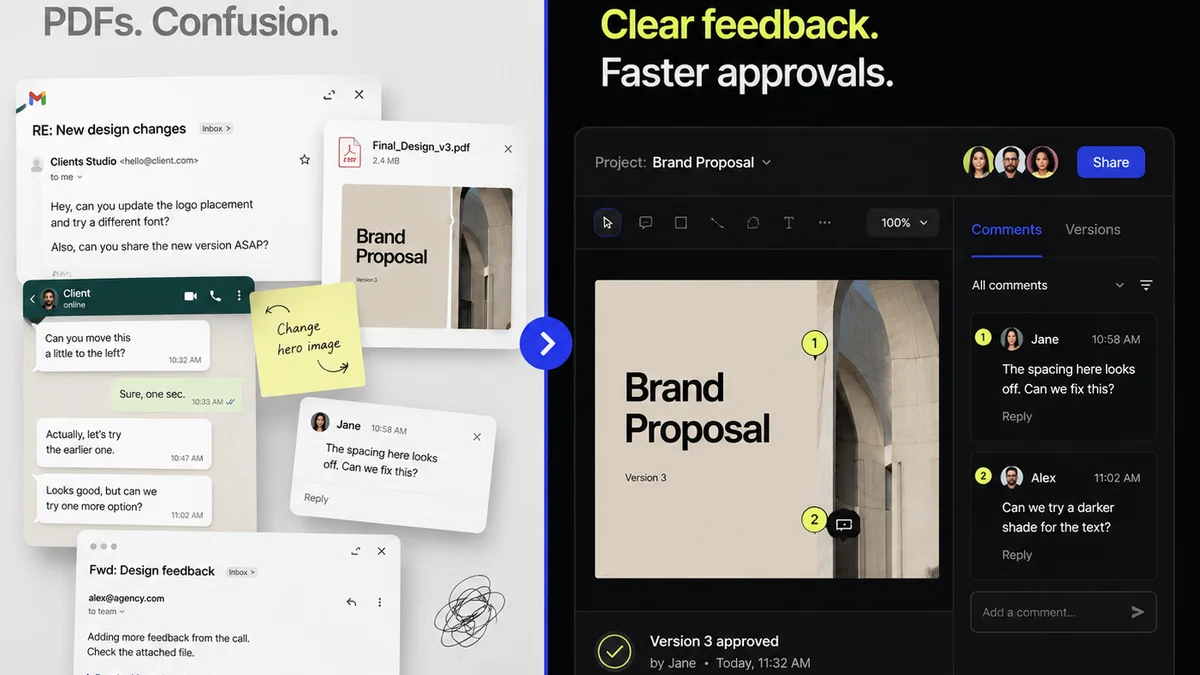
- Endless email chains where feedback gets buried.
- Conflicting comments from different stakeholders.
- Designers guessing which version is the latest.
- Account managers spending hours chasing down a single sign-off.
- Scope creep disguised as 'minor tweaks'.
- Frustration on both sides.
This isn't just bad luck. It's a symptom of a broken workflow.
The Real Problem: Lack of Structure
A truly effective review process isn't about hoping for the best. It's about designing for certainty.
It requires a system. A predictable, repeatable way to present work, gather feedback, manage revisions, and secure approvals.
Without that system, you’re operating on guesswork. And guesswork in client work is a recipe for disaster.
2. Designing Your Review Workflow: The Core Pillars
Let’s get practical. A solid review workflow has to address a few key areas:
a. Clarity of Presentation
How are you showing the work? Is it easy for the client to see exactly what you want them to review?
Sending a raw PSD or a link to a live, unfinished site is a recipe for confusion. They’ll see every layer, every placeholder, every half-baked element.
The goal is to present the intended experience, not the raw materials.
- Use dedicated preview links.
- Annotate key areas if needed.
- Provide context for the stage of the work.
- Ensure fast loading times.
b. Centralized Feedback Collection
Where does feedback live? If it’s scattered across emails, Slack messages, and random Word docs, you’re sunk.
Every piece of feedback needs a single source of truth. This prevents:
- Lost comments.
- Duplicate feedback.
- Arguments over what was *really* said.
- The dreaded 'I thought I told you that already!'
This centralization is non-negotiable for efficiency.
c. Clear Revision Cycles
What happens *after* feedback is collected? How do you track what’s been addressed and what hasn’t?
A client might give you five comments. You implement three, and they say, 'Great, looks good!' But they never explicitly approved the other two.
Your workflow needs to:
- Visually track which comments are addressed.
- Allow clients to re-approve specific changes.
- Define how many revision rounds are included.
This isn't about being rigid; it's about managing expectations and scope.
d. Defined Approval Gates
When is the work officially signed off? This needs to be crystal clear.
A vague 'Looks good to me' isn't an approval. It's a temporary truce.
Formal approval should:
- Be a distinct step in the process.
- Require explicit confirmation (a button click, a formal email).
- Be tied to a specific version or set of changes.
This protects your agency and provides a clear ‘done’ point for each stage.
3. Implementing a Structured Review Process
Okay, so what does this look like in practice?
a. Pre-Flight Checklist for Submissions
Before you even send something to a client, run it through your own internal checklist.
- Is it fully QA’d?
- Does it meet the brief’s requirements?
- Is it presented in the correct format?
- Are all necessary annotations or explanations included?
- Is it the *right* version?
This catches 80% of potential issues before they ever reach the client, saving everyone time.
b. Staged Feedback Rounds
Don't dump everything on the client at once. Break down the review process into logical stages.
For a website redesign, this might be:
- Wireframes & Content Structure
- Homepage Mockup
- Key Inner Page Mockups
- Interactive Prototype
- Final Staging Review
Each stage has a clear deliverable and a defined feedback window.
c. Standardized Commenting Protocol
Train your clients (and your team) on how to provide feedback effectively.
This means no vague statements like 'Make it pop more.' It means:
- Specific: Referencing exact elements.
- Actionable: Suggesting a clear change.
- Contextual: Explaining *why* a change is needed.
- Prioritized: Indicating urgency or importance.
When clients understand this, their feedback becomes exponentially more useful.
d. Version Control is Your Best Friend
How many times has a client said, 'We loved the version from Tuesday, before you changed X'? It happens.
Your workflow must have robust version control. Every submission, every revision set, needs to be clearly labeled and easily accessible.
This prevents confusion and eliminates the need to recreate 'that one version we liked'.
4. Where Revue Fits In
Managing all of this manually is a nightmare. Spreadsheets, email folders, shared drives – they fall apart under pressure.
That’s where a dedicated platform like Revue becomes essential.
Revue is built to operationalize the creative review process.
- Centralized Feedback: All client comments live in one place, attached to the specific asset they refer to. No more digging through emails.
- Visual Annotation: Clients can click directly on elements to leave comments, making feedback precise and unambiguous.
- Revision & Approval Tracking: See the entire history of changes, who approved what, and when. Easily compare versions.
- Streamlined Quality Checks: Ensure your team is hitting all the requirements before client submission.
It’s about taking the chaos out of feedback and replacing it with a predictable, efficient system.
This frees up your team to do their best creative work, rather than managing administrative back-and-forth.
5. Common Pitfalls to Avoid
Even with a good system, things can go wrong. Watch out for these:
a. Overly Permissive Feedback Stages
If clients can request fundamental changes during a 'final review' stage, your workflow is broken.
Clearly define what kind of feedback is acceptable at each stage. Anything outside that scope becomes a change order.
b. Assuming 'Approved' Means 'Happy'
Clients approve work for many reasons, sometimes just to move on. Your goal isn't just approval; it's delivering work they're genuinely happy with.
A structured process helps ensure quality, which leads to true satisfaction.
c. Lack of Internal Alignment
Your team needs to understand and follow the workflow just as much as the client does.
If designers are accepting feedback directly or account managers are bypassing the system, it collapses.
d. Not Documenting the Process
Write it down. Create a simple SOP for your client review process. Share it with clients upfront.
Clarity prevents confusion and sets expectations from day one.
Final Thought
Is your client review process a source of friction or a well-oiled machine? The difference isn't magic; it's deliberate design. By building structure, clarity, and accountability into every step, you transform feedback from a bottleneck into a catalyst for great work. What’s one small change you can make to your review process this week?
Frequently asked questions
What is a client review workflow?
A client review workflow is a structured process that outlines how creative work is presented to clients, how feedback is collected and managed, and how final approvals are obtained. It's designed to ensure clarity, efficiency, and accountability throughout the revision process.
Why is a structured client review workflow important for agencies?
A structured workflow prevents common problems like lost feedback, scope creep, and endless email chains. It saves time, reduces frustration for both the agency and the client, protects profit margins, and leads to higher client satisfaction.
How can I make client feedback more actionable?
Encourage clients to provide specific, actionable, and contextual feedback. This means referencing exact elements, explaining the 'why' behind a suggestion, and avoiding vague comments. Using a tool with annotation features also helps pinpoint feedback.
What's the role of version control in client reviews?
Version control is crucial for tracking changes and ensuring everyone is referencing the correct iteration of the work. It prevents confusion about which version is being discussed or approved, saving significant time and preventing errors.
How does software like Revue help with client reviews?
Platforms like Revue centralize feedback, allow for visual annotations directly on the work, track revisions and approvals clearly, and provide a single source of truth. This automates many of the manual, error-prone steps of managing client reviews.