Everyone thinks creative automation is about robots taking over. Or maybe just faster rendering times. None of that is wrong. But it’s incomplete.
The real power of automation for creative teams isn't just about doing things faster. It’s about doing the *right* things, more consistently, so you have more time for the actual creative thinking that clients pay you for.
The Hard Truth: You're Drowning in Process, Not Creativity
The common assumption is that automation handles the grunt work. The tedious stuff. The repetitive tasks. And it does.
But the deeper truth is that most creative teams aren't bogged down by a lack of creative ideas. They're drowning in inefficient processes. They're losing hours to chasing feedback, managing revisions, and performing quality checks manually. This isn't a creative problem; it's an operational one.
Automation, when applied strategically, tackles these operational bottlenecks. It frees up your team's most valuable asset: their time and mental energy.
1. Centralized Client Feedback & Approval Platforms
This is ground zero for operational drag. How many hours do your account managers and creative leads spend:
- Chasing down feedback via email chains?
- Trying to decipher conflicting comments from multiple stakeholders?
- Manually compiling feedback into a single, digestible document?
- Tracking down the latest approved version?
This isn't just annoying; it's expensive. Every minute spent on this is a minute *not* spent designing, strategizing, or client-servicing.
The Problem: Scattered, Ambiguous Feedback
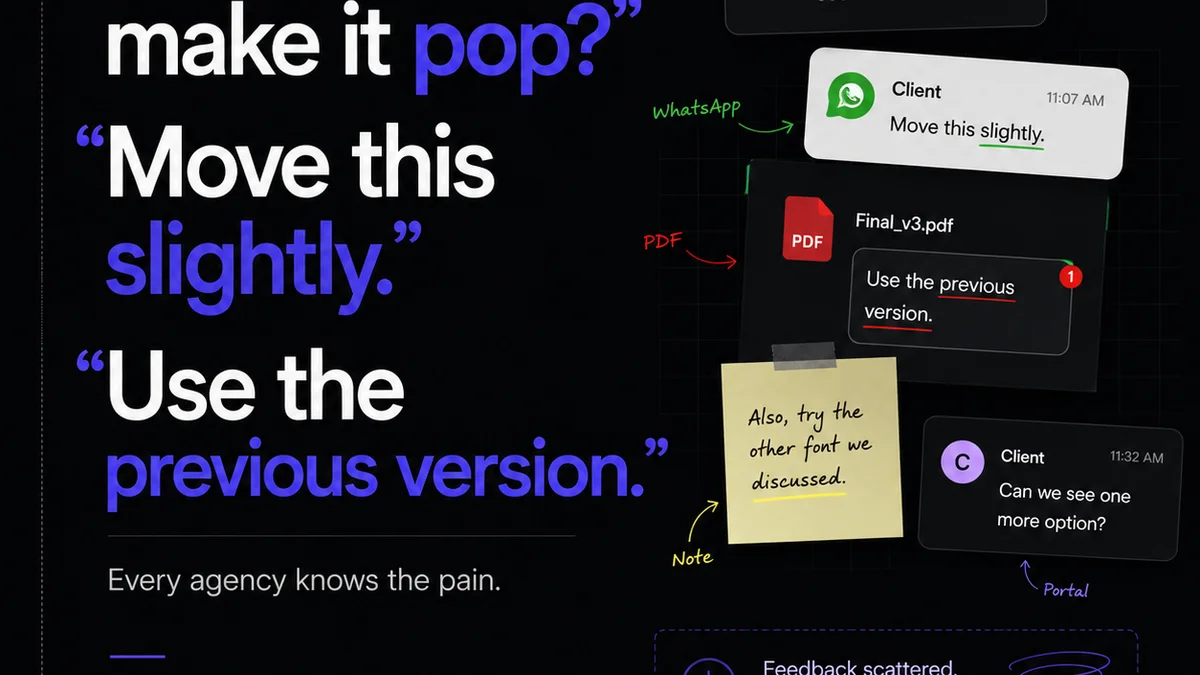
Feedback silos are the enemy of efficient creative work. When comments live in emails, Slack threads, or even random Word docs, you lose context. You introduce ambiguity.
A stakeholder might say, “Make the logo pop more.” What does that mean to three different people? Without a visual context and a clear thread, you're guessing.
The Solution: Visual Annotation and Version Control
A good feedback platform allows stakeholders to comment directly on the creative asset. On a specific pixel. This eliminates guesswork.
It also provides a clear audit trail. You can see who said what, when, and what the final approved version is. No more “I never said that!” moments.
This type of tool automates the collection, organization, and clarification of feedback. It’s the first step in reclaiming your team's bandwidth.
2. Project Management Software with Creative Workflows
Sure, you use a PM tool. But does it understand the nuances of a creative project? Or is it just a glorified to-do list?
Creative projects aren't linear. They involve iteration, collaboration, and often, unexpected pivots. Your PM tool needs to support this fluidity, not fight against it.
The Problem: Task Mismanagement and Scope Creep
When tasks aren't clearly defined, assigned, and tracked, things fall through the cracks. A design is ready for review, but the copywriter hasn't finished the accompanying text. The video editor is waiting on final graphics. These dependencies are critical.
Scope creep often starts with unmanaged requests. A client asks for “one small change,” and it balloons into a multi-day task because it wasn't properly logged and assessed against the original brief.
The Solution: Visual Task Boards and Automation Rules
Tools that offer visual Kanban boards, Gantt charts, and custom workflows are essential. They allow you to see the entire project at a glance.
More importantly, they can automate notifications. When a task is marked complete, the next person in the workflow gets an alert. When a deadline is approaching, the assigned team member receives a reminder.
Some PM tools even allow for custom fields to track things like client approvals, budget status, or specific asset types. This level of detail, when automated, saves immense manual tracking effort.
3. Digital Asset Management (DAM) Systems
Where do you store all your final assets? Your client logos? Your brand guidelines? Your past campaign materials?
If the answer is a messy network drive, a series of shared cloud folders, or worse, individual hard drives, you have a problem.
The Problem: Wasted Time Searching, Risk of Using Outdated Assets
Your team spends countless hours searching for the right file. The correct logo version. The high-res image. The approved color palette.
This is a classic example of operational friction. It’s also dangerous. Using an outdated logo or an unapproved image can lead to brand inconsistencies or even legal issues.
The Solution: A Single Source of Truth
A DAM system centralizes all your creative assets. It acts as a searchable library, complete with metadata, version history, and access controls.
Imagine a new designer joining the team. Instead of asking ten people for files, they can log into the DAM and find everything they need, organized and tagged.
Automated features can include:
- Version control: Always access the latest approved file.
- Metadata tagging: Automatic or semi-automatic tagging based on file content or upload details.
- Search functionality: Powerful search capabilities based on keywords, tags, file types, etc.
- Usage rights management: Track licensing and permissions for assets.
This is about efficiency, brand consistency, and risk mitigation, all rolled into one automated system.
4. Automated Proofing and Quality Assurance (QA) Tools
This is where many agencies still rely heavily on manual checks. A designer eyeballs a PDF. A project manager scrolls through a website mockup. A QA tester compares a live page to a spec sheet.
It’s subjective and prone to human error.
The Problem: Inconsistent Quality and Missed Errors
Even the most detail-oriented person can miss things. A misplaced pixel. A typo on a mobile view. A color that’s slightly off. These small errors add up, impacting the perceived quality of your work.
Manual QA is time-consuming and often happens late in the process, leading to costly rework.
The Solution: Rule-Based Checks and Visual Comparison
Automated QA tools can catch many common errors before a human ever needs to look.
Think about:
- Automated layout checks: Ensuring elements are aligned, spacing is consistent, and breakpoints are correct across devices.
- Color and contrast checks: Verifying that color palettes meet accessibility standards (WCAG).
- Automated proofreading: Catching typos and grammatical errors in copy.
- Visual regression testing: Comparing new versions of a webpage against previous versions to ensure no unintended visual changes have occurred.
These tools automate the tedious, rule-based aspects of QA. This allows your human reviewers to focus on the subjective creative quality and strategic alignment, rather than hunting for misplaced commas.
Where Revue Fits In
You might be thinking, “This all sounds great, but how do I manage it all?” That’s where a platform like Revue comes in. We’re not just about sending newsletters; we're about streamlining your entire creative output and client communication process.
Revue acts as the central nervous system for your client-facing creative work. It integrates with your existing tools to bring clarity and control where it’s often missing:
- Centralized Feedback Visibility: While Revue isn't a direct annotation tool, it integrates with platforms that are. More importantly, it centralizes the *communication* around feedback and approvals, ensuring everyone sees the same status, the same comments, and the same final decisions. No more digging through emails to find out if a client signed off.
- Revision and Approval Tracking: Revue provides a clear, auditable trail of all client interactions, feedback cycles, and final approvals. This transparency is crucial for managing expectations and preventing disputes. You know exactly which version was approved and by whom.
- Quality Check Integration: By providing a clear overview of project status and client sign-offs, Revue helps ensure that the work being finalized has met all necessary approval gates. This reduces the risk of moving forward with unapproved or unfinished assets, supporting your internal QA process.
By bringing order to the chaos of client feedback and approvals, Revue allows your team to spend less time managing the process and more time doing the creative work that drives results.
Final Thought
Automation isn't about replacing creativity. It's about protecting it.
It’s about building operational resilience so that your team can do their best work, consistently. Are you automating the right things? Are you freeing up your team for what truly matters?
Frequently asked questions
What is creative automation?
Creative automation refers to the use of technology to streamline, expedite, or perform repetitive tasks within the creative process. This can range from managing client feedback and revisions to asset organization and quality assurance checks, ultimately freeing up creative professionals to focus on strategic and conceptual work.
Do I need to replace my existing creative tools to implement automation?
Not necessarily. The goal is often to integrate automation into your existing workflow. Many tools, like Revue, are designed to connect with other platforms, enhancing their capabilities. The key is to identify bottlenecks and find tools or integrations that address them.
How can automation help with client feedback?
Automation tools, particularly centralized feedback platforms, can significantly improve the client feedback process. They enable direct annotation on assets, consolidate comments, provide version control, and create a clear audit trail, reducing misinterpretation and saving time spent chasing down or deciphering feedback.
Is creative automation only for large agencies?
No, creative automation benefits teams of all sizes. Smaller teams often have fewer resources, making efficiency gains from automation even more impactful. Centralizing processes and reducing manual busywork can be a game-changer for boutique agencies and in-house teams alike.
What's the difference between automation and AI in creative work?
Automation typically involves pre-defined rules and workflows to execute tasks automatically. AI (Artificial Intelligence) involves systems that can learn, adapt, and perform tasks that typically require human intelligence, such as generating content or making complex design decisions. While AI can be a form of automation, not all automation uses AI.