Everyone talks about design collaboration. They tell you to use the right tools, set clear expectations, and hold regular meetings. None of that is wrong. But it’s incomplete.
The hard truth? Great design collaboration isn’t about the *things* you do; it’s about the *system* that makes those things work, predictably. It’s about removing friction, not adding more steps.
1. Define the Collaboration Workflow Before You Start
Before the first pixel is pushed, the entire team needs to know how feedback will flow. This isn’t a meeting topic; it’s a documented process.
What are the stages of feedback? Who gives it? When do they give it? How is it logged? How is it actioned?
A common assumption is that everyone understands what “feedback” means. They don’t.
Is it broad strategic input? Is it a specific UI tweak? Is it a copy edit? Is it a technical constraint?
Clarify these upfront:
- Feedback Givers: Who has the authority to provide feedback at each stage?
- Feedback Timing: When is feedback solicited? When is it due?
- Feedback Format: Where and how should feedback be submitted? (e.g., comments in a tool, email, Slack, formal review meeting).
- Feedback Scope: What kind of input is expected at each stage? (e.g., concept validation, detailed UI review, final sign-off).
- Decision Authority: Who makes the final call when feedback conflicts?
This clarity prevents scope creep and endless revision loops.
2. Centralize All Communication and Assets
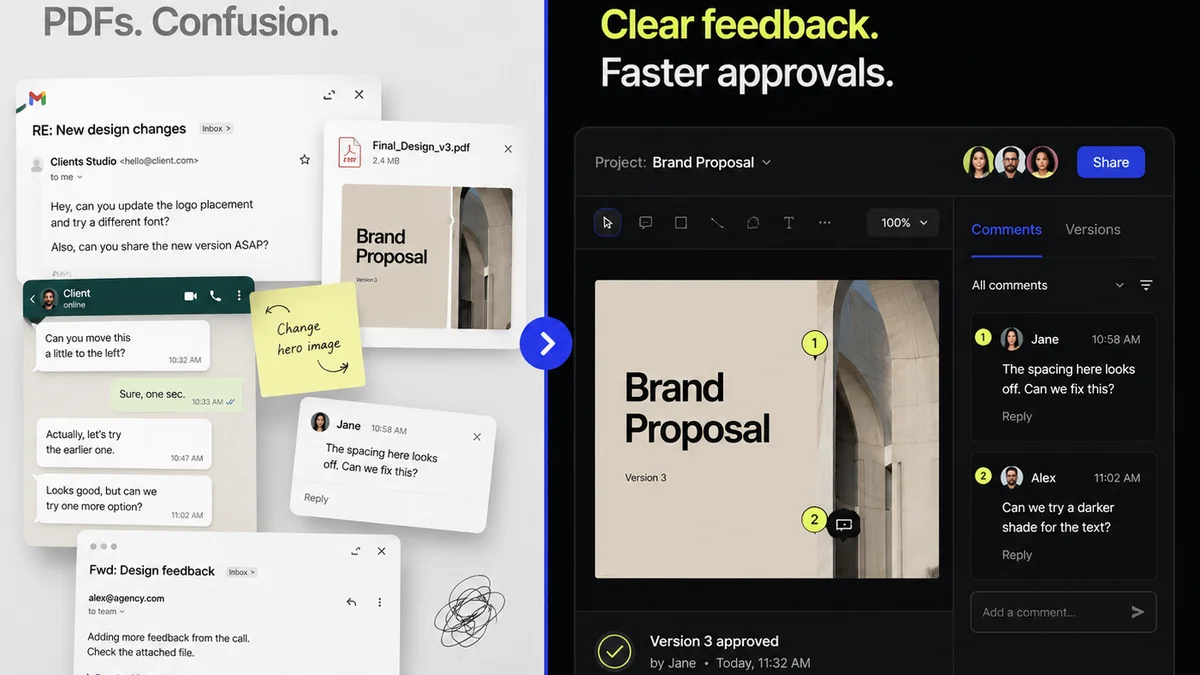
Scattered feedback is the enemy of efficient collaboration. Emails get lost. Slack threads disappear. Files live in a dozen different cloud folders.
This isn’t just annoying; it’s a direct hit to productivity and quality. When you can’t find the latest version or the most recent feedback, you’re guessing. Guessing leads to rework.
Assets and communication need a single source of truth.
Think about it: If a stakeholder has to hunt for the correct file or dig through their inbox for a decision, they’re less likely to provide timely, accurate input. And you’re less likely to get it right the first time.
This means:
- Version Control: Always work from the latest approved version.
- Unified Comments: All feedback, regardless of source, should be consolidated.
- Clear Audit Trail: Easily see who said what, when, and what action was taken.
- Asset Management: All design files, mockups, prototypes, and final assets are in one accessible place.
Without this, you’re building on shifting sand.
3. Standardize Review and Approval Processes
“Ship it when it’s done” is not a process. It’s a recipe for disaster.
Every project, from a minor UI update to a full rebrand, needs a defined review and approval gate. This ensures alignment and prevents half-baked work from moving forward.
Common pitfalls:
- Ad-hoc Reviews: Designers sharing work via Slack hoping for a quick glance.
- Unclear Sign-off: “Looks good” from someone who wasn’t the ultimate decision-maker.
- Feedback Overload: Too many cooks in the kitchen, all with conflicting opinions.
- Late-Stage Redesigns: Major changes requested after development has begun.
A structured approach looks like this:
Internal Reviews
Before client eyes ever see the work, your internal team needs to vet it. This includes:
- Designer Self-Review: Did I meet the brief? Are there any obvious errors?
- Peer Review: Another designer provides a fresh perspective.
- Creative Director/Lead Review: Strategic alignment and quality assurance.
Client Reviews
These should be scheduled and focused. Provide clear context for what you want reviewed. For example:
- Concept Presentation: Focus on strategic direction and overall feel.
- Mid-Fidelity Review: Focus on user flows and core functionality.
- High-Fidelity Review: Focus on visual design, micro-interactions, and copy.
- Final Approval: Confirms all requirements are met.
Each stage should have a clear outcome: Approved, Approved with Minor Revisions, or Needs Significant Revision. And crucially, a deadline for feedback.
4. Implement Actionable Feedback Loops
Feedback is useless if it’s not actionable. “I don’t like it” is not actionable. “This button is too hard to find because it lacks contrast” is actionable.
The goal is to move from subjective opinions to objective improvements.
This requires:
- Specific Critiques: Feedback should point to a particular element and explain the *why*.
- Prioritization: Not all feedback is equal. Distinguish between critical issues and minor suggestions.
- Responsibility: Assign specific feedback items to individuals for resolution.
- Tracking: Ensure every piece of feedback is acknowledged, addressed, or deliberately rejected with a reason.
This transforms feedback from a potential roadblock into a constructive part of the design process.
5. Foster a Culture of Constructive Criticism
This goes beyond process. It’s about mindset.
Designers need to feel safe receiving critique. Stakeholders need to understand that their feedback is valuable but also needs to serve the project goals.
This means:
- No Personal Attacks: Critique the work, not the person.
- Assume Good Intent: Everyone is trying to make the project successful.
- Focus on Solutions: Frame challenges as opportunities for improvement.
- Educate Stakeholders: Help them understand design principles and the impact of their requests.
When criticism is constructive, it fuels innovation, not defensiveness.
Where Revue Fits In
Managing design collaboration effectively can feel like juggling chainsaws. That’s where a dedicated platform like Revue becomes essential.
Revue is built to streamline the entire design feedback and approval lifecycle.
Centralized Feedback: Instead of tracking comments across emails, Slack, and random documents, all stakeholder feedback lives in one place, attached directly to the design asset. This eliminates confusion and ensures nothing gets lost.
Revision and Approval Visibility: Track the progress of feedback. See who has reviewed what, what decisions have been made, and what revisions are pending. This provides a clear audit trail and accountability.
Quality Checks: By having all feedback and approvals documented, you create a clear record of what was agreed upon. This helps ensure that the final output meets all requirements and standards, reducing last-minute surprises and costly rework.
Revue turns the chaotic back-and-forth into a structured, transparent process. It’s the operational backbone for successful design collaboration.
Final Thought
Are you managing design collaboration, or is it managing you?
The difference lies in a robust system that prioritizes clarity, accountability, and efficiency. When you get the system right, the collaboration flows, and the creative work shines.
Frequently asked questions
What are the key stages of design collaboration?
Key stages typically include: defining the workflow, centralizing assets and communication, conducting internal reviews, managing client reviews and feedback loops, and finally, obtaining formal approval. Each stage requires clear processes and defined roles.
How can I ensure feedback is actionable?
Actionable feedback is specific, objective, and explains the 'why' behind a suggestion. It focuses on elements of the design and their impact, rather than subjective opinions. Assigning feedback to individuals for resolution and tracking its status also makes it more actionable.
What is the difference between internal and client reviews?
Internal reviews are conducted by your team (designers, creative directors) to ensure quality and alignment before presenting to the client. Client reviews involve the external stakeholders who provide feedback on strategic direction, functionality, and aesthetics. Both need structured processes.
How does a centralized platform help design collaboration?
A centralized platform like Revue consolidates all assets, communication, and feedback in one place. This eliminates version control issues, prevents lost comments, provides a clear audit trail, and ensures everyone is working from the same information, significantly improving efficiency and reducing errors.