Everyone wants more design productivity. It sounds simple: faster turnarounds, happier clients, bigger profits. You’ve seen the articles: “10 Ways to Be More Productive,” “The Secret to Creative Flow,” “Master Your Workflow.” They offer quick fixes, time-blocking strategies, and endless to-do lists. None of that is wrong. But it’s incomplete.
The hard truth? True design productivity isn’t about doing more, faster. It’s about doing the right things, with minimal friction, and maximum clarity. It’s about building systems that support your creative process, not hinder it. This checklist dives deep into the operational realities of creative agencies and in-house teams, moving beyond generic advice to actionable steps.
1. Define Your Core Processes
Before you can optimize anything, you need to know what you’re optimizing. What are the fundamental steps in your design workflow, from brief to final delivery?
Understand the Current State
Map out your existing processes. Don’t assume you know them; document them. Use flowcharts, simple lists, or even just a whiteboard session.
- Initial client brief intake
- Internal kickoff and discovery
- Concept development and ideation
- Design and iteration
- Client feedback rounds
- Revisions and refinements
- Final asset preparation
- Quality assurance and delivery
This exercise often reveals bottlenecks you didn’t realize existed.
Standardize Where Possible
Not every project needs a bespoke process. Identify repeatable stages and create standard operating procedures (SOPs) for them. This reduces cognitive load and ensures consistency.
- Branding projects
- Website design
- Social media graphics
- Presentation decks
This isn’t about rigid bureaucracy; it’s about removing unnecessary decision-making for common tasks.
2. Master Client Communication & Feedback
This is where most creative projects go off the rails. Poor communication and unclear feedback are productivity killers.
Set Crystal Clear Expectations Upfront
From the first client call, define the scope, deliverables, timelines, and, crucially, the feedback process. What does a successful outcome look like for them?
- Define the number of revision rounds
- Specify the format and channel for feedback
- Establish who the key decision-makers are
- Agree on response times
Document these agreements in your SOW and initial project kickoff.
Systemize Feedback Collection
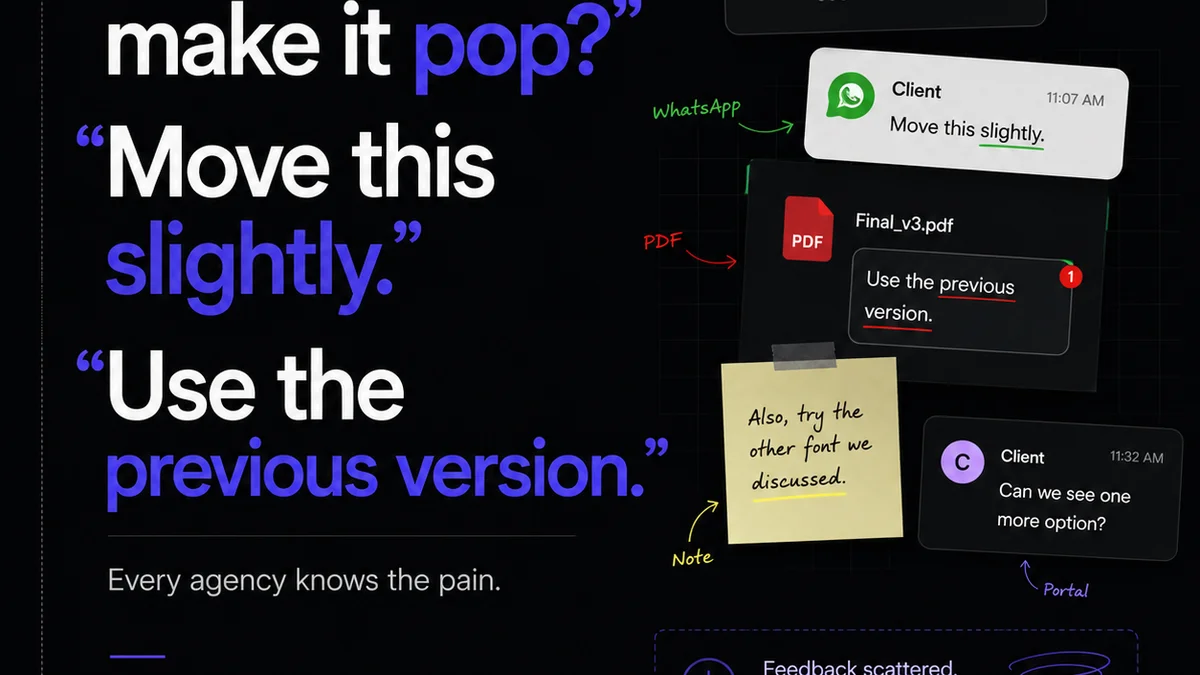
Ad-hoc feedback via email chains, Slack messages, or random calls is a recipe for disaster. Centralize it.
- Use a dedicated platform for all feedback (like Revue!).
- Aggregate comments by stakeholder and by asset.
- Ensure feedback is actionable and specific.
Ambiguous feedback like “I don’t like it” or “Make it pop more” is useless. Push for clarity.
Manage Revision Cycles Effectively
Revisions are part of the process, but they can spiral out of control without management.
- Track every revision request against the original brief.
- Quantify the scope of each revision.
- Communicate the impact of significant revisions on timeline and budget.
This ensures everyone understands the trade-offs involved.
3. Optimize Your Creative Tools & Technology
The tools you use directly impact your team’s ability to execute efficiently.
Choose the Right Software Stack
Select tools that integrate well and serve specific needs without overcomplicating your workflow.
- Design software (Figma, Adobe Creative Cloud)
- Project management (Asana, Monday.com)
- Communication (Slack, Microsoft Teams)
- File storage and sharing (Google Drive, Dropbox)
- Feedback and approval platforms (Revue!)
Avoid tool sprawl. Consolidate where possible.
Ensure Seamless Collaboration
Real-time collaboration is key. Tools should facilitate, not frustrate, teamwork.
- Leverage cloud-based design tools for live co-editing.
- Use shared libraries for reusable assets.
- Establish clear file-naming conventions and version control.
This prevents duplicated effort and confusion.
Automate Repetitive Tasks
Look for opportunities to automate mundane, time-consuming tasks.
- Batch processing for image exports.
- Using templates for common deliverables.
- Automating report generation from project management tools.
Free up your designers to focus on creative problem-solving.
4. Foster a Productive Team Culture
Productivity isn’t just about processes and tools; it’s about people.
Protect Focus Time
Constant interruptions kill productivity. Implement strategies to minimize distractions.
- Schedule dedicated “deep work” blocks.
- Use status indicators effectively in communication tools.
- Encourage asynchronous communication when possible.
Respect your team’s need for uninterrupted creative time.
Encourage Skill Development
A team that’s constantly learning is a team that’s becoming more efficient.
- Provide opportunities for training on new tools and techniques.
- Facilitate knowledge sharing sessions.
- Support experimentation with new creative approaches.
Investing in your team’s skills pays dividends in productivity.
Promote Psychological Safety
When team members feel safe to take risks, ask questions, and admit mistakes, they are more engaged and productive.
- Lead with empathy and support.
- Celebrate learning from failures as much as successes.
- Create an environment where constructive feedback is welcomed.
A toxic environment drains energy and stifles creativity.
5. Implement Robust Quality Assurance (QA)
Skipping QA is a false economy. Errors caught post-delivery are far more costly than those caught internally.
Develop a QA Checklist
Create a comprehensive checklist tailored to your common project types. This ensures consistency and catches common oversights.
- Brand guideline adherence
- Correct file formats and dimensions
- Accessibility standards (WCAG guidelines are a good reference)
- Typographical accuracy
- Visual consistency across assets
- Functionality (for interactive projects)
This is your final line of defense before client delivery.
Assign Clear QA Responsibility
Who is responsible for QA? Make it explicit. It shouldn’t be an afterthought or the job of whoever has a spare five minutes.
- Designate a specific person or small team for QA.
- Ensure they have the time and authority to halt a release if necessary.
This prevents issues from slipping through the cracks.
Where Revue Fits In
Managing design projects involves a complex interplay of creative execution, client collaboration, and operational oversight. The points above highlight common friction points: unclear feedback, sprawling communication, and inefficient revision cycles.
Revue is built to address these directly. It provides a centralized hub for all client feedback, ensuring comments are contextual, actionable, and tracked. This drastically reduces misunderstandings and the time wasted chasing down information across emails and chat logs.
By streamlining the revision and approval process, Revue helps teams manage scope creep and maintain clear visibility into project status. This operational clarity frees up creative teams to focus on what they do best: creating exceptional work. It transforms feedback from a chaotic bottleneck into a manageable, integrated part of the workflow, directly contributing to design productivity.
Final Thought
Productivity isn’t a destination; it’s a continuous optimization. Are you chasing the latest productivity hack, or are you building a resilient system designed for sustained creative output? The difference is operational rigor.
Frequently asked questions
What is the most common productivity killer in design agencies?
The most common productivity killer is unclear or unmanaged client feedback. This leads to endless, ambiguous revision cycles, wasted effort, and project delays. Centralizing feedback and setting clear expectations upfront are crucial to combat this.
How can I improve client communication for better design productivity?
Improve client communication by setting clear expectations from the start regarding scope, deliverables, timelines, and the feedback process. Use a dedicated platform for all feedback, ensure it's specific and actionable, and manage revision cycles transparently, communicating any impact on schedule or budget.
What role do tools play in design productivity?
Tools are critical for design productivity. Choosing the right stack—design software, project management, communication, and feedback platforms—that integrates well and facilitates seamless collaboration can significantly reduce friction. Automating repetitive tasks with the right tools also frees up creative time.
How does a team culture impact design productivity?
Team culture has a profound impact. Fostering psychological safety, protecting focus time, and encouraging continuous skill development creates an environment where designers can do their best work. A supportive and clear culture reduces stress and increases engagement, directly boosting productivity.