Most creative teams think Digital Asset Management (DAM) is about organizing files. That it’s a glorified Dropbox, maybe with better search. A place to dump finished assets so they don’t get lost.
None of that is wrong. But it’s incomplete.
The hard truth? DAM isn’t just storage. It’s the operational backbone of your entire creative output. It’s not a passive archive; it’s an active workflow engine. Get it wrong, and your entire production pipeline grinds to a halt. Get it right, and you unlock speed, consistency, and sanity.
1. Beyond the File Cabinet: DAM as a Workflow Hub
Your assets aren’t static. They’re born, they evolve, they get approved, they get deployed, they get archived. Each stage needs visibility and control. A simple file-sharing system treats assets like dead objects.
A true DAM treats them as living entities within a process.
The Symptoms of a Weak DAM Strategy
- Endless searching for the latest version.
- Duplicated efforts because no one knew an asset existed.
- Brand inconsistencies across campaigns.
- Missed deadlines due to version control chaos.
- Clients asking for assets you can’t find.
- Wasted time on manual file transfers.
These aren’t minor annoyances. They’re critical operational failures.
2. Defining Your Asset Lifecycle
Before you even look at software, map out how your assets move. From initial brief to final delivery and beyond.
Who creates them? Who reviews them? Who approves them? Who uses them? Where do they go? How long do they live?
Key Stages to Consider
- Concept & Ideation: Early sketches, mood boards, wireframes.
- Production: Drafts, work-in-progress files, source files.
- Review & Approval: Staging links, client feedback rounds, final sign-off.
- Distribution: Final renders, campaign-ready files, platform-specific versions.
- Archival: Legacy assets, usage rights management, historical data.
Each stage has different needs for access, versioning, and permissions.
3. Metadata is Your Master Key
This is where the real power lies. Without robust metadata, your DAM is just a slow, expensive hard drive.
Metadata isn’t just file names. It’s context. It’s the searchable DNA of your assets.
Essential Metadata Categories
- Descriptive: What is it? (e.g., “Product launch banner,” “Social media video ad”)
- Administrative: Who owns it? What are the usage rights? Expiration dates?
- Technical: File type, dimensions, resolution, color space.
- Project-Specific: Campaign name, client, project ID, related assets.
- Keywords/Tags: Actionable terms for easy discovery.
Automate where you can. Use consistent naming conventions. Train your team to tag diligently. This is non-negotiable.
4. Version Control: The Silent Killer of Productivity
The “final_final_v3_really_this_time.psd” problem is a plague. It breeds confusion, errors, and massive amounts of wasted time.
A proper DAM system tracks every iteration. It clearly designates the approved, current version and keeps a history of all previous ones.
Features to Demand
- Clear version numbering and history logs.
- Ability to revert to previous versions if needed.
- Visual diffing between versions (if possible).
- Secure storage of all historical states.
This single feature can save your team hours every week.
5. Permissions and Access Control: Protecting Your Work
Not everyone needs access to everything. And not everyone should be able to edit critical assets.
Your DAM must allow granular control over who can view, download, edit, and share specific assets or collections.
Who Needs What Access?
- Internal Creative Team: Full access to production files, editing rights.
- Marketing Team: Access to approved assets for deployment, perhaps download rights.
- Sales Team: Access to approved collateral, presentation decks.
- Clients: View-only access, perhaps limited download of final assets.
- External Vendors: Temporary, project-specific access.
Define roles and assign permissions accordingly. This prevents accidental overwrites and unauthorized use.
6. Integrations: Connecting Your Ecosystem
Your DAM shouldn’t live in a vacuum. It needs to talk to the other tools you use daily.
Think project management software, creative tools like Adobe Creative Cloud, and CMS platforms.
Key Integration Points
- Project Management: Link assets directly to tasks and projects.
- Creative Software: Access and save assets directly from Photoshop, Illustrator, Premiere, etc.
- CMS/Website: Easily pull approved images and videos for web use.
- Marketing Automation: Ensure brand consistency in email campaigns.
Seamless integrations reduce friction and eliminate manual file handling.
7. Where Revue Fits In
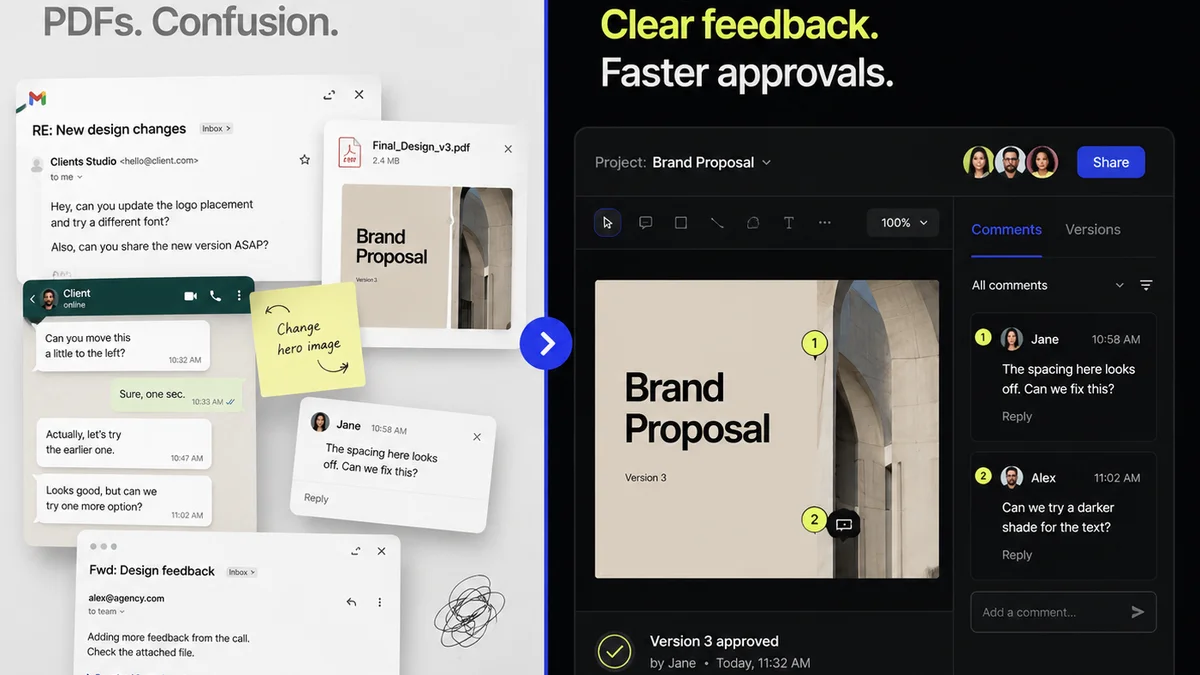
Managing feedback and approvals is a critical part of the asset lifecycle. It’s often the bottleneck where version chaos truly begins.
Revue acts as the central hub for client feedback and revision tracking. It integrates directly with your creative workflow, providing a clear, auditable trail for every asset.
- Centralized Feedback: All comments and annotations live in one place, tied to the specific asset version.
- Revision Visibility: Track every change, every round of feedback, and every approval status. No more digging through emails or Slack threads.
- Quality Checks: Ensure that assets meet all requirements before final approval, reducing last-minute issues.
By connecting your DAM with a robust feedback and approval tool like Revue, you create a truly integrated, efficient creative operation.
8. Training and Adoption: The Human Element
The best DAM system in the world is useless if your team doesn’t use it. Or worse, if they use it incorrectly.
Invest time in proper training. Explain the *why* behind the system, not just the *how*.
Keys to Successful Adoption
- Clear documentation and best practice guides.
- Regular training sessions for new hires and refreshers.
- Appoint DAM champions within the team.
- Lead by example: consistently use and reference the DAM.
- Gather feedback and iterate on processes.
Adoption is an ongoing effort, not a one-time event.
Final Thought
Your digital assets are your agency’s currency. They represent your creativity, your client relationships, and your brand. Treating them as mere files is a critical operational mistake.
Is your DAM a dusty archive, or is it the high-performance engine driving your creative output?
Frequently asked questions
What is the difference between a DAM and cloud storage like Dropbox?
Cloud storage is primarily for file syncing and sharing. A DAM is a specialized system designed for managing the entire lifecycle of creative assets, including version control, metadata, permissions, and workflow integration. It's about control and operational efficiency, not just storage.
How much does a DAM system cost?
Costs vary widely based on features, storage needs, and user count. Some solutions are relatively affordable for smaller teams, while enterprise-level systems can be a significant investment. It's crucial to assess your specific needs and budget.
Is implementing a DAM system difficult?
Implementation can range from straightforward to complex, depending on the system's capabilities and your existing infrastructure. Key factors include data migration, metadata strategy, user training, and integration setup. Proper planning and dedicated resources are essential.
How can metadata improve my workflow?
Robust metadata acts like a powerful search engine for your assets. It allows you to quickly find specific files based on keywords, project details, usage rights, and more, drastically reducing search time and preventing the use of outdated or incorrect assets.