Most agencies think of Optical Character Recognition (OCR) as a way to turn scanned PDFs into editable text. It’s a useful tool for document management, sure. But that’s like saying a high-performance sports car is just for getting from A to B.
It’s incomplete. The real power of OCR, especially when applied creatively, lies in its ability to detect inconsistencies and errors in visual assets. It’s not just about reading text; it’s about comparing, validating, and flagging deviations from a defined standard. This capability can be a game-changer for quality control in creative workflows.
1. The Assumption: Design is Purely Subjective
The common wisdom is that design is art. It’s about aesthetics, gut feelings, and client taste. Therefore, errors are subjective and can only be caught by human eyes during a review.
None of that is wrong. But it’s incomplete.
While the subjective elements of design are crucial, there are objective, measurable aspects that are often overlooked. These are the elements that can, and should, be automated. Think about brand guidelines, legibility requirements, or even simple data accuracy. These aren't matters of taste; they are matters of fact.
The Hard Truth: Objective Design Standards Exist
Every design project, no matter how avant-garde, operates within a framework of objective constraints. Brand logos must appear in the correct color and proportion. Copy must be legible and free of typos. Technical specifications for print or web must be met. These are non-negotiable elements.
Ignoring these objective standards is where costly errors creep in. They lead to client revisions, brand damage, and wasted production time.
2. How OCR Sees What Humans Miss
Traditional review processes rely on human eyeballs. This is prone to fatigue, distraction, and simple oversight. A designer might miss a subtle kerning issue after staring at a layout for hours. A project manager might skim over a transposed number in a data visualization.
OCR, when programmed correctly, doesn't get tired. It doesn't get bored. It can systematically scan visual elements and compare them against predefined rules or source files.
Validating Visual Elements
Consider these scenarios:
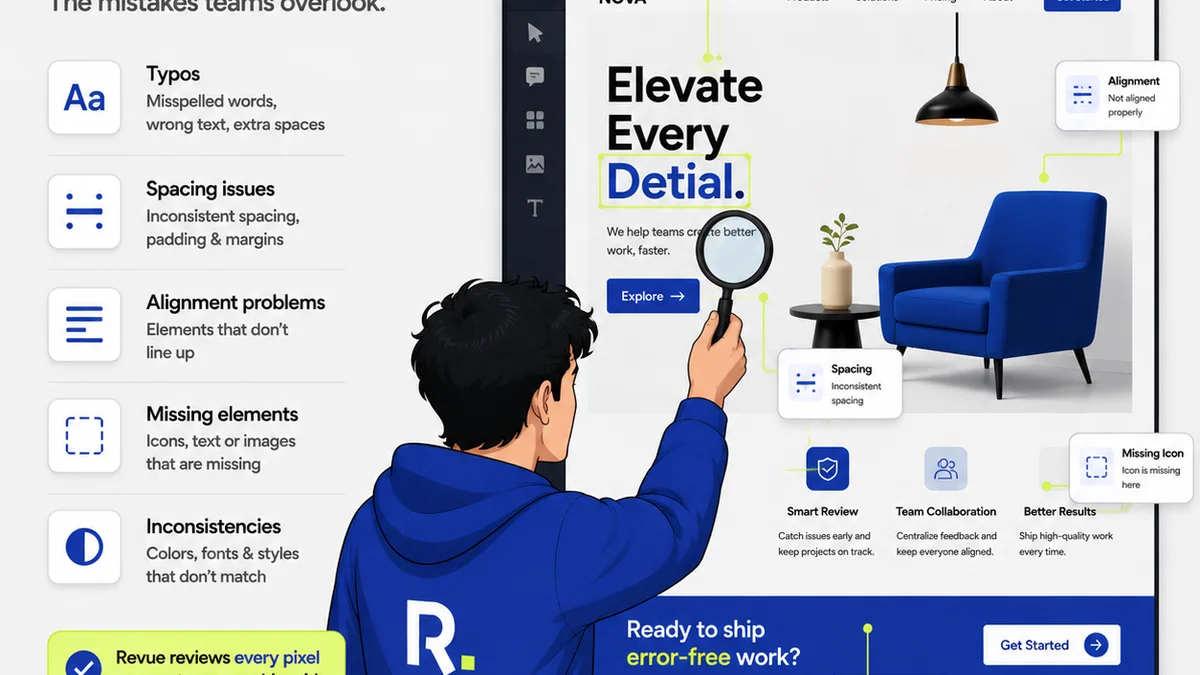
- Brand Consistency: Does the logo use the correct PMS color? Is its scale and placement consistent across all mockups? OCR can be trained to identify specific color values and spatial relationships.
- Typography Checks: Are font sizes within an acceptable range? Is the leading consistent? Are there any unintended widows or orphans? OCR can analyze character and line spacing.
- Data Accuracy: In charts, graphs, or infographics, are the numbers and labels correct and aligned? OCR can read the text elements within visual data representations and compare them to source data.
- Layout Integrity: Are crucial elements like calls-to-action or key text blocks obscured by other content in different responsive views? OCR can detect overlapping elements or elements pushed out of bounds.
This isn't about replacing designers or proofreaders. It's about augmenting their capabilities with a tireless digital assistant that handles the grunt work of objective validation.
3. Implementing OCR for Design Quality
Applying OCR to design error detection isn't a plug-and-play solution off the shelf. It requires a strategic approach and the right tools. It’s about defining what needs to be checked and how.
Defining Your Checkpoints
Start by identifying the most common, costly, or critical errors in your specific workflow. These are often:
- Brand guideline violations (color, logo usage, typography)
- Typos and grammatical errors in key copy
- Inaccurate data in charts and graphs
- Incorrect dimensions or bleed issues for print
- Broken links or incorrect URLs in digital assets
- Inconsistent spacing or alignment
Once identified, you need to establish the rules for these checkpoints. This might involve:
- Creating a library of approved brand assets (logos, color palettes).
- Defining acceptable ranges for font sizes, weights, and spacing.
- Establishing tolerance levels for alignment and positioning.
- Preparing source data for comparison against visual representations.
The Technology Stack
While off-the-shelf OCR software exists, its application in design requires more specialized configurations or custom scripting. This can involve:
- Image Processing Libraries: Tools that allow for pixel-level analysis and comparison.
- Text Recognition Engines: Standard OCR engines to extract text from images.
- Rule-Based Systems: Logic that compares extracted information against predefined standards.
- Machine Learning (Advanced): For more complex pattern recognition and anomaly detection.
The goal is to build or integrate a system that can ingest a design file (or a rendered output) and systematically flag any deviations from your defined rules.
When to Deploy OCR Checks
OCR-powered checks are most effective at specific stages:
- Pre-flighting: Before a design is sent for client review or to production, run an automated check for objective errors.
- Cross-Platform Verification: Ensure consistency across different device mockups or responsive layouts.
- Final Quality Assurance: As a last line of defense before final delivery.
This isn't about adding layers of bureaucracy. It's about building efficiency and reducing rework by catching the obvious, objective mistakes early.
4. Beyond Text: OCR for Layout and Structure
The term
Frequently asked questions
Can OCR really detect design *errors*, or just typos?
While OCR's core function is text recognition, its application in design error detection extends to validating visual elements. By analyzing color values, spatial relationships, font metrics, and layout consistency against predefined rules, it can flag deviations that go far beyond simple typos.
Is this technology expensive or difficult to implement for a design agency?
Implementing OCR for design error detection isn't a one-click solution. It often requires custom scripting or integration with existing tools. The cost and complexity depend on the scope of checks you need. However, the potential savings from reduced revisions and fewer costly mistakes can quickly outweigh the initial investment.
Will this replace human proofreaders and designers?
Absolutely not. OCR-powered checks are designed to augment human capabilities, not replace them. They excel at objective, repetitive validation tasks, freeing up human reviewers to focus on subjective aesthetic judgments, strategic creative direction, and complex problem-solving.
What types of design errors are best suited for OCR detection?
OCR is most effective for detecting objective, rule-based errors. This includes brand guideline violations (color, logo usage, typography), data inaccuracies in charts, incorrect dimensions for print, and inconsistencies in layout or spacing. Subjective aesthetic judgments remain firmly in the human domain.