Creative agencies don't have a file-sharing problem.
They have a review problem.
The file is usually easy enough to send. The difficult part comes afterward.
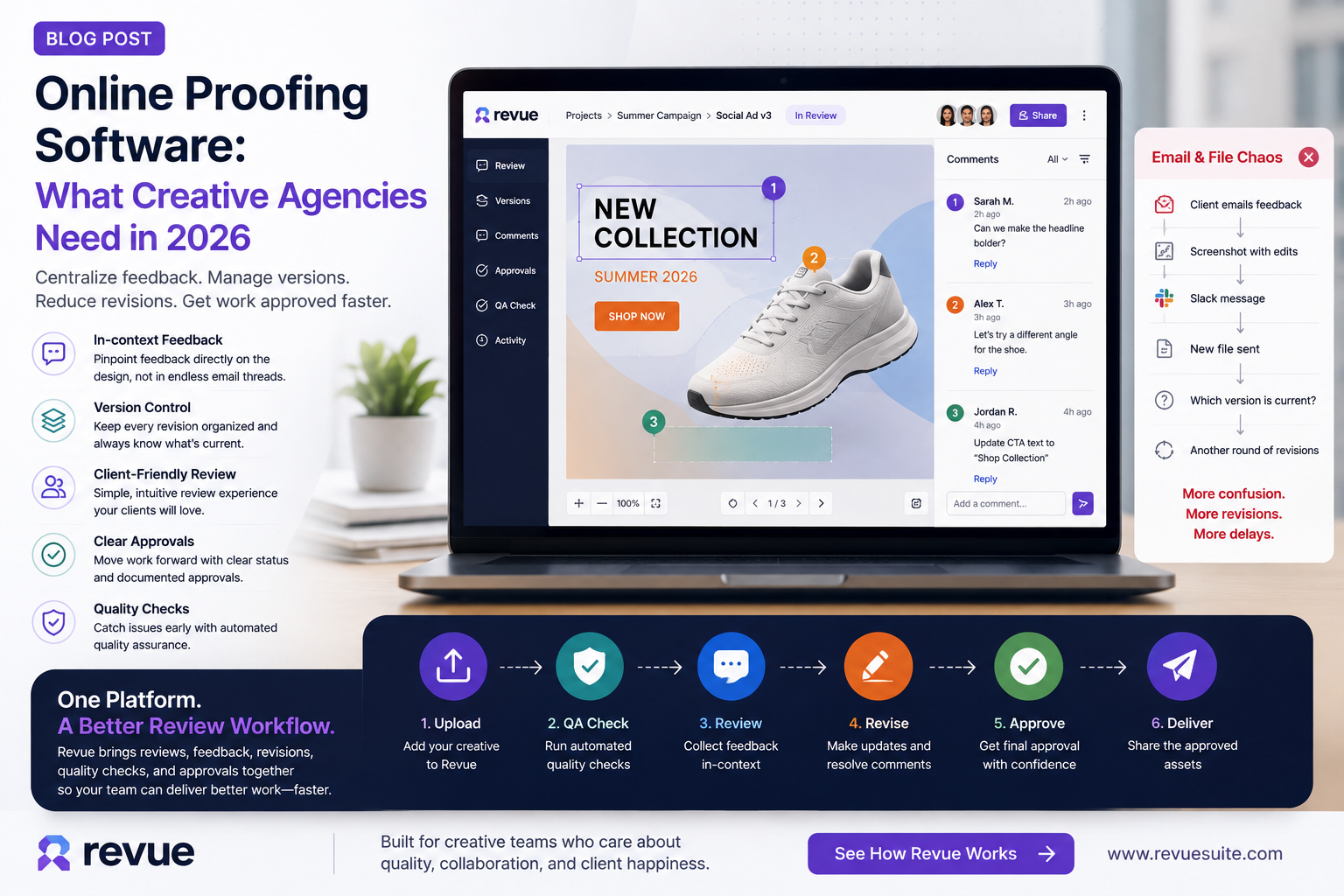
A client opens the design. Someone sends feedback over email. Another stakeholder comments in Slack. The account manager forwards a screenshot. The designer makes changes. A new PDF gets uploaded.
Then someone asks:
“Which version are we reviewing?”
That is where creative projects start to slow down.
For agencies managing multiple clients and dozens of assets, online proofing software can turn this messy process into a structured workflow.
Instead of moving feedback between disconnected tools, teams can review creative work, leave contextual comments, manage versions, and move toward approval from one place.
And that's the real value of online proofing.
It isn't simply about commenting on a design.
It's about creating a controlled path from first review to final approval.
What Is Online Proofing Software?
Online proofing software is a digital platform that allows teams and clients to review creative assets online, provide feedback, annotate specific areas, manage versions, and approve work.
For a creative agency, that can include:
Website designs
PDFs
Advertisements
Social media graphics
Presentations
Brand assets
Campaign creative
Photography
Marketing materials
Instead of sending a file and asking, “What do you think?”, the agency creates a structured review environment.
The client can see the work.
They can point to a specific area.
They can leave feedback.
The team can respond.
And the agency can keep the review connected to the correct version.
That distinction matters.
Why Email Is a Terrible Proofing System
Email wasn't designed for creative proofing.
Yet many agencies still use it as their primary review system.
A typical workflow looks like this:
Designer → Email → Client → Email → Account Manager → Slack → Designer → New File → Email → Client
Nothing is technically broken.
But everything is fragmented.
The feedback isn't attached to the design.
The latest version isn't always obvious.
Different stakeholders may respond to different emails.
And the project manager becomes responsible for remembering what everyone said.
That's not a workflow.
That's human-powered version control.
What Should Online Proofing Software Actually Do?
Not every proofing platform solves the same problem.
If you're evaluating online proofing software for your agency, look beyond the ability to leave comments.
The important question is:
Does the software make the entire review process easier?
Here are the capabilities that matter most.
1. Visual, in-context feedback
A comment such as:
“The headline doesn't feel right.”
isn't particularly useful.
A comment attached directly to the headline is different.
The designer immediately knows what the client is referring to.
Good online proofing tools make feedback contextual.
The comment belongs to the creative asset rather than floating somewhere inside an email thread.
2. Version control
Creative work rarely has one version.
There is V1.
Then V2.
Then V3.
Then V3 with the client's changes.
Then V4.
Then someone discovers that the client was actually commenting on V2.
Version control isn't a nice-to-have for agencies.
It's essential.
A useful proofing workflow should make it obvious:
Which version is current
What changed
Which feedback belongs to which version
What has already been resolved
Which version was approved
That removes a huge amount of unnecessary communication.
3. Client-friendly reviewing
Your client shouldn't need a training session to review a banner.
The review experience should be simple enough that someone can open the work, understand what they're looking at, leave feedback, and approve it.
This is particularly important for agencies.
Your internal team may understand the workflow.
Your client shouldn't have to.
The easier the review experience, the less time your account team spends explaining it.
4. Clear approval states
Feedback and approval are not the same thing.
A client saying:
“Looks good.”
isn't necessarily the same as formally approving the asset.
A structured proofing workflow should distinguish between:
In Review → Changes Requested → Revised → Ready for Approval → Approved
That creates clarity for everyone.
It also gives project managers a much better understanding of what's actually blocking delivery.
5. Quality checks before approval
Here's where proofing becomes more powerful.
The final review shouldn't only ask:
“Does the client like it?”
It should also ask:
“Is the work actually ready to ship?”
A creative asset can receive client approval and still contain:
Spelling mistakes
Incorrect spacing
Alignment issues
Contrast problems
Inconsistent typography
Brand inconsistencies
Production errors
This is where a platform like Revue can add another layer to the workflow.
Review the creative.
Collect feedback.
Revise it.
Run quality checks.
Then approve it.
That's a much safer process than simply collecting comments.
Online Proofing vs. Email: What's the Difference?
The biggest difference is context.
With email, the conversation and the creative asset are usually separated.
With an online proofing system, the feedback is connected directly to the work.
Email-based review | Online proofing |
|---|---|
Feedback in inboxes | Feedback attached to the work |
Versions shared manually | Versions organized |
Difficult to track decisions | Clear review status |
Comments can get lost | Centralized feedback |
Approval often informal | Structured approval |
Heavy project-manager involvement | More self-service |
Harder to audit | Review history is easier to track |
The goal isn't to eliminate email completely.
It's to stop using email as the system of record for creative review.
How Agencies Can Build a Better Proofing Workflow
Software alone won't fix a messy process.
You still need rules.
A strong agency workflow might look like this:
Step 1: Define the review objective
Don't send every stakeholder into every review.
Decide what the current review is actually checking.
Is it:
Creative direction?
Copy?
Layout?
Brand compliance?
Production quality?
Final approval?
Step 2: Send one version for review
Avoid sending five files and asking the client to choose.
There should be one clearly identified version under review.
Step 3: Collect feedback in one place
Don't let feedback spread across:
Email
Slack
Text messages
PDFs
Meetings
Phone calls
Centralize it.
Step 4: Resolve feedback before moving forward
A review isn't finished simply because comments stopped arriving.
The team should know which feedback was addressed and which remains open.
Step 5: Run quality control
Before final approval, check the asset for objective issues.
This is where automated quality checks can save creative teams from catching obvious problems manually.
Step 6: Get final approval
Once feedback is resolved and the asset passes QA, get explicit approval.
Now there is a clear point in the workflow where everyone knows:
This is the approved version.
Where Revue Fits
This is exactly the gap Revue is designed to address.
Instead of treating review, revisions, quality control, and approval as separate activities, Revue connects them into one creative workflow.
A team can upload creative work, run quality checks, review and annotate the work, share it with clients, manage revisions, and move the approved version forward.
The important idea isn't “another place to leave comments.”
It's having a workflow where the feedback, version, quality check, and approval stay connected.
See how Revue handles creative review and approvals →
What Should You Look for When Choosing Proofing Software?
Before purchasing an online proofing platform, ask these questions:
Can clients review without friction?
If clients struggle to access the proof, adoption will suffer.
Does feedback stay attached to the creative?
Context matters.
Can you manage multiple versions?
You should never have to ask, “Is this the latest file?”
Can your team see what's still unresolved?
Review status should be obvious.
Does it support your creative workflow?
The platform should fit how your agency actually works rather than forcing you into an overly complicated process.
Can quality control happen before approval?
This is an increasingly important differentiator.
The best system isn't necessarily the one with the most features.
It's the one that removes the most friction from the way your team already works.
The Future of Creative Proofing Is About More Than Comments
Online proofing started with a simple problem:
How do we let someone comment on a file without sending another email?
The problem has evolved.
Modern creative teams need more than comments.
They need:
Context.
Version control.
Collaboration.
Quality checks.
Approvals.
Accountability.
That's why online proofing is becoming part of a larger creative workflow rather than a standalone commenting tool.
And for agencies, that distinction matters.
Because the real goal isn't to collect feedback faster.
It's to get good creative work approved and delivered without the chaos in between.
Frequently asked questions
What is online proofing software?
Online proofing software helps creative teams and clients review digital assets, leave contextual feedback, manage versions, and approve work online.
Who uses online proofing software?
Creative agencies, marketing teams, in-house design teams, production teams, branding studios, and other organizations that regularly review creative assets can benefit from online proofing.
Is online proofing better than email?
For structured creative reviews, yes. Online proofing keeps feedback connected to the asset and makes versions, comments, and approvals easier to manage.
What should creative agencies look for in proofing software?
Look for easy client access, visual annotations, version control, centralized feedback, approval tracking, and quality-control capabilities.
Can online proofing software reduce revisions?
It can help reduce unnecessary revisions by making feedback clearer, keeping everyone on the same version, and giving teams a structured process for resolving comments.