Most teams think having Adobe Creative Suite – Photoshop, Illustrator, InDesign – is enough for packaging design. That’s the baseline, sure. But it’s a dangerously incomplete picture.
The hard truth? Great packaging design isn't just about creating pretty visuals. It’s about rigorous process, seamless collaboration, and ironclad quality control. And that requires a specific toolkit that goes far beyond design software.
1. The Core Creative Suite (Duh)
Let’s get the obvious out of the way. You need the industry standards.
Illustrator for Vector Precision
For logos, typography, and any clean, scalable graphics, Illustrator is king. Packaging relies heavily on vector elements that need to scale without losing quality.
Photoshop for Raster Imagery
When it comes to product photos, textures, and complex image manipulation, Photoshop is essential. Think photo retouching, color correction, and creating realistic mockups.
InDesign for Layout and Print Prep
While less common for initial packaging concepts, InDesign is invaluable for laying out multi-page spec sheets, dielines, and final print-ready files, especially for complex kits or multi-part packaging.
2. 3D Visualization and Mockup Tools
Static 2D mockups are fine for early concepts. But clients need to see how it looks in three dimensions.
The Need for Realism
Packaging exists in the real world. It sits on shelves, gets handled, and needs to look good from every angle. 3D tools bridge the gap between flat designs and the final product.
Key Software Options
- Adobe Dimension: Integrates well with Photoshop and Illustrator for creating realistic 3D scenes and mockups.
- Blender: A powerful, free, and open-source option for advanced 3D modeling, rendering, and animation. Steep learning curve, but incredibly capable.
- Cinema 4D: Professional-grade 3D software known for its ease of use (relative to other pro 3D tools) and excellent integration with Adobe products.
- Keyshot: Specifically designed for product visualization, offering fast rendering and intuitive material application.
These tools allow you to present packaging concepts that look and feel real, drastically improving client understanding and reducing revision cycles based on misinterpretations.
3. Collaboration and Feedback Platforms
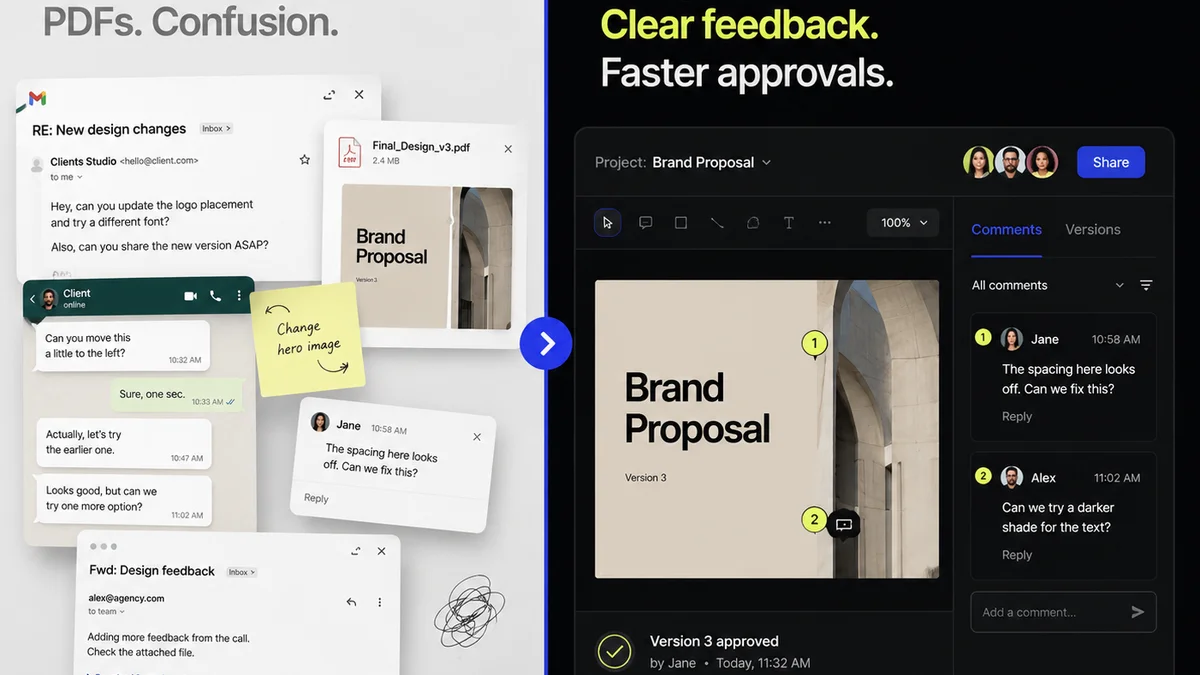
This is where most teams stumble. Email chains and scattered comments kill efficiency.
The Feedback Black Hole
Client feedback buried in emails, Slack messages, or even random Word docs? That’s a recipe for missed revisions, duplicated effort, and team frustration. Packaging projects often involve multiple stakeholders with varying levels of design understanding.
Centralized Feedback is Non-Negotiable
- Revue: (More on this later, but it’s built for this.)
- Filestage: A dedicated platform for creative review and approval, streamlining feedback on various asset types.
- Frame.io (for video/motion): While focused on video, its core principles of in-context commenting apply to any visual asset.
- Miro/Mural: Great for collaborative brainstorming and mood boards, but can be adapted for visual feedback if structured properly.
The goal is a single source of truth for all feedback, comments, and approvals. This ensures everyone is working from the latest version and that no critical input gets lost.
4. Project Management and Workflow
Packaging design isn't just about the visuals; it’s about managing the entire project lifecycle.
Beyond the Design Phase
From initial brief and concept development to print production and launch, there are countless moving parts. A robust project management system keeps everything on track.
Essential PM Tools
- Asana/Trello/Monday.com: For task management, deadline tracking, and team accountability.
- Notion: A flexible workspace that can be customized for project briefs, asset management, and team knowledge bases.
- Smartsheet: Combines spreadsheet functionality with project management features for complex workflows.
These tools ensure that design tasks are clearly defined, assigned, and tracked, preventing bottlenecks and missed deadlines. They are the backbone of an efficient creative operation.
5. Color Management and Proofing
What looks good on screen might print completely differently. This is a critical, often overlooked, area for packaging.
The CMYK Conundrum
RGB (for screens) and CMYK (for print) are fundamentally different color models. What’s vibrant on your monitor can look dull and muddy when printed if not managed correctly.
Tools and Techniques
- Calibrated Monitors: Essential for accurate color representation. Invest in good monitors and calibrate them regularly.
- Color Libraries (Pantone): Having access to physical Pantone swatch books and digital libraries is crucial for specifying exact brand colors.
- Color Management Software/Settings: Understanding and correctly configuring color profiles within your design software (e.g., Adobe Bridge, specific print driver settings) is vital.
- Digital Proofing Tools: Software that simulates how colors will appear on specific paper stocks and printing processes.
- Physical Proofing: The gold standard. Working with your printer to get physical proofs (match prints, press proofs) is non-negotiable for critical packaging projects.
Getting color right saves costly reprints and ensures brand consistency across all packaging runs.
6. Dieline and Die-Cut Management
The physical structure of the packaging is as important as its graphics.
The Blueprint for Production
A dieline is the template that shows where the packaging will be cut, folded, and assembled. It’s the blueprint for the physical structure.
Software for Dielines
- Adobe Illustrator: Still the workhorse for creating and editing dielines, often layered and meticulously detailed.
- Specialized Packaging Software (e.g., ArtiosCAD): For more complex structural design and 3D dieline creation, these tools offer advanced capabilities.
Accuracy here is paramount. A flawed dieline leads to packaging that doesn't fit together, doesn't protect the product, or is impossible to manufacture efficiently. Clear communication of dieline specs to both clients and printers is key.
Where Revue Fits In
You’ve got the design software. You’ve got 3D mockups. You’ve got PM tools. But how do you manage the constant back-and-forth, ensure all feedback is captured, and track revisions effectively?
This is precisely where a platform like Revue shines.
Instead of endless email threads or scattered comments on shared drives, Revue provides a centralized hub for client feedback and design approvals.
- In-Context Commenting: Leave specific feedback directly on design assets, eliminating ambiguity.
- Version Control: Easily track different versions of your packaging designs, ensuring clients always review the latest iteration.
- Clear Approval Workflows: Define clear steps for feedback and final sign-off, reducing miscommunication and speeding up the approval process.
- Centralized Asset Library: Keep all your packaging designs, mockups, and final files organized and accessible.
Revue streamlines the review and approval process, allowing your team to focus on design, not on chasing down feedback or deciphering conflicting comments.
Final Thought
The tools for successful packaging design extend far beyond the Adobe Creative Suite. They encompass 3D visualization, robust collaboration, meticulous project management, precise color control, and accurate dieline management.
Are you equipping your team with the full spectrum of tools they need to not just design, but to execute flawlessly from concept to shelf?
Frequently asked questions
What's the difference between RGB and CMYK for packaging?
RGB (Red, Green, Blue) is for digital screens and produces vibrant colors. CMYK (Cyan, Magenta, Yellow, Key/Black) is for printing and uses subtractive color mixing. Packaging relies on CMYK, and colors need careful management to ensure they print as intended, as CMYK is a more limited color space than RGB.
How important is 3D visualization in packaging design?
Extremely important. 3D visualization allows clients to see how the packaging will look and function in a realistic, three-dimensional space. This significantly reduces misunderstandings and revision cycles compared to relying solely on 2D flat designs.
What is a dieline and why is it critical?
A dieline is the blueprint for the physical packaging structure, showing where it will be cut, scored, and folded. Accuracy is paramount; an incorrect dieline can result in packaging that doesn't assemble properly, doesn't fit the product, or is impossible to manufacture cost-effectively.
Can I manage packaging feedback with just email?
Technically, yes, but it's highly inefficient and prone to errors. Email chains bury feedback, making it easy to miss crucial comments or approvals. A dedicated collaboration platform ensures all feedback is centralized, tracked, and easily accessible, saving time and preventing mistakes.