You're likely comparing Revue vs. GoVisually, or similar creative review tools, thinking it's about features. More annotation options, better version control, faster uploads. None of that is wrong. But it’s incomplete.
The real decision isn't about which tool has more bells and whistles. It's about which tool solves your specific, painful workflow bottlenecks. And often, the tools that claim to do everything are the ones that do nothing particularly well.
1. The Assumption: More Features Equal Better Review
The common wisdom is that the more features a platform boasts, the more robust it is. You see a long list of annotation types, approval workflows, and reporting dashboards, and you assume it's the best choice for your creative agency or in-house team.
This leads to decision paralysis. Or worse, choosing a tool that’s overkill and too complex for your actual needs. You end up paying for features you never use, and your team struggles with a bloated interface.
The Hard Truth: Solving Specific Problems is Key
The truth is, the best tool isn't the one with the most features. It's the one that directly addresses the most critical pain points in your creative feedback loop. Are you drowning in email threads? Is version control a nightmare? Are client approvals a black box?
Your choice should be dictated by the problems you need to solve, not by a feature checklist. Let's break down the typical challenges creative directors face and how tools like Revue and GoVisually approach them.
2. GoVisually: The All-in-One Contender
GoVisually positions itself as a comprehensive solution for creative project management and client feedback. It aims to be the central hub for everything from initial brief to final sign-off.
Core Strengths
GoVisually offers a wide array of functionalities:
- Detailed Annotation Tools: Point-and-click comments, drawing tools, markups directly on images, videos, and PDFs.
- Version Control: Tracks different versions of assets, allowing comparisons and rollbacks.
- Workflow Automation: Customizable approval stages and task management.
- Client Collaboration: Designed to bring clients into the loop for feedback and approvals.
- Project Management Features: Beyond just review, it often includes task assignments and deadlines.
Where It Can Fall Short
While comprehensive, this breadth can be a double-edged sword. The complexity can be overwhelming for teams that don't need every single function.
The learning curve can be steep, both for internal teams and external clients. If your primary need is just streamlined feedback, a full project management suite might be unnecessary overhead.
Integration challenges can arise. Does it play nicely with your existing stack (e.g., Adobe Creative Suite, Figma, project management software)? Often, 'all-in-one' means you're locked into their ecosystem.
Cost can escalate quickly, especially for larger teams or when adding premium features.
3. Revue: Focused on Centralized Feedback and Approval
Revue isn't trying to be your entire project management system. Its focus is laser-sharp: simplifying and centralizing the creative review and approval process.
Core Strengths
Revue excels in specific areas crucial for creative operations:
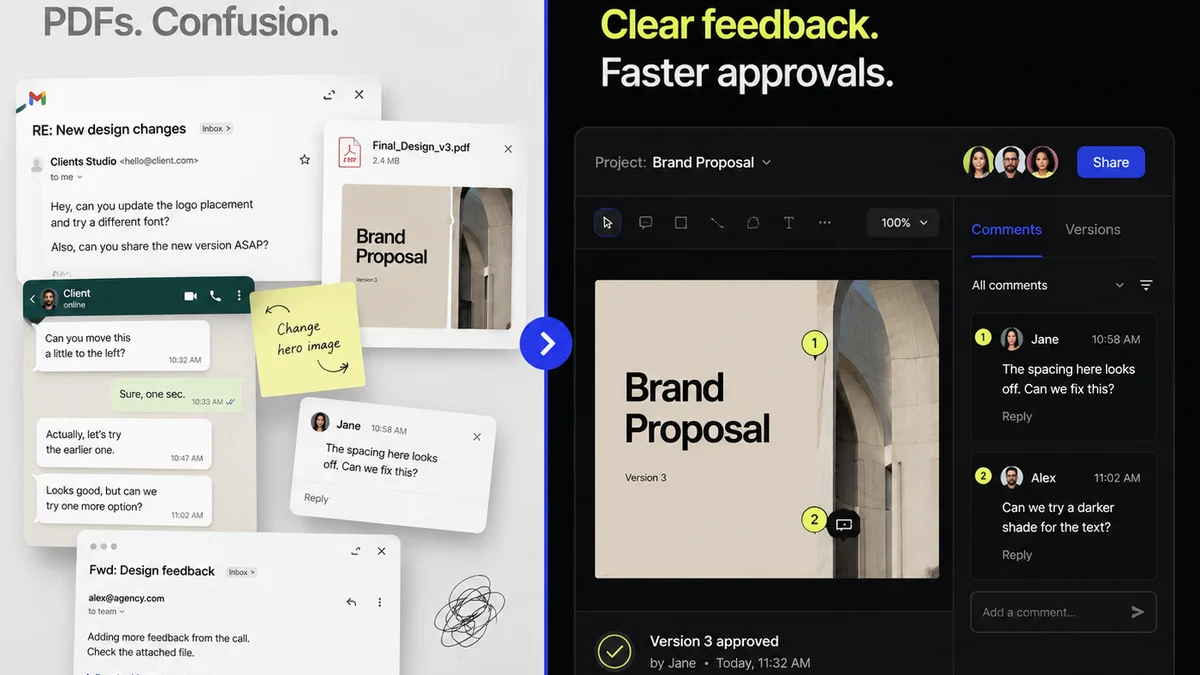
- Centralized Feedback Hub: Consolidates all client and stakeholder feedback in one place, eliminating scattered emails and Slack messages.
- Clear Revision Tracking: Provides a visual history of changes and approvals, making it easy to see what's been done and what's pending.
- Streamlined Approvals: Offers clear, unambiguous approval workflows, reducing confusion and speeding up sign-offs.
- Quality Assurance Checklists: Enables teams to build and use custom checklists to ensure all creative and technical requirements are met before delivery.
- Intuitive Interface: Designed for ease of use, minimizing the learning curve for both internal teams and clients.
Where It Fits Best
Revue is ideal for agencies and in-house teams who already have a project management system but struggle specifically with the feedback and approval stages. It’s about making that one critical part of the workflow efficient and transparent.
If your problem isn't managing tasks, but managing the endless back-and-forth on creative assets, Revue is built for that specific fight.
4. The Real Workflow Gaps: Beyond Basic Annotation
Let’s get granular. What are the actual operational failures that tools like these are supposed to fix? It’s rarely just about drawing a red line on a PDF.
The Email Avalanche
How many hours do your creatives and producers spend sifting through email chains, trying to decipher feedback?
Frequently asked questions
What is the primary difference between Revue and GoVisually?
GoVisually offers a broader, all-in-one project management and creative review solution. Revue focuses specifically on streamlining and centralizing the client feedback and approval process, integrating with existing workflows rather than replacing them entirely.
Which tool is better for large, complex projects?
For very large projects requiring extensive task management, resource allocation, and a wide range of project management features beyond feedback, GoVisually's comprehensive suite might be considered. However, if the bottleneck is specifically feedback and approvals, Revue's focused approach can be more efficient.
Is GoVisually difficult for clients to use?
GoVisually's extensive feature set can present a steeper learning curve for clients compared to simpler tools. Revue aims for a more intuitive, straightforward client experience focused solely on providing feedback and approvals.
When should I choose Revue over GoVisually?
Choose Revue if your core problem is managing scattered client feedback, tracking revisions, and streamlining approvals within an existing project management framework. If you need a dedicated tool to solve feedback chaos without overhauling your entire project system, Revue is a strong contender.