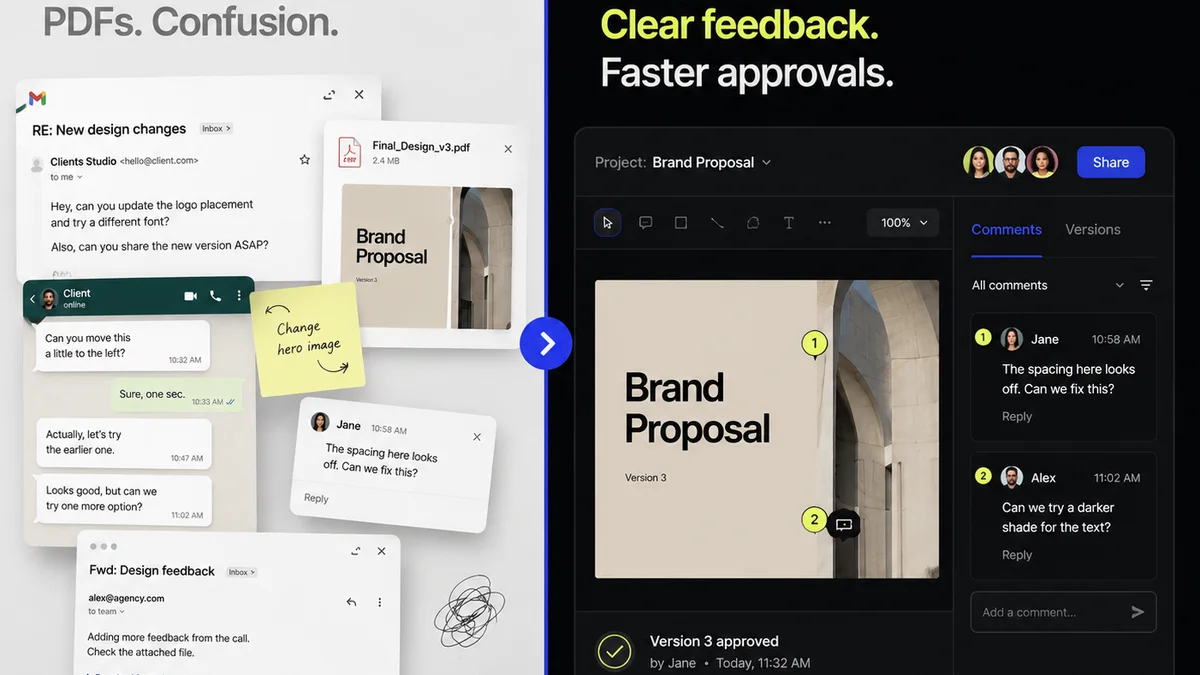
Everyone talks about version control. Usually, it’s developers. Agile sprints, code repositories, Git commits. Marketing teams? We’re usually too busy chasing deadlines, juggling client feedback, and trying to keep track of the latest 'final' file to worry about that.
But that’s a mistake. A big one.
Thinking version control is just for coders is like thinking a project manager is just for building bridges. It misses the point entirely.
The hard truth is: version control is essential for any team producing creative work, especially marketing teams. Without it, you’re not just inefficient; you’re actively sabotaging your own output.
1. The Myth of 'The Latest File'
The common assumption is that we can manage versions by simply naming files smartly. 'ProjectName_v1.docx', 'ProjectName_v2_feedback.docx', 'ProjectName_final.docx', 'ProjectName_final_final.docx', 'ProjectName_final_really_final_USE_THIS_ONE.docx'. Sound familiar?
This feels organized. It feels manageable.
It’s not.
This manual approach is a ticking time bomb. It relies on human memory, discipline, and perfect communication. All things that, let’s be honest, are in short supply under pressure.
What Goes Wrong
- Lost Work: Accidentally overwriting a crucial version, or saving over the wrong file.
- Confusion: Multiple people working on different versions simultaneously, leading to merge conflicts that are impossible to untangle.
- Audit Trails Vanish: No clear history of who changed what, when, and why. Crucial for accountability and learning.
- Missed Deadlines: Time wasted searching for the right file or trying to reconcile conflicting versions.
- Client Frustration: Sending the wrong version to a client, or having them point out edits made on an outdated draft.
This isn't a hypothetical scenario. It's the daily reality for countless marketing teams.
2. The Real Cost of Version Chaos
Beyond the immediate frustration, uncontrolled versions have a profound impact on your team's productivity and your bottom line. It’s a drain on resources you can’t afford.
Think about the time spent:
- Searching for files.
- Asking colleagues which version is current.
- Recreating lost work.
- Manually merging feedback from multiple sources.
- Correcting errors caused by using the wrong file.
This lost time translates directly into:
- Increased project costs.
- Delayed campaign launches.
- Reduced client satisfaction.
- Burnout for your team.
Your creative assets are valuable. Treating them like disposable documents, easily replaced by a slightly different filename, is a critical operational error.
3. What True Version Control Looks Like
True version control isn't about clever file naming conventions. It's a system that automatically tracks changes, stores historical states of your work, and allows you to revert to any previous point.
Key features include:
- Automatic Saving: Every significant change is captured.
- History Tracking: A clear, chronological log of all modifications.
- Branching: The ability to work on new features or revisions in isolation without affecting the main project.
- Merging: Safely combining changes from different branches back into the main project.
- Rollbacks: Easily reverting to a previous stable version if something goes wrong.
- Collaboration: Enabling multiple team members to work concurrently with clear conflict resolution.
This is the bedrock of efficient development. It should be the bedrock of efficient creative operations, too.
Why It Matters for Marketing Assets
Marketing assets are rarely static. They evolve through internal reviews, client feedback, A/B testing iterations, and campaign performance adjustments.
Consider these asset types:
- Website copy and landing pages
- Ad creatives (images, videos, copy)
- Social media content calendars
- Email marketing campaigns
- Brand guidelines and templates
- Case studies and whitepapers
Each of these goes through multiple revisions. Each needs a clear, auditable history.
4. Implementing Version Control: Beyond Git
For developers, Git is the standard. It’s powerful, flexible, and free. But for marketing teams, the command-line interface and complex branching strategies can be overkill. You need solutions that fit your workflow.
Where can marketing teams find effective version control?
Built-in Features in Creative Tools
Many modern creative tools have some form of version history built-in. Figma, for example, automatically saves versions of your designs, allowing you to browse and restore previous states.
Adobe Creative Cloud applications also offer version history for cloud documents.
These are excellent starting points. Leverage them.
Dedicated File Sync & Share with Versioning
Services like Dropbox, Google Drive, and OneDrive offer version history for files stored within them. They save previous versions of documents, allowing you to restore them.
This is a step up from manual file management but has limitations. It’s often file-by-file, not project-aware, and doesn't handle complex collaborative merging well.
Digital Asset Management (DAM) Systems
A DAM system is designed to store, organize, and retrieve digital assets. Many DAMs include robust version control capabilities, tracking revisions, approvals, and usage rights.
This is a more comprehensive solution, especially for larger teams or those with extensive asset libraries.
Project Management Tools with Versioning Features
Some advanced project management platforms are starting to integrate version control features, particularly for documents and creative files attached to tasks.
Where Revue Fits In
While Revue isn't a version control system in the Git sense, it plays a crucial role in managing the *lifecycle* of creative versions, especially concerning client feedback and approvals.
Revue centralizes feedback on specific versions of your creative work. This means:
- Clear Feedback: All comments are attached to the exact version of the asset they refer to. No more 'feedback on the feedback' or confusion about which comment applies to which iteration.
- Revision Visibility: You can see a clear history of revisions, who made them, and what feedback led to them. This builds accountability and provides an audit trail.
- Streamlined Approvals: The approval status is tied to specific versions, ensuring clients are always approving the latest, agreed-upon iteration.
- Quality Checks: By having a clear lineage of changes and feedback, you can more effectively perform quality checks, ensuring no critical elements were missed or altered incorrectly during revisions.
Revue acts as the control tower for your creative workflow, ensuring that each version is managed, reviewed, and approved with precision. It complements the technical version control within your design tools by managing the human element of feedback and approval.
5. Building a Culture of Version Control
Technology is only part of the solution. You need to foster a team culture that respects and utilizes version control.
Set Clear Protocols
Define how versions will be managed. Will you rely on tool-based versioning? Will there be a specific naming convention *in addition* to system versioning (e.g., for major milestones)?
Train Your Team
Ensure everyone understands *why* version control is important and *how* to use the chosen tools effectively.
Emphasize the 'Why'
Constantly reiterate the benefits: less wasted time, fewer errors, happier clients, and a more professional operation.
Integrate into Workflow
Make version control a non-negotiable step in your creative process. It’s not an afterthought; it’s part of the core workflow.
Start Simple
Don't try to implement a complex Git workflow overnight if your team isn't ready. Start with the built-in versioning in your design tools or a robust file-sync service. Gradually introduce more sophisticated methods as your team matures.
Final Thought
The fear of 'breaking something' by changing how you manage files often stems from a lack of understanding or a resistance to adopting new workflows. But the real risk isn't in adopting version control; it's in continuing without it.
Are you managing your creative assets, or are they managing you?
Frequently asked questions
Can marketing teams really use Git for version control?
While Git is powerful, its command-line interface and complex branching can be overwhelming for non-developers. Many marketing teams find success with version control features built into creative tools (like Figma), cloud storage services (like Dropbox), or Digital Asset Management (DAM) systems.
What's the difference between file naming and true version control?
File naming relies on manual tracking and human memory, which is prone to errors, lost versions, and confusion. True version control is a system that automatically logs changes, stores historical states, and allows for easy reversion, providing an auditable history and preventing data loss.
How does Revue help with version control?
Revue doesn't replace technical version control systems but enhances the feedback and approval process. It centralizes client comments and approvals on specific asset versions, creating a clear, auditable trail of revisions and ensuring everyone is working with the correct iteration.
What are the biggest risks of not using version control for marketing assets?
The biggest risks include lost work, team confusion over which file is current, inability to track changes or revert to previous versions, increased project costs due to wasted time, delayed campaign launches, and reduced client satisfaction.